
Send Readiness: check before you send
Send Readiness is the pre-send email deliverability check on every campaign’s Review & send page. It checks your sender reputation, authentication, content, links, compliance, audience and route in one run, gives a verdict, and offers a fix for most problems it finds. It runs again before the send starts, so a problem that appears overnight holds the send instead of reaching your list.
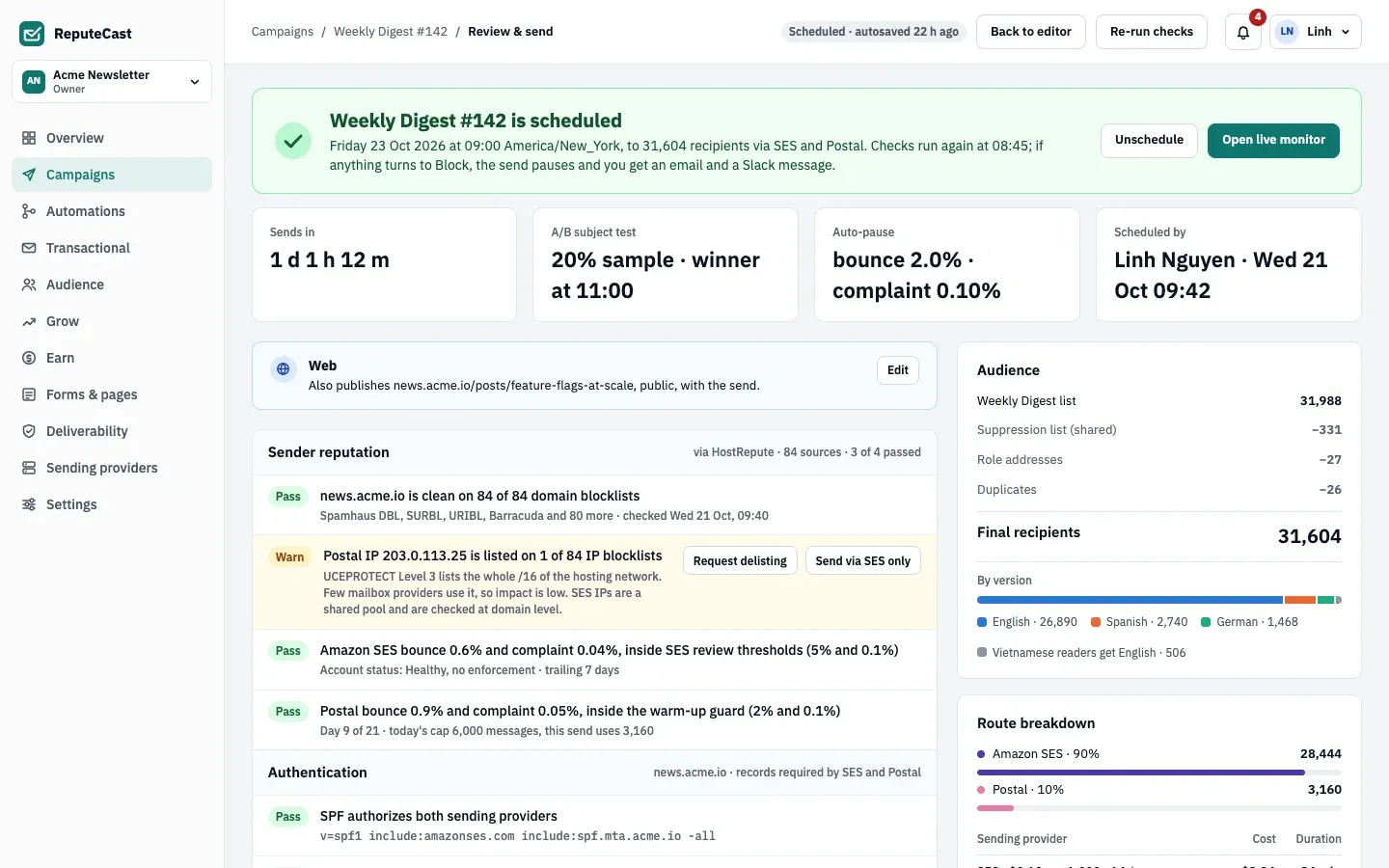
- The status banner: the verdict before you send, and the schedule plus the time of the next recheck once the campaign is scheduled.
- The check groups, each with its result. A group opens to show its checks and their fixes.
- The audience estimate: the list, minus the suppression list and role addresses, down to the final number of recipients.
- The actions for a scheduled send: Unschedule and Open live monitor.
Verdicts and check results
Section titled “Verdicts and check results”Each check returns one result, and the results decide the verdict:
| Check result | What it means |
|---|---|
| Pass | Nothing to do. |
| Warn | The send can go, but you confirm the warning when you send. |
| Block | The send can’t go until it is fixed. |
| Unknown | The check couldn’t run, for example because blocklist data is unavailable. |
| Verdict | When |
|---|---|
| Blocked | Any check blocks. The send button stays disabled until every block is fixed. |
| Ready with warnings | Nothing blocks, but something warns. |
| Ready | Nothing blocks or warns. |
Unknown results don’t change the verdict, but sending stays disabled until you retry the checks or choose to continue without them (see when HostRepute doesn’t respond).
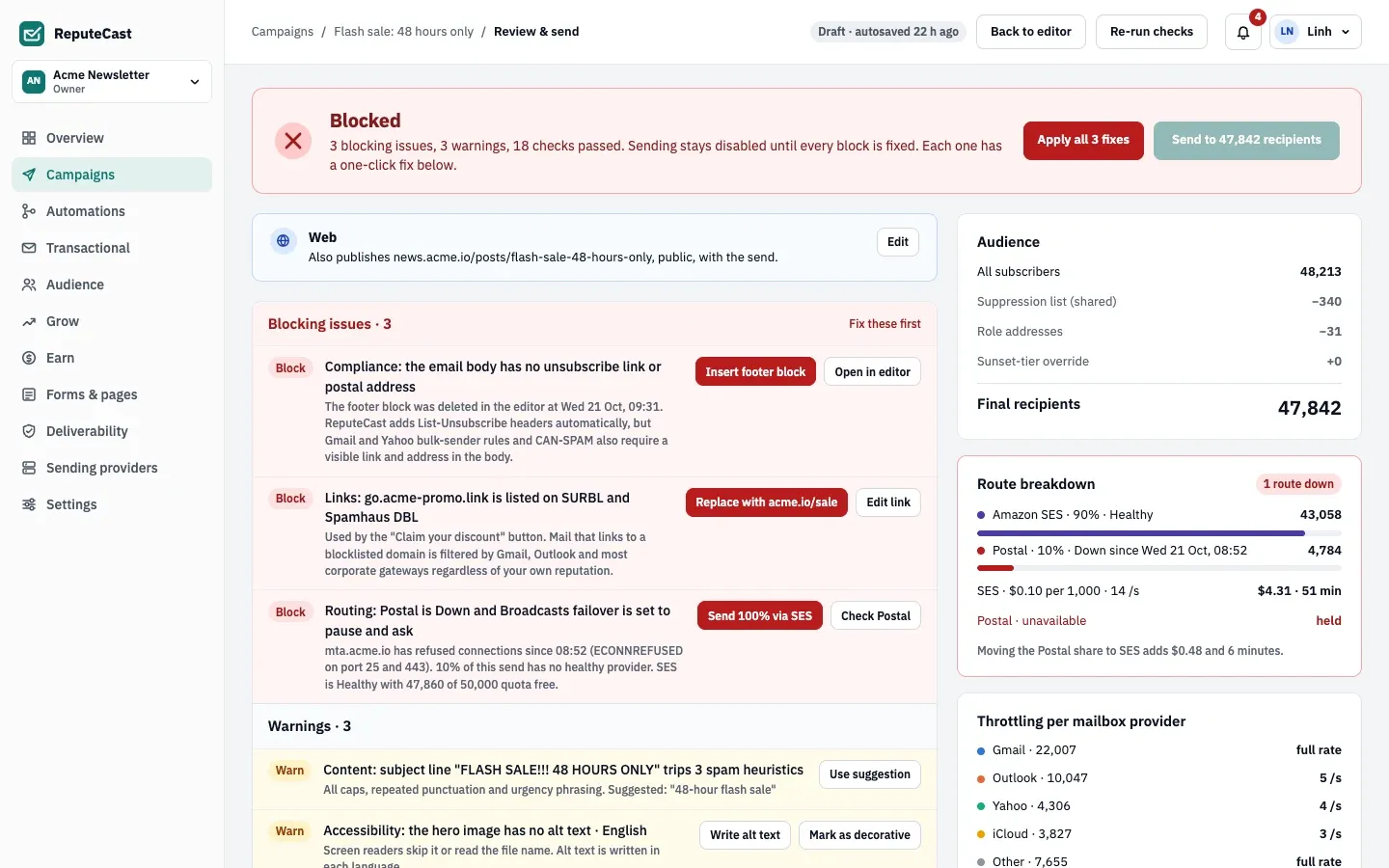
When a campaign is blocked, the page lists checks by severity instead of by group: blocking issues first, then warnings, checks that couldn’t run, and passed checks.
The ten check groups
Section titled “The ten check groups”Groups appear in this order. A group with nothing to check is left out: Languages only appears for an email with language versions, and Conditional content only for an email with conditional blocks.
- Sender reputation. Blocklist listings of your sending domains and of the dedicated IPs on the route: a listing on a high-impact list blocks, others warn, and missing data is Unknown. Each sending provider’s own account health from its last 7 days of bounces and complaints: a warning from 80% of the provider’s limit, a block at the level where the provider pauses accounts. A warm-up day cap below the recipients routed to that provider also warns.
- Authentication. A sender is set; SPF authorizes the sending provider; DKIM is verified (a key under 1024 bits warns); DMARC exists and is valid (under 90% aligned mail in the last 7 days warns); the MAIL FROM domain keeps SPF aligned. A domain that was never checked warns. See set up SPF, DKIM and DMARC.
- Content. An empty subject blocks. Subject spam heuristics (all caps, repeated punctuation, urgency and money words), images over 60% of the email, HTML from 85 KB (Gmail clips at 102 KB) and an empty plain-text part warn. Incomplete polls, sponsor and upgrade blocks are checked here too. See fix content warnings before sending.
- Languages. Which version each group of contacts gets, and warnings for Outdated and Draft versions. This group never blocks. See send each reader their language.
- Accessibility. Serious issues (missing alt text, links with no text, low contrast) warn, or block when the workspace policy is Block. Moderate issues warn. See check email accessibility.
- Conditional content. A condition that points at a deleted segment, list or field blocks, and so does a version with nothing between the header and the footer. A version over 102 KB warns. Above 50 versions, the 50 with the largest audiences plus the largest and smallest email are checked. See show blocks to some readers.
- Links. A link domain on SURBL, URIBL or Spamhaus DBL blocks. Broken links (404, 410, a 5xx answer or no answer), URL shorteners and buttons without a link warn.
- Compliance. The body (of every language version) needs an unsubscribe link and a postal address, or the send blocks. The one-click
List-Unsubscribeheader needs an HTTPS public URL, or it warns. The bulk sender rules of Gmail and Yahoo: DMARC that doesn’t pass warns, and the route’s 7-day complaint rate warns from 0.1% and blocks from 0.3%. - Audience quality. An audience with nobody to send to blocks. Unengaged contacts (1% of the audience or 500 contacts), contacts that soft-bounced in the last 30 days, risky addresses from address verification and inactive contacts not verified in 90 days warn.
- Routing. A stream without a sending provider, or a provider on the route that is down, paused or degraded, blocks. It only warns when the stream’s failover policy isn’t “pause and ask” and another provider can take the share. A provider in sandbox mode or one whose terms don’t allow bulk mail blocks. A 24-hour quota below the share and provider-side open or click tracking (double tracking) warn. See route mail across providers.
One-click fixes
Section titled “One-click fixes”Most warnings and blocks come with a button that fixes them in place, for example “Insert footer block”, “Replace with destination URL”, “Send 100% via SES”, “Exclude 412 unengaged” or “Mark as decorative”. The banner can apply every block’s fix, or every warning’s fix, at once.
- A fix needs
campaigns:edit. A fix that changes the route also needscampaigns:send. - Every fix is recorded in the audit log, and Send Readiness runs again right after it.
- A fix that changes the campaign also re-checks an open approval against what was approved.
When it runs
Section titled “When it runs”- When you open Review & send, if the last run is missing or out of date and you can edit the campaign. Editing the campaign doesn’t rerun the checks by itself; it marks the last run as out of date. Changing only the schedule keeps the run valid.
- When you select Re-run checks, and right after a one-click fix.
- When you request approval, if the last run is out of date.
- 15 minutes before a scheduled send. A block here holds the send.
- When the send starts. With Send now, a block means nothing is sent. With a schedule, the campaign is held.
A held send shows “Send-time recheck turned Blocked” on Review & send, with Cancel send. ReputeCast notifies the person who requested approval (or last edited the campaign) and the approvers, sends the campaign.paused webhook with paused_by: send_readiness, and checks again every 15 minutes. When a recheck passes, the send starts, at once if its time has already passed.
When HostRepute doesn’t respond
Section titled “When HostRepute doesn’t respond”Send Readiness doesn’t call HostRepute during a run. It reads the blocklist results that the hourly HostRepute sync and the built-in DNS blocklist checks stored. A HostRepute request gives up after 30 seconds and 3 attempts. When HostRepute data can’t be refreshed and no newer built-in result exists, the blocklist checks are Unknown, never Block, and the page says “Couldn’t finish: HostRepute didn’t respond”. Provider account health still comes from each sending provider’s API and is unaffected.
You then choose:
- Select Retry blocklist checks to run the checks again.
- Or select Continue with provider data only to send without the blocklist results. ReputeCast records the skipped checks in the campaign’s audit trail and runs them again when the send starts.
See connect HostRepute and check and fix blocklist listings.
Estimates
Section titled “Estimates”Next to the checks, Review & send shows what the send will do:
- Audience: the list or segment, minus the shared suppression list, role addresses, duplicates (plus tags and Gmail dots are ignored) and contacts stopped by the sunset policy, down to Final recipients. With language versions it also shows recipients by version.
- Route breakdown: each sending provider’s share, its cost at the provider’s price per 1,000 and how long it takes. Routes run in parallel. A provider that is down shows its share as held, with what moving it would cost.
- Throttling per mailbox provider: the sending rate for Gmail, Outlook, Yahoo, iCloud and other mailbox providers, which sets how long the send takes. The rates come from workspace sending defaults.
Defaults and limits
Section titled “Defaults and limits”| Setting | Default | How to change |
|---|---|---|
| Checks run again before a scheduled send | 15 minutes before the send time | Fixed |
| A held send is checked again | Every 15 minutes | Fixed |
| HostRepute request timeout before "Continue with provider data only" is offered | 30 s per request, 3 attempts | Fixed |
| Email sends that need the recipient count typed to confirm | 1,000 recipients or more | Fixed |
| Best time per recipient | Each contact's most frequent open hour, up to 24 hours after the scheduled time; contacts without opens get the scheduled time | Review & send › Scheduling |
| Earliest time you can schedule a send | 1 minute from now | Fixed |
| Warning for contacts with no open or click in 180 days | 1% of the audience or 500 contacts | Fixed; the 180 days follow the sunset policy in Audience › List health |
| Window for recently bounced contacts | 30 days | Fixed |
| Warning for risky addresses found by address verification | 2% of the audience | Fixed |
| Warning for At risk and Sunset contacts not verified in 90 days | 10% of the audience | Fixed |
When to change them
Section titled “When to change them”The check thresholds are fixed. What you can change is how strict the outcome is:
- Switch the workspace accessibility policy to Block so serious accessibility issues stop a send.
- Set a stream’s failover policy to “pause and ask” if a down provider should block a send instead of moving its share.
- Adjust the sunset policy in list health: it sets which contacts count as unengaged.
- Turn on the approval rule for Ready with warnings if every warning should get a second pair of eyes.
Related
Section titled “Related”- Schedule and send a campaign covers confirming warnings and choosing the send time.
- Monitor a send and auto-pause explains what guards the send once it starts.
- Gmail, Yahoo and Microsoft bulk sender requirements maps each rule to the check that enforces it.
- Limits and defaults lists every fixed number in one place.