
Send through the SMTP relay
The SMTP relay lets apps that can’t call an HTTP API send SMTP relay transactional email through ReputeCast: they connect on port 587 (STARTTLS) or 465 (TLS), authenticate with a send-only credential, and the message goes through the workspace’s Transactional route, suppressions and message log. An instance admin turns it on once per instance; each workspace then creates its own credentials.
Before you begin
Section titled “Before you begin”- You are an instance admin, and you can change the server’s firewall and Docker Compose file.
- A hostname for the relay, such as
smtp.example.com, with anA/AAAArecord pointing to the server. The instance’s public URL host is suggested. - In the workspace:
apikeys:manageto create SMTP credentials, and a verified Transactional sender. TheFromaddress of every message must be a verified Transactional sender (see add sending domains and senders). - Processes with the
webrole run the relay listeners. If you split roles, see scale with web, ingest and worker roles.
Publish the ports
Section titled “Publish the ports”ReputeCast listens on the relay ports inside the container, but Docker Compose only publishes what you list. The
default deploy/docker-compose.yml publishes port 8080 only, so add the two relay ports to the app service
yourself:
services: app: ports: - "${REPUTECAST_PORT:-8080}:8080" - "587:587" # SMTP relay, STARTTLS - "465:465" # SMTP relay, implicit TLSApply it with docker compose up -d, and open both ports in the server’s firewall. SMTP is not HTTP, so the
relay ports go straight to the app, never through your reverse proxy. If you change the ports in the relay
settings, publish those instead.
Turn on the relay
Section titled “Turn on the relay”-
Open Instance admin, then Instance & updates from the account menu and find the SMTP relay section.
-
Set the Hostname, the STARTTLS port (587) and the TLS port (465). The two ports must differ.
-
Choose the Certificate:
- Let’s Encrypt: ReputeCast gets and renews the certificate itself. Let’s Encrypt validates the hostname over
HTTP, so
http://<hostname>/.well-known/acme-challenge/must reach a ReputeCast web process, for example through your reverse proxy. Every web node shares the certificate. - Certificate and key files: upload a Certificate chain (PEM) and a Private key (PEM). The key is write-only: it is sealed and never shown again.
- Let’s Encrypt: ReputeCast gets and renews the certificate itself. Let’s Encrypt validates the hostname over
HTTP, so
-
Choose Turn on, then Run checks. ReputeCast checks that the hostname resolves, that both ports are reachable from the internet, and that the certificate is valid. Checks also run every 10 minutes; instance admins are told when a port stops answering.
Create an SMTP credential
Section titled “Create an SMTP credential”-
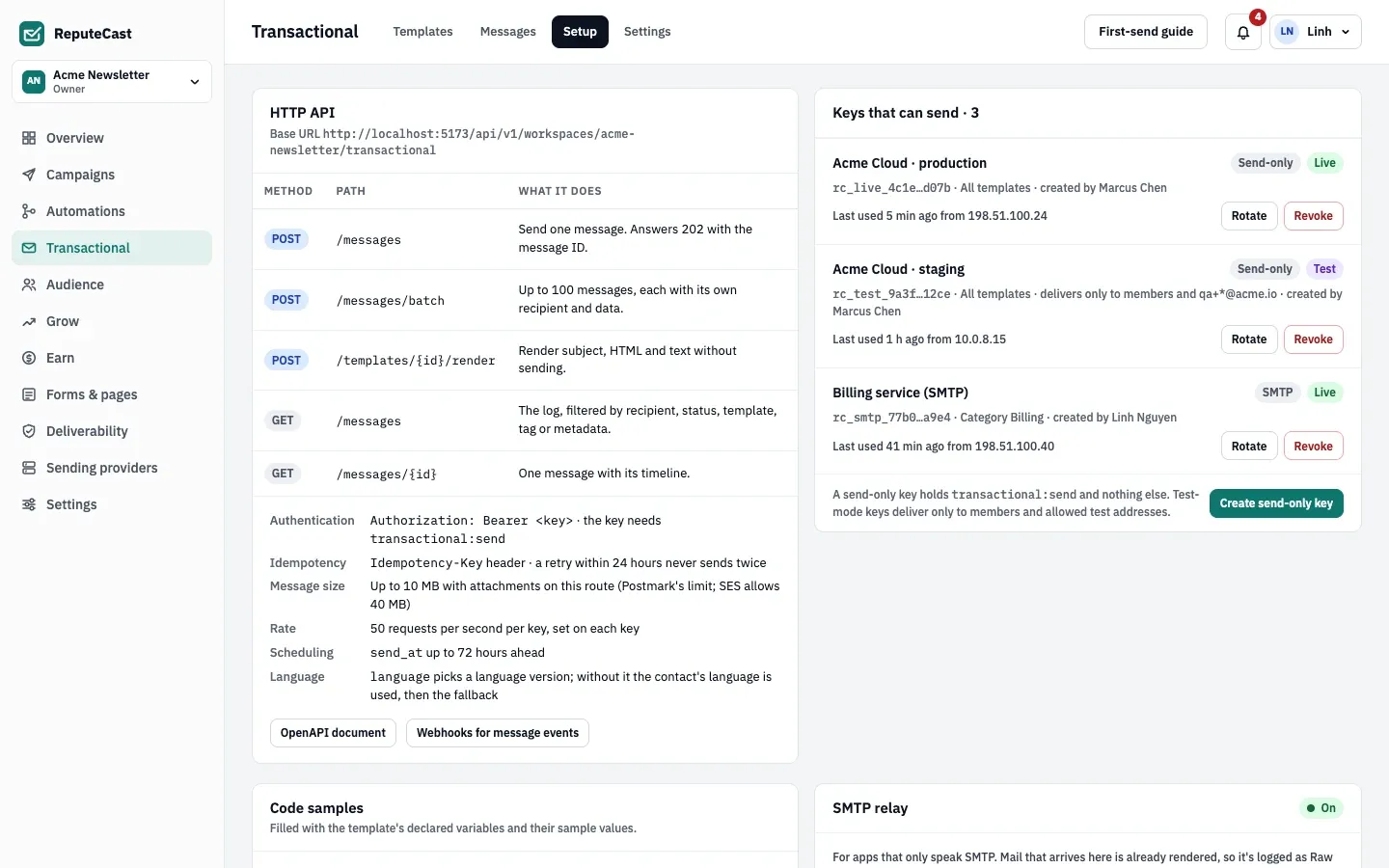
In the workspace, open Transactional, then Setup and choose Create SMTP credential.
-
Name it after the app, choose Live or Test mode, and optionally limit the templates and categories it can send and when it expires. Test mode delivers only to workspace members and the test addresses you allow.
-
Copy the password now: it is shown once. The username is the credential’s key ID; the password is its secret, which starts with
rc_smtp_. The credential holdstransactional:sendonly, and never more than you hold now: it stops authenticating when you leave the workspace, are deactivated or no longer holdtransactional:send.
Configure your app
Section titled “Configure your app”| Setting | Value |
|---|---|
| Host | The relay hostname, such as smtp.example.com |
| Port | 587 with STARTTLS, or 465 with TLS |
| Auth | PLAIN or LOGIN |
| Username | The credential’s key ID |
| Password | The credential’s secret (rc_smtp_…) |
| From | An address on a verified Transactional sender |
Two optional headers tag the message in ReputeCast; the relay reads them and they are not passed on:
X-ReputeCast-Tags: invoice, euX-ReputeCast-Category: BillingX-ReputeCast-Tags is comma-separated. X-ReputeCast-Category takes a category’s name or ID; without it, a
credential limited to one category uses that one. A recipient who turned an Optional category off doesn’t get its
mail.
Limits
Section titled “Limits”| Setting | Default | How to change |
|---|---|---|
| Ports | 587 (STARTTLS) and 465 (TLS) | Instance admin › Instance & updates › SMTP relay; any two different ports |
| Largest message | 40 MiB | Fixed; the route's provider limit may be lower |
| Recipients per message | 50 | Fixed; each recipient counts against the credential's send rate |
| Connection read and write timeout | 5 minutes each | Fixed |
| Status checks | Every 10 minutes | Run the checks again |
| Settings changes reach other web processes | Within 30 s | Fixed |
Check that it worked
Section titled “Check that it worked”Send a message from your app, then open Transactional, then Messages. The message shows Raw (SMTP) in place of a template, with its delivery timeline.
Troubleshooting
Section titled “Troubleshooting”- The check says a port isn’t reachable → the port is not published in Compose, or a firewall in front of the server blocks it.
- The check says the hostname doesn’t resolve → add the
A/AAAArecord, wait for DNS, then run the checks again. - Let’s Encrypt fails → port 80 for the hostname doesn’t reach a ReputeCast web process. Route
/.well-known/acme-challenge/to it, or upload certificate files. - Authentication fails → use the key ID as the username, not the credential’s name, and check that the
credential isn’t revoked or expired, and that the member who created it is still active and holds
transactional:send. The535reply says which. - The message is refused with a size error → the relay accepts up to 40 MiB, but the route’s sending providers may accept less; the reply says so.
- Apps get a refused connection → the relay is off. The HTTP API keeps working either way.