
Roles and permissions
ReputeCast gives you the role-based access control email marketing teams need: every member of a workspace has one
role, and a role is a set of permissions such as
campaigns:send. API keys and MCP agents hold permissions too, and never more than the member who created them.
How it works
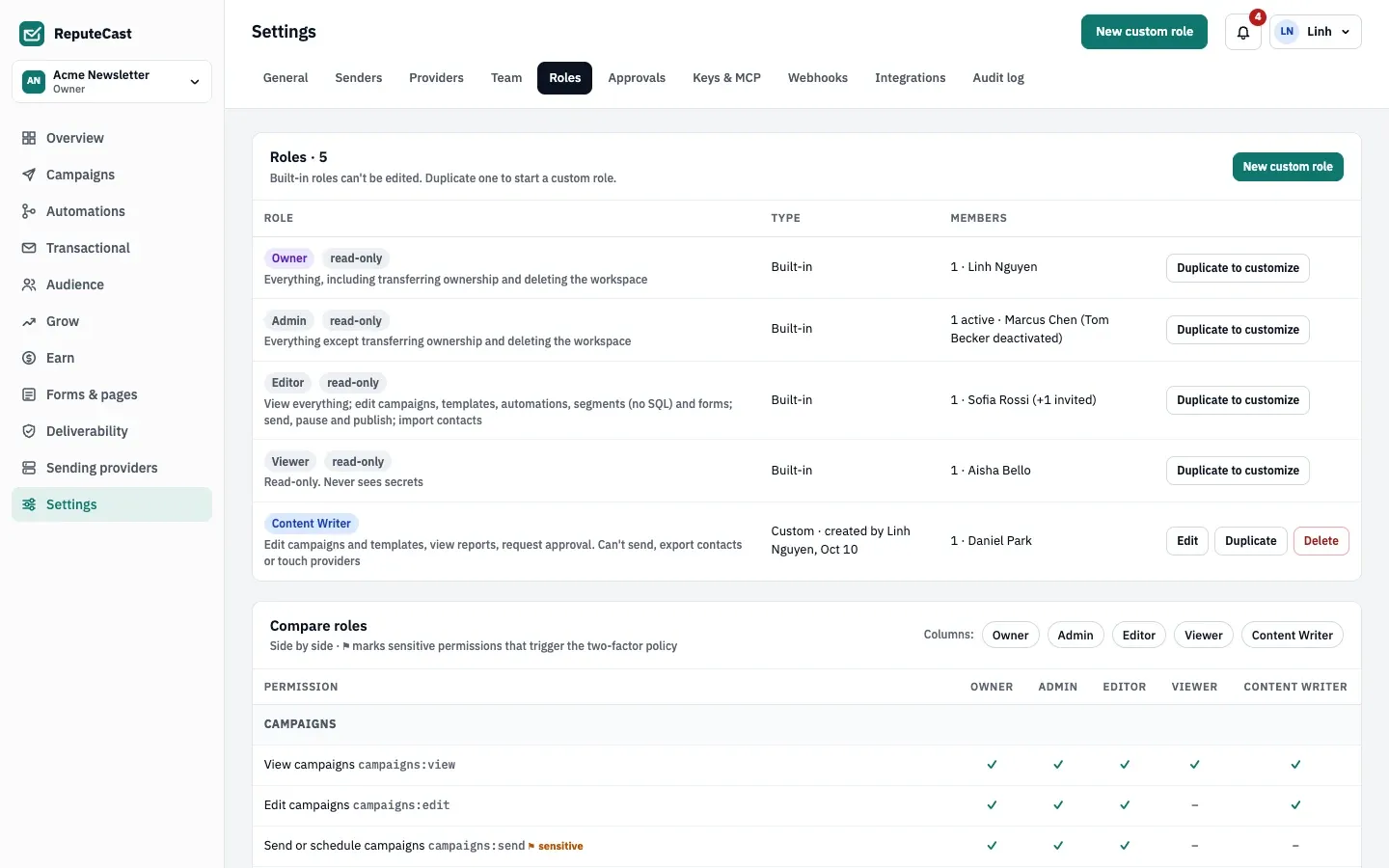
Section titled “How it works”- A role decides what a member can do. Each member has exactly one role per workspace. Four roles are built in: Owner, Admin, Editor and Viewer. They are read-only and get new permissions automatically when you upgrade.
- A permission includes its view permission. Giving
campaigns:sendalso givescampaigns:view, andteam:manageincludesteam:invite. The role editor shows these as “included by”. - A scope narrows where a member works. A scope is set on the membership (when you invite or change a member), not on the role. A scoped member sees and acts only on the chosen lists, and picks only the chosen sender domains in the campaign composer. Their email, SMS, push and WhatsApp sends go only to those lists: the composer offers them no segments, and a send checks its audience against the scope of whoever sends it. They can’t download the whole-workspace export either. An empty scope means everything.
- Changes apply at once. Editing a role or a member’s role applies on their next request. API keys follow their creator: a key’s permissions are its own permissions, cut down to what its creator holds right now.
- Every decision is logged. Role changes, refused grants and denied actions on sensitive permissions are written to the audit log.
Built-in roles
Section titled “Built-in roles”| Role | What it is for |
|---|---|
| Owner | Everything, including transferring ownership and deleting the workspace. At least one per workspace. |
| Admin | Everything except transferring ownership and deleting the workspace. |
| Editor | Creates and sends: campaigns, templates, automations, segments without SQL, forms, imports, website and products. No approving, exporting, deleting contacts, providers, team or keys. |
| Viewer | Read-only. Never sees secrets. |
Client workspaces of an agency add two more built-in roles, Client approver and Client viewer. The matrix lists which permission each built-in workspace role includes; every key is described in permissions and roles.
| Permission | Owner | Admin | Editor | Viewer |
|---|---|---|---|---|
campaigns:view | included | included | included | included |
campaigns:edit | included | included | included | not included |
campaigns:send | included | included | included | not included |
campaigns:pause | included | included | included | not included |
campaigns:approve | included | included | not included | not included |
templates:view | included | included | included | included |
templates:edit | included | included | included | not included |
transactional:view | included | included | included | included |
transactional:edit | included | included | included | not included |
transactional:publish | included | included | included | not included |
transactional:send | included | included | not included | not included |
transactional:content | included | included | not included | not included |
automations:view | included | included | included | included |
automations:edit | included | included | included | not included |
automations:publish | included | included | included | not included |
subscribers:view | included | included | included | included |
subscribers:create | included | included | included | not included |
subscribers:edit | included | included | included | not included |
subscribers:import | included | included | included | not included |
subscribers:export | included | included | not included | not included |
subscribers:delete | included | included | not included | not included |
subscribers:verify | included | included | not included | not included |
lists:manage | included | included | included | not included |
segments:edit | included | included | included | not included |
segments:sql | included | included | not included | not included |
forms:edit | included | included | included | not included |
reports:view | included | included | included | included |
reports:share | included | included | included | not included |
deliverability:view | included | included | included | included |
integrations:hostrepute | included | included | not included | not included |
providers:view | included | included | included | included |
providers:manage | included | included | not included | not included |
domains:manage | included | included | not included | not included |
team:view | included | included | included | included |
team:invite | included | included | not included | not included |
team:manage | included | included | not included | not included |
apikeys:manage | included | included | not included | not included |
webhooks:manage | included | included | not included | not included |
mcp:manage | included | included | not included | not included |
integrations:view | included | included | included | included |
integrations:manage | included | included | not included | not included |
ai:use | included | included | included | not included |
scoring:edit | included | included | included | not included |
placement:run | included | included | included | not included |
placement:manage | included | included | not included | not included |
grow:view | included | included | included | included |
grow:edit | included | included | included | not included |
grow:review | included | included | included | not included |
grow:connect | included | included | not included | not included |
earn:view | included | included | included | included |
earn:edit | included | included | not included | not included |
earn:manage | included | included | not included | not included |
payments:manage | included | included | not included | not included |
sponsors:manage | included | included | included | not included |
conversions:create | included | included | not included | not included |
website:view | included | included | included | included |
website:edit | included | included | included | not included |
website:publish | included | included | included | not included |
website:manage | included | included | included | not included |
products:view | included | included | included | included |
products:edit | included | included | included | not included |
products:publish | included | included | included | not included |
orders:manage | included | included | included | not included |
sms:send | included | included | included | not included |
push:send | included | included | included | not included |
whatsapp:send | included | included | included | not included |
audit:view | included | included | included | included |
workspace:manage | included | included | not included | not included |
workspace:transfer | included | not included | not included | not included |
workspace:delete | included | not included | not included | not included |
Custom roles
Section titled “Custom roles”Choose Duplicate to customize on a built-in role, or New custom role, to start a custom role. In the editor, Start from Editor picks the Editor permissions you hold. There is no limit on the number of custom roles; names are up to 60 characters, unique, and can’t reuse a built-in name.
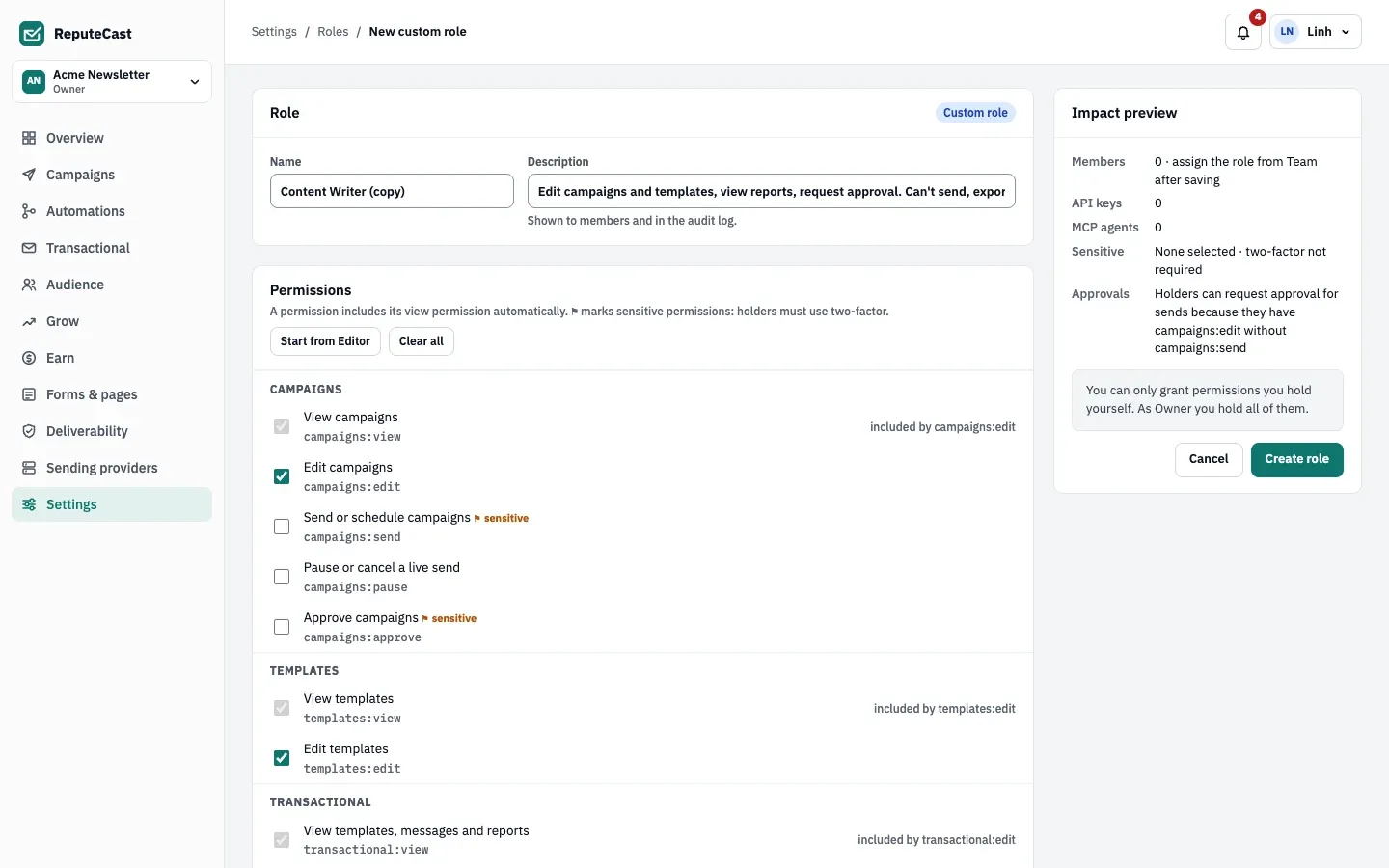
The Impact preview card updates after each change: how many members, API keys and MCP agents are affected, which sensitive permissions the role holds and what it means for approvals. When you save changes to a role that people hold, a dialog lists who loses or gains what before anything changes. A role that members or pending invitations still use can’t be deleted; move them to another role first.
The escalation guard
Section titled “The escalation guard”Nobody can grant a permission they don’t hold: not to a role, a member, an invitation, an API key or an MCP agent.
- Permissions you don’t hold are locked in the role editor, with the names of up to two people who can grant them.
- Saving a role with a permission you lack answers
403with the codeescalation_denied. - You can only invite or assign a role whose permissions you all hold, and a scope within your own.
- You can’t change, deactivate or remove a member whose role holds a permission you don’t, so an Admin can’t touch an Owner.
- Only a transfer of ownership makes someone an Owner, and the new Owner needs two-factor authentication.
Sensitive permissions and two-factor authentication
Section titled “Sensitive permissions and two-factor authentication”Permissions that send, approve, publish, export, delete contacts or manage providers, the team, keys and agents are
sensitive (⚑). By default, the instance requires two-factor
authentication for everyone who holds one in any workspace, with a 7-day grace period. Editors hold sensitive
permissions such as campaigns:send, so they are covered by it.
When the grace period ends, the person can still sign in but can’t use the app or the API until they add an authenticator app or a passkey. Members who sign in with single sign-on are covered when their identity provider enforces two-factor. Instance admins choose the policy in Instance admin, then Authentication, then Two-factor enforcement.
Who can hold a permission
Section titled “Who can hold a permission”| Rule | Permissions | Why |
|---|---|---|
| People only | integrations:manage, ai:use |
API keys and MCP agents can’t hold them. |
| No agents | subscribers:verify, placement:run, placement:manage |
They send addresses or copies out, or reach seed mailboxes. Keys may hold them. |
| Owner only | workspace:transfer, workspace:delete |
Only the built-in Owner role holds them; custom roles can’t. |
Asking for access
Section titled “Asking for access”When a page answers that your role can’t open it, choose Request access. ReputeCast
suggests the smallest built-in role that has the missing permission and notifies everyone with team:manage. They
grant it by changing your role on the Team page.
When to change them
Section titled “When to change them”- Create a custom role when a built-in role gives too much, for example writers who edit but must request approval to send.
- Use a scope rather than a new role when people do the same work on different lists or brands.
- Ask an instance admin to require two-factor authentication for everyone when every member should use a second factor.