
Send RSS digests automatically
A recurring digest turns a blog’s feed into an RSS to email newsletter: ReputeCast reads the feed, collects the posts published since the last issue, builds the next issue from your template and sends it on a schedule, or leaves it as a draft for you to check. Each issue is its own campaign, with its own Send Readiness run, approval and report.
Before you begin
Section titled “Before you begin”- Creating and editing a digest needs
campaigns:edit. - Turning a digest on in Send automatically mode needs
campaigns:send; in Create a draft mode,campaigns:edit. Whoever turns it on becomes its owner, and issues go out under their authority. API keys and AI agents can’t turn a digest on. - Pausing a digest or skipping an issue needs
campaigns:pause. - You need a feed: RSS 2.0, Atom 1.0 or JSON Feed 1.1, or a WordPress site connected under integrations.
Create a digest
Section titled “Create a digest”-
Open Campaigns, select New campaign and choose Recurring digest. Existing digests are on the Recurring tab.
-
Enter the feed. A feed address or the address of a page that links to its feed both work. ReputeCast reads it through the same network guard as other outgoing requests: no private network addresses, at most 3 redirects, 5 MB and 15 seconds.
-
Choose the schedule:
- Use Daily for every day or weekdays only.
- Use Weekly for one day a week (the default is Friday 08:00 in the workspace time zone).
- Use Monthly for a day of the month or the first weekday of the month.
- Use When new items arrive to send once a number of new posts (1–50) has arrived, at most once a day and inside a sending window (08:00–18:00 by default).
-
Set Preparation: how many hours before the send time ReputeCast builds the issue (1–24, default 3). Set the Late limit (6, 24 or 48 hours): an issue that can’t go out within it is skipped, with the reason.
-
Set the filters. Keep only posts in some categories or tags, leave out posts older than a number of days (14 by default), and choose whether the first issue holds only posts published after you turn the digest on (the default) or also the latest few posts.
-
Choose the audience, the sender and how issues go out: Send automatically or Create a draft (nothing goes out by itself; you send each draft).
-
Design the template. The Feed items block lists the issue’s posts as a List (title and excerpt, no images), Cards (image above the text, the default) or a Grid (two posts per row, stacked on phones). Choose the fields (image, linked title, date, author, categories, excerpt of 5–200 words, a “Read the post” button), the order and the maximum (1–20 posts, default 6). When there are more posts than fit, send the newest and leave out the rest (the default), or keep the rest for the next issue. Images are copied to the media library and resized.
-
Select Turn on. You become the digest’s owner.
Use these tokens in the subject, the preheader and any text block:
{{ feed.title }}                  The feed's title{{ issue.number }}                The issue number: 3{{ issue.date }}                  The send day: Friday 16 October{{ issue.items.size }}            How many posts the issue has{{ issue.items.first.title }}     The newest post's title
{% for item in issue.items %}     Each post: item.title, item.url, item.date,  {{ item.title }}                item.author, item.image, item.excerpt,{% endfor %}                      item.categories
The starter subject is {{ issue.items.first.title }}{% if issue.items.size > 1 %} and {{ issue.items.size | minus: 1 }} more{% endif %} from {{ feed.title }}. The usual personalization tokens work too.
How each issue goes out
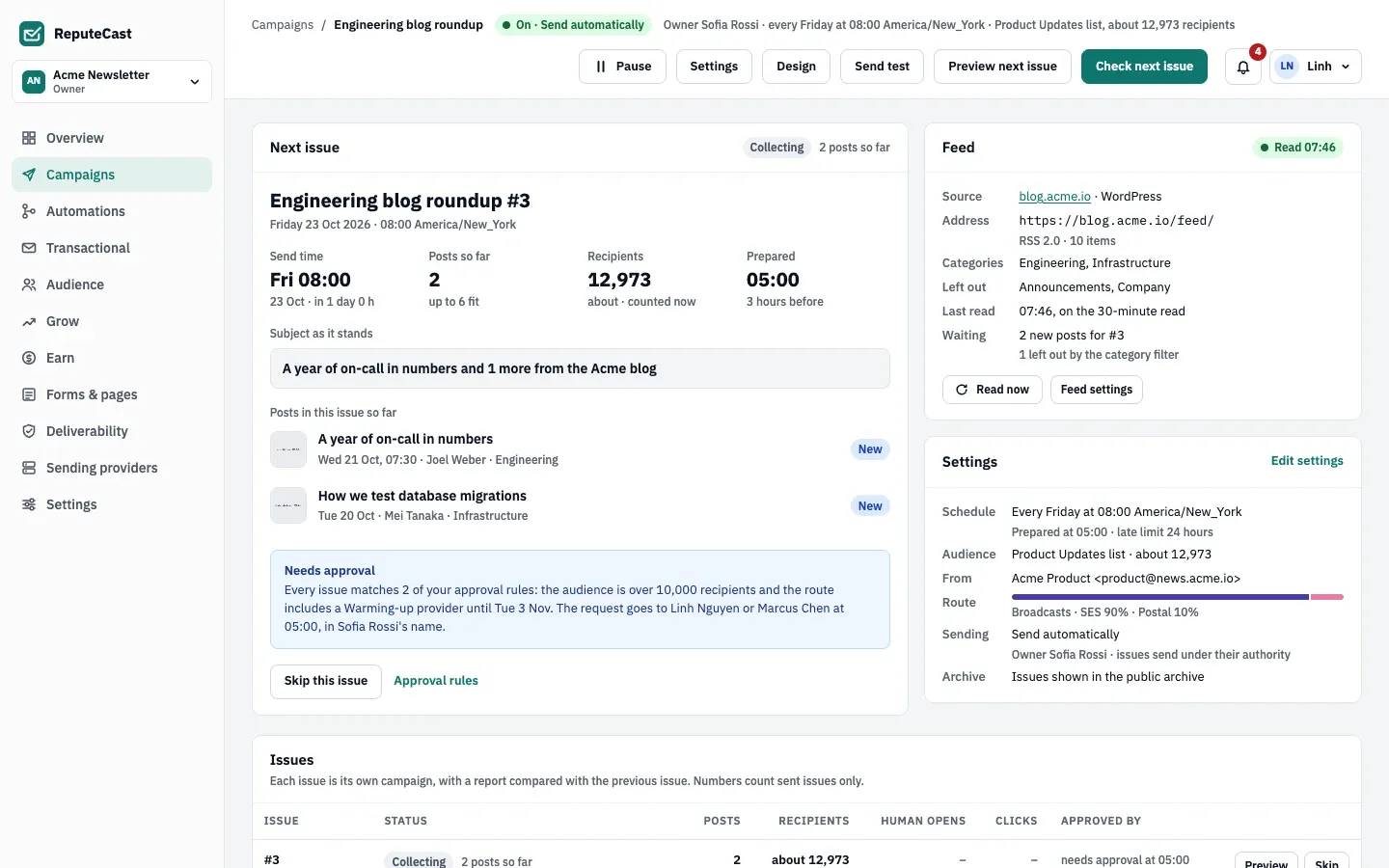
Section titled “How each issue goes out”- Collecting. ReputeCast reads the feed every 30 minutes while the digest is on, and marks posts as new, already sent, left out by a filter, or published before the digest was turned on.
- Prepared. At the preparation time it reads the feed again and builds the issue. If the feed can’t be read, it retries every 15 minutes until the send time.
- Waiting for approval. The workspace’s approval policy runs on every issue as if it were a campaign. A matching rule sends a request in the owner’s name to the approvers (not to the owner).
- Checked. Send Readiness runs at preparation, 15 minutes before the send and when it starts. A Blocked result holds the issue until someone releases it.
- Sending and Sent, or Draft ready in Create a draft mode.
An issue is skipped, with the reason shown, when there are no new posts since the last issue, the feed couldn’t be read, it wasn’t approved in time, it was held past the late limit, or a person skipped it. A draft that wasn’t sent by the late limit becomes Not sent.
On the digest’s page you can preview and test the next issue, select Skip this issue (needs campaigns:pause), or select Release issue on a held issue once the block is fixed (needs campaigns:send).
When a digest pauses itself
Section titled “When a digest pauses itself”- The owner can’t send any more. Every minute ReputeCast checks that the owner still holds
campaigns:send(orcampaigns:editin Create a draft mode) and is still an active member of the workspace. If not, the digest pauses, the waiting issue is skipped, and everyone withcampaigns:sendis told. Anyone with the permission can turn it on again and becomes the owner. - The feed keeps failing. When three issues in a row are skipped because the feed couldn’t be read, the digest pauses and tells the owner. Skips for other reasons (no new posts, no approval, a person skipping) don’t count, and the count starts again after an issue goes out or the digest is turned on.
You can also select Pause: no new issues are prepared, the waiting issue is skipped, and its posts stay new for the next issue.
Defaults and limits
Section titled “Defaults and limits”| Setting | Default | How to change |
|---|---|---|
| How often the feed is read | Every 30 minutes while the digest is on, and again at preparation | Fixed |
| Feed size, timeout and redirects | 5 MB, 15 s, up to 3 redirects | Fixed |
| Preparation before the send time | 3 hours | Digest settings › Preparation, 1–24 hours |
| Late limit | 24 hours | Digest settings › Late limit; 6, 24 or 48 hours |
| Posts in the Feed items block | 6 | Feed items block › Maximum, 1–20 |
| Ignore posts older than | 14 days | Digest settings › Filters, 1–365 days, or off |
| Default schedule | Weekly, Friday 08:00 in the workspace time zone | Digest settings; daily, weekly, monthly or when new posts arrive |
| "When new items arrive" schedule | 3 new posts, sent between 08:00 and 18:00, at most one issue a day | Digest settings, 1–50 posts |
| Feed that can't be read at preparation | Retried every 15 minutes until the send time; the digest pauses after 3 issues in a row are skipped | Fixed |
Check that it worked
Section titled “Check that it worked”- The digest’s header reads “On · Send automatically” (or “On · Create a draft”) with the owner and the schedule.
- The Next issue card lists the posts collected so far, the subject as it stands, the send time and when it will be prepared.
- After each send, the issue appears in the Issues table with its recipients, human opens and clicks, and its report.
Troubleshooting
Section titled “Troubleshooting”- The feed shows as unreachable. Open the feed address in a browser. Feeds on private network addresses, feeds over 5 MB and feeds that take more than 15 seconds are refused.
- Issue skipped: “no new posts since the last issue”. Nothing new was published, or every new post was left out by a filter. Check the category filter and the maximum post age.
- The digest paused with “Paused automatically”. Its owner lost the permission, was deactivated or left. Turn it on again with your own account.
- “Paused after three feed failures”. Fix the feed, then turn the digest on again.
- Issue skipped: “not approved in time”. Approvers didn’t decide before the late limit. Ask them to watch for requests, or adjust the approval rules for this audience.
Related
Section titled “Related”- Design emails in the composer covers the template editor.
- Require approval for risky sends explains the rules each issue goes through.
- Connect WordPress for digests from a WordPress site.
- Publish a newsletter website shows sent issues on your public archive.