
Workspace sending defaults
Settings, then Providers holds the email auto-pause thresholds, the pause scope and the per-mailbox-provider throttles that every new campaign in the workspace starts from, plus the rotation of your providers’ webhook signing secrets. Each campaign can still override the thresholds in Review & send.
Before you begin
Section titled “Before you begin”- You need the
providers:managepermission. Withproviders:viewyou can see the page but not change it. - Rotating webhook secrets has to be done by a signed-in member; API keys can’t do it.
- Read Monitor a send and auto-pause for what happens when a threshold trips.
Change the defaults
Section titled “Change the defaults”-
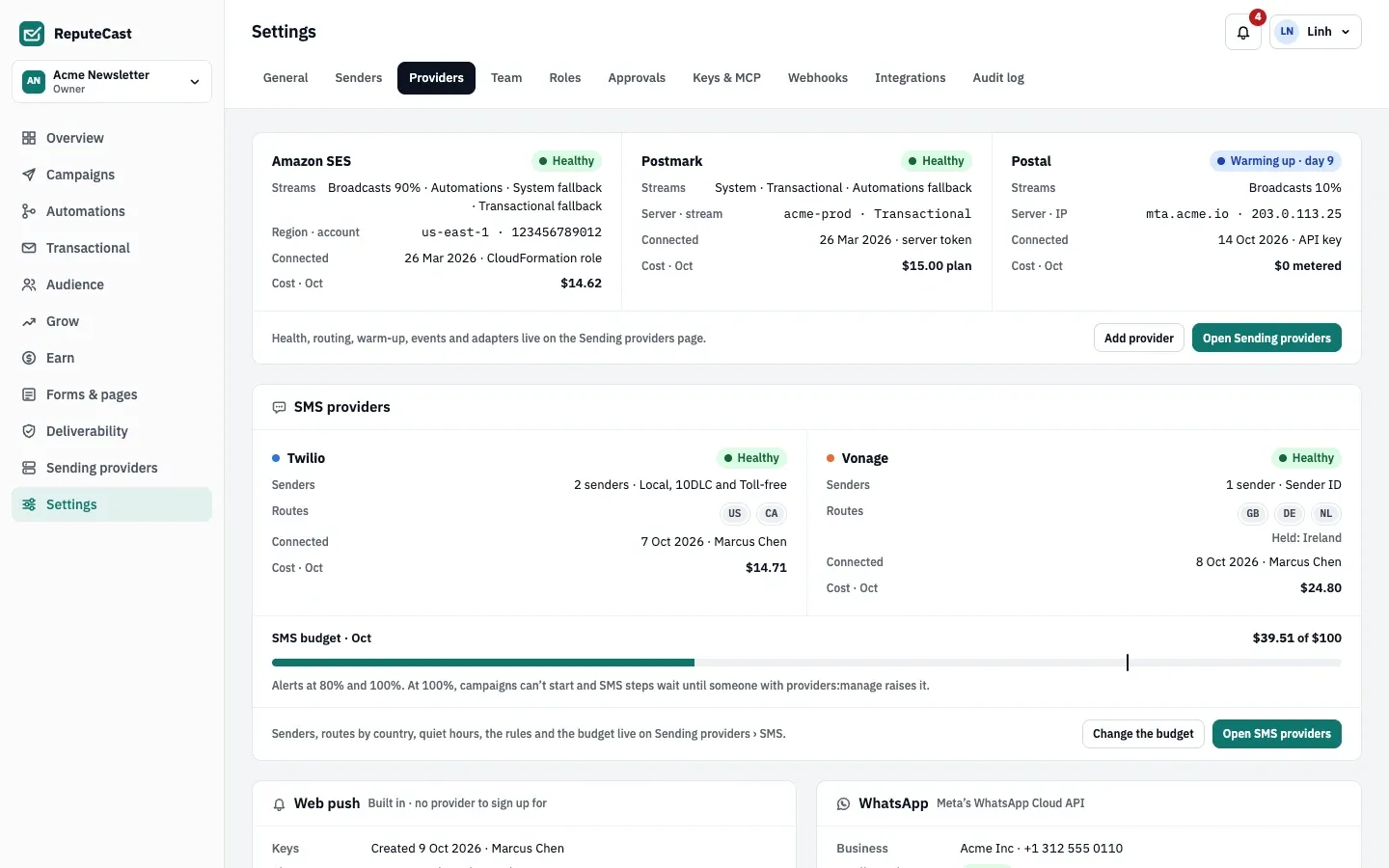
Open Settings, then Providers. The top of the page summarizes each connected provider (and any SMS, push or WhatsApp channel): its status, the streams it carries, when it was connected and its cost this month. Health, routing, warm-up and events live on Open Sending providers.
-
Under Workspace-wide sending defaults, set the auto-pause thresholds:
- Auto-pause · bounce rate: hard and soft bounces per message sent.
- Auto-pause · complaint rate: complaints per message delivered.
- Per mailbox provider complaint: the same rate for each mailbox provider (Gmail, Outlook, Yahoo, iCloud, other) on its own. It follows the overall complaint rate unless you set it.
-
Choose the Pause scope: Only the affected route or mailbox provider (the default: the rest of the campaign keeps sending) or The whole campaign.
-
Under Throttles per mailbox provider, set the most messages per second each mailbox provider gets, written as “5 per second”, or “no limit”. Throttles apply on every route.
-
Choose Save defaults. New campaigns start from the new values; a send that has already started keeps the thresholds and throttles it started with.
Rotate the webhook signing secrets
Section titled “Rotate the webhook signing secrets”Each provider signs, or authenticates, the events it posts to ReputeCast with a secret. Rotate the secrets if one may have leaked, or as routine.
-
Under Webhook signing secrets, check when they were last rotated and choose Rotate.
-
Confirm with Rotate secrets. ReputeCast makes a new secret for each provider and registers the webhook again with it wherever the provider’s API allows. If registering fails at a provider, that provider keeps its old secret and the result names it.
Defaults and limits
Section titled “Defaults and limits”| Setting | Default | How to change |
|---|---|---|
| Bounce rate (hard and soft bounces per message sent) | 2.0% | Settings › Providers, 0.1–50%; per campaign in Review & send, 0.1–20% |
| Complaint rate (per message delivered) | 0.10% | Settings › Providers, 0.01–5%; per campaign in Review & send, 0.01–5% |
| Complaint rate per mailbox provider (Gmail, Outlook, Yahoo, iCloud, other) | 0.10%, the same as the complaint rate unless set separately | Settings › Providers, 0.01–5%; per campaign in Review & send, 0.01–5% and at most 5 times the complaint rate |
| Deferral rate per mailbox provider | 5.0% | Fixed |
| What a tripped threshold pauses | Only the affected mailbox provider or sending provider (route) | Settings › Providers › Pause scope, or per campaign in Review & send; route or the whole campaign |
| How often rates are checked during a send | Every 2 s | Fixed |
| Bounces, complaints or deferrals needed before a rate can trip | 5 | Fixed |
| Confidence that a rate is above its threshold before it trips | About 90% | Fixed |
| Messages before a mailbox provider's or sending provider's rates count | 500 messages | Fixed |
| Messages before campaign-wide rates count | 1,000 messages | Fixed |
| Provider outage during a send holds the provider's share after | 3 minutes of failed calls (at least 5 calls), or as soon as the provider is marked down | Fixed |
| Retry of a held share | Every 60 s for 15 minutes, then a person is asked again | Retry on the held share in the live monitor (needs campaigns:send) |
| Retries of a message that failed temporarily | Up to 10 attempts, after 5 s, 10 s, 20 s, 40 s, then every 60 s | Fixed |
| Campaign thresholds can be changed until | The send starts | Review & send; later changes to the workspace defaults don't affect a send that has started |
| Setting | Default | How to change |
|---|---|---|
| Throttle per mailbox provider | Gmail no limit; Outlook 5/s; Yahoo 4/s; iCloud 3/s | Settings › Providers, 0–10,000 messages per second (0 = no limit) |
| Suppression sync with providers | Every 15 minutes, and right after a bounce adds addresses | — |
| Provider health check | Every 5 minutes; every minute while a provider is down or degraded | Fixed |
| Provider marked down | 2 failed health checks in a row, or 50% of calls failing over 3 minutes (at least 5 calls) | Fixed; rejected credentials mark it down at once |
| Healthy time before traffic switches back after an outage | 10 minutes | Fixed |
| "Webhooks silent" after | 6 hours without an event while mail is being accepted | Fixed; SMTP providers are exempt (they use a bounce mailbox) |
| Raw provider webhook events kept | 90 days | Fixed |
| Largest provider webhook payload | 5 MiB | Fixed |
| Provider webhook secret after rotation | The new secret replaces the old one at once | Settings › Providers › Webhook signing secrets |
| Bounce mailbox polling (SMTP providers) | Every minute, up to 200 messages each time | Fixed |
| Event polling when webhooks aren't set up yet | Every minute | Connect a provider › Use polling for now |
| Wait for the setup test message's delivery event | 30 minutes | Fixed |
| Messages per API call | Amazon SES 50, Postmark 500, Resend 100, Mailjet 50, SMTP 25 per connection; other built-in adapters 1 | Fixed |
Check that it worked
Section titled “Check that it worked”- A “Sending defaults saved” message appears, and the card shows the new values after a reload.
- In a new campaign’s Review & send, the thresholds start from your new defaults.
- After a rotation, the card says when the secrets were rotated, and Sending providers, then Events & sync keeps receiving events from every provider. Read Delivery events and suppression sync.
Troubleshooting
Section titled “Troubleshooting”- “Each threshold needs a number, like 2.0 %”: enter a percentage in each threshold field.
- A throttle isn’t accepted: write it as “5 per second”, or as “no limit”.
- A provider’s events stop after a rotation: its webhook was set up by hand, so it doesn’t have the new secret. Read the danger note above, and Provider health and outages for the Degraded state it shows meanwhile.
- A running campaign ignores a new threshold: thresholds are fixed when a send starts. The new values apply from the next campaign.