
Sell digital products
Sell digital downloads, such as guides, templates or course files, from Earn, then Products. A product is a file and a price, sold through Stripe Checkout on your own Stripe account. After payment, ReputeCast emails the buyer a personal download link through your Transactional stream.
Before you begin
Section titled “Before you begin”- Connect Stripe.
- Editing products needs
products:edit; putting them on sale, taking them off and changing what they cost needsproducts:publish(sensitive). Handling orders needsorders:manage(Permissions and roles). - Set up a Transactional route so delivery emails can go out (Transactional email in ReputeCast).
Create a product
Section titled “Create a product”- Open Earn, then Products and select New product.
- Upload the files: up to 500 MB per file and 2 GB per product. Large uploads are sent in parts and resume if the connection drops.
- Write the name and the description buyers see.
- Set the price: One-time (a fixed price, at least $1) or Pay what you want (a minimum of at least $1 and an optional suggested price).
- Under delivery, set how long a download link works (7 days by default, 1–30) and how many downloads it allows (5 by default, 1–20).
- Publish the product. Products are Draft, Published or Archived; only published products can be bought.
Sell the product from your emails or on a landing or sales page with a product block.
Handle orders
Section titled “Handle orders”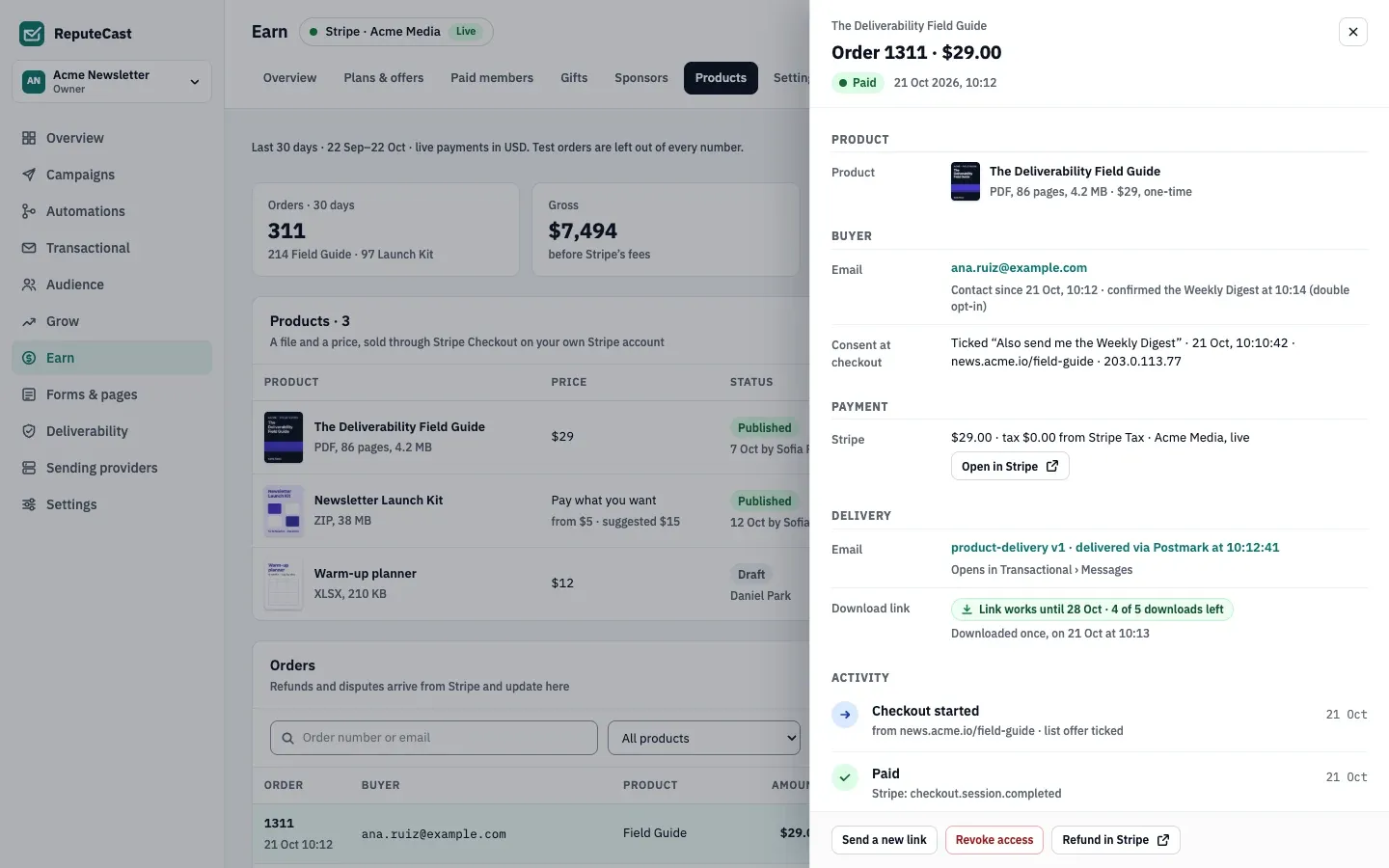
Each order has a status: Paid, Refunded, Partially refunded, Disputed or Test. Open an order to see the buyer, the Stripe payment, the delivery email and the download link’s state.
- Send a new link when the buyer’s link expired or ran out of downloads. Buyers can also request new links themselves, up to 3 per order in any 24 hours.
- Revoke access ends the buyer’s access to the download.
- Refund in Stripe opens the payment in your Stripe dashboard. Refunds and disputes are made in Stripe, arrive through the webhook and update the order here.
Defaults and limits
Section titled “Defaults and limits”| Setting | Default | How to change |
|---|---|---|
| File size | Up to 500 MB per file and 2 GB per product | Fixed |
| Minimum price | $1, also the lowest pay-what-you-want minimum | Fixed |
| Download link works for | 7 days | Earn › Products › product › Delivery, 1–30 days |
| Downloads per link | 5 | Earn › Products › product › Delivery, 1–20 |
| New links a buyer can request | 3 per order in any 24 hours | Fixed; your team can send more from the order |
Check that it worked
Section titled “Check that it worked”- Buy the product with a Stripe test card. The order appears with the Test status and is left out of every number.
- The test buyer gets the delivery email, and the order panel shows the download link with its downloads left.
Troubleshooting
Section titled “Troubleshooting”- The buyer got no email → open the delivery email in the order; it links to the message in Transactional’s message log (Message log and alerts).
- “Link expired” for the buyer → select Send a new link, or raise the link validity on the product.
- The order still shows Paid after a refund → check the Stripe webhook in Earn, then Settings, then Payments; the hourly catch-up applies missed refunds.