
Monitor a send and auto-pause
Once a campaign starts, the Live sending monitor shows it as it happens, and guarded sending watches its rates. When the bounce rate or the complaint rate of an email campaign crosses its threshold, ReputeCast auto-pauses only the part of the send that caused it, for example the Outlook recipients, and the rest keeps going. When a sending provider stops answering, its share is held or moved. In both cases a person decides what happens next.
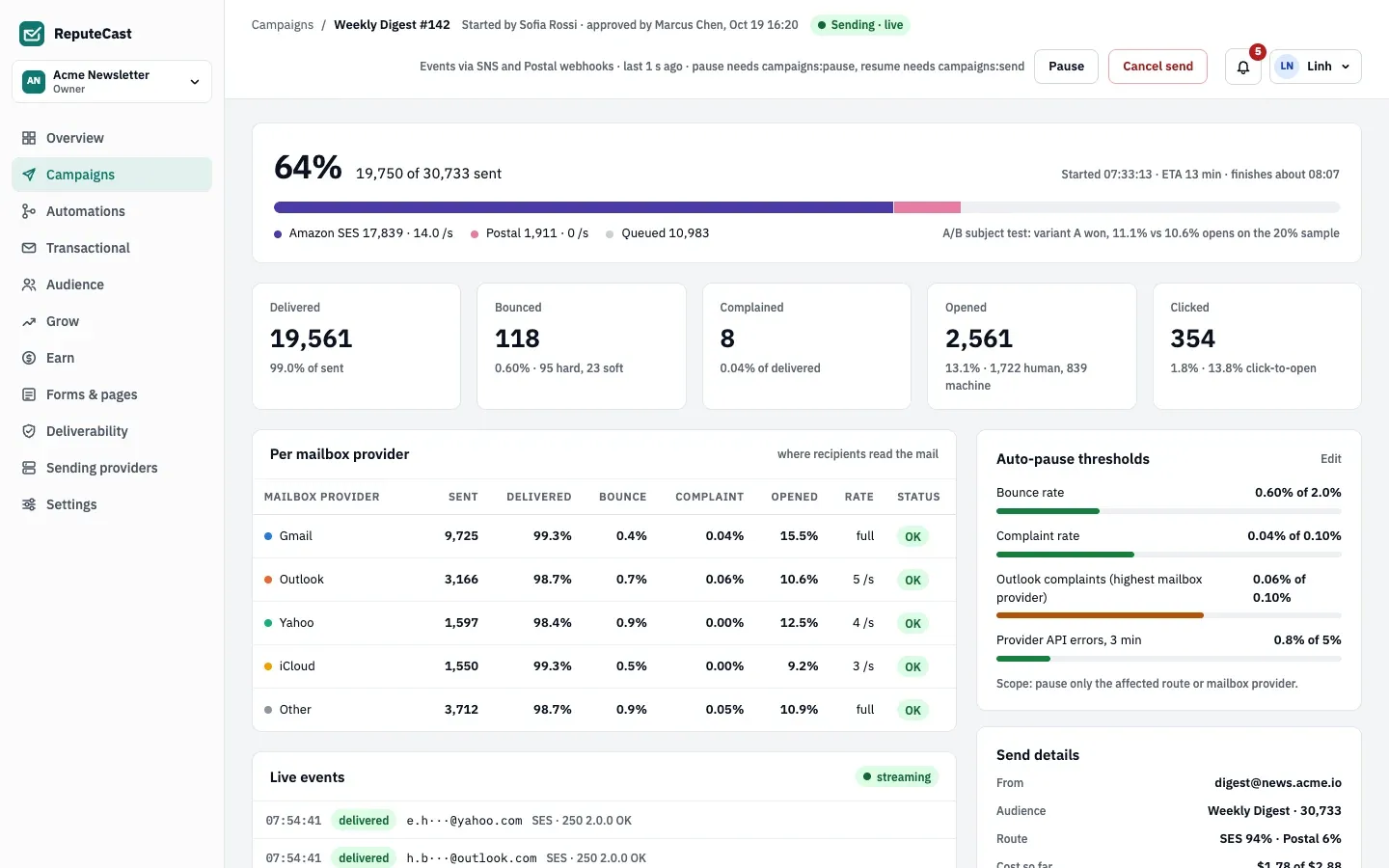
The page shows progress and the expected finish time, five tiles (delivered, bounced, complained, opened with human and machine opens split out, clicked), a table Per mailbox provider and one Per sending provider, the Auto-pause thresholds with a bar per rate, and the Live events feed. The numbers come from your sending providers’ delivery webhooks (see delivery events and suppression sync) and update about once a second over a server-sent event stream.
How auto-pause decides
Section titled “How auto-pause decides”- Rates are counted per message. The bounce rate is hard plus soft bounces per message sent. The complaint rate is complaints per message delivered. The deferral rate is deferred messages per message sent.
- Every 2 seconds ReputeCast checks them in this order: for each mailbox provider (Gmail, Outlook, Yahoo, iCloud, other) the complaint rate, the bounce rate and the deferral rate; for each sending provider the bounce rate; then the bounce and complaint rates of the whole campaign. The first rate that trips wins.
- A rate trips only on enough evidence. A mailbox provider or a sending provider needs 500 messages before its rates count; the whole campaign needs 1,000. There must be at least 5 bounces, complaints or deferrals, the rate must be over its limit, and ReputeCast must be about 90% confident the true rate is over the limit, so one unlucky complaint early in a send doesn’t stop it.
- The scope decides what pauses. With the default scope, only the affected mailbox provider’s recipients (or the affected sending provider’s share) are held, and everything else keeps sending. With the campaign scope, the whole campaign pauses.
- Thresholds are frozen when the send starts. They come from the workspace defaults, changed for this campaign in Review & send if you did.
The deferral threshold (5.0% per mailbox provider) is fixed and has no field in the app.
What happens on a pause
Section titled “What happens on a pause”- The held recipients wait in the queue. Nothing is dropped.
- Everyone in the workspace with
campaigns:sendgets an urgent notification in the app and by email, for example “Outlook complaint rate reached 0.18% (limit 0.10%). 2,522 held, everything else still sending.” - The
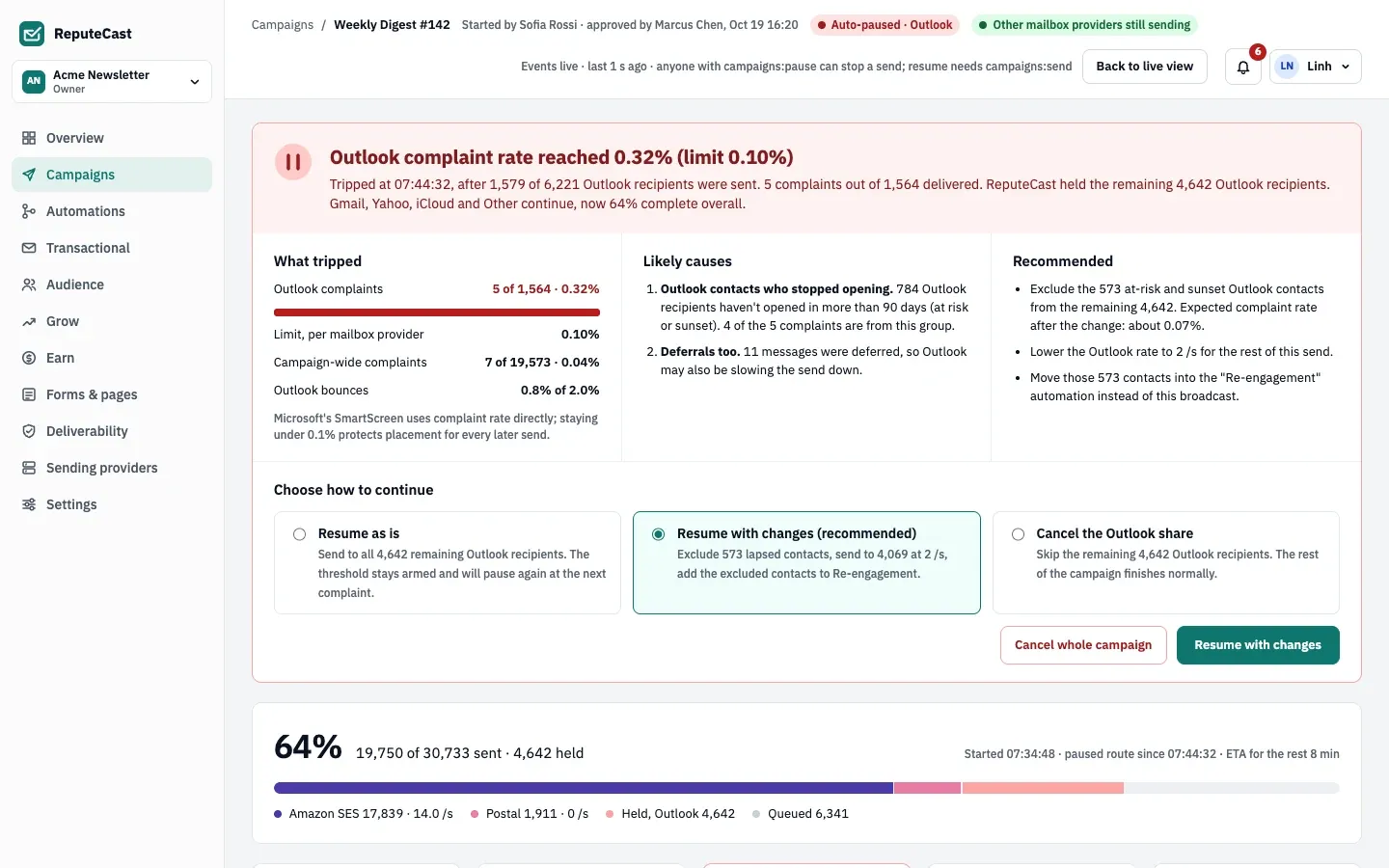
campaign.pausedwebhook fires withpaused_by: auto_pause, the metric, its value and limit, the scope and the number held. - The live monitor opens a decision panel: What tripped, the likely causes, a recommendation and Choose how to continue.
Decisions after a threshold pause
Section titled “Decisions after a threshold pause”- Resume as is sends to everyone still held. The threshold stays armed and pauses again at the next complaint (or bounce) of that kind.
- Resume with changes is offered for a mailbox provider pause when ReputeCast finds a cause. It can exclude the group that produced most of the complaints (for example never-engaged imports, or at-risk and sunset contacts), halve that mailbox provider’s sending rate for the rest of the send, and, when a matching re-permission or re-engagement automation is live, add the excluded contacts to it. The option lists exactly what it will do before you choose it. For a sending provider pause, it resumes without changes.
- Cancel the share skips the held recipients; the rest of the campaign finishes normally.
- Cancel the whole campaign with Cancel whole campaign stops everything that hasn’t been sent.
With the campaign scope, the choices are Resume as is and cancel the campaign.
Sending provider outages
Section titled “Sending provider outages”The Provider API errors, 3 min bar shows the highest share of failed calls, over the last 3 minutes, among the sending providers on the route (it counts every call to that provider, not only this send’s). It is there to watch; it never pauses a send, even when it turns red. A provider’s share is taken off the send when:
- its calls for this send have all failed for 3 minutes, with at least 5 failed calls (rate-limit answers don’t count, and one success resets the clock),
- the provider health check marks the provider down, or
- the provider rejects the credentials, at once.
What happens then depends on the Broadcast stream’s failover policy. With an automatic policy, ReputeCast moves the remaining share to a provider that is available, allows bulk mail and isn’t warming up (the stream’s fallback first, then the largest share of the split), and records the move. With “pause and ask”, with rejected credentials, or when no provider qualifies, the share is held and everyone with campaigns:send is asked to decide.
Decisions after an outage hold
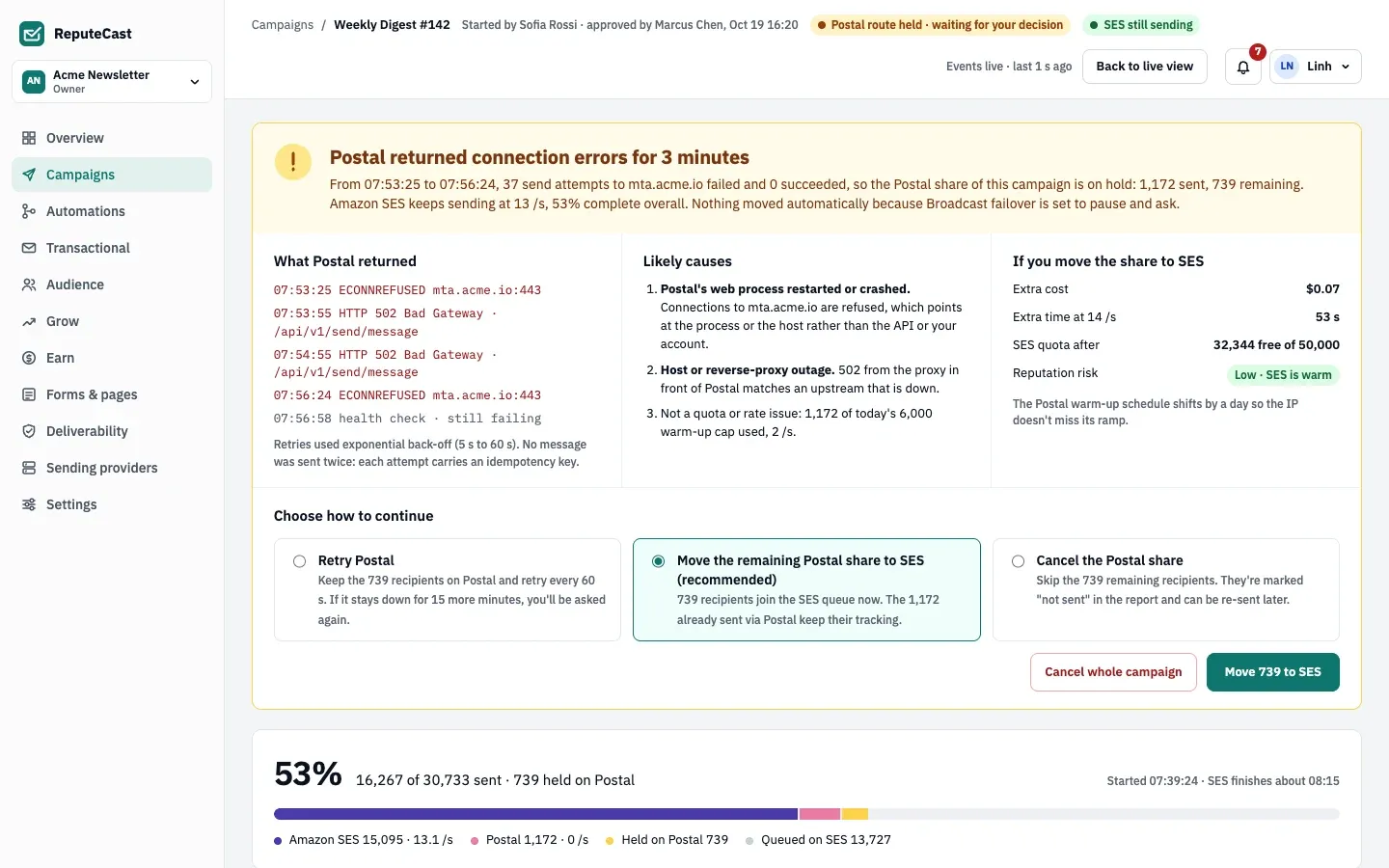
Section titled “Decisions after an outage hold”- Retry keeps the recipients on the same provider and tries again. If it is still failing after 15 more minutes, you are asked again.
- Move the remaining share sends the held recipients through another provider. The panel shows the extra cost, the extra time at that provider’s rate, its quota after the move and the reputation risk (“Low · SES is warm”). Messages already sent keep their tracking.
- Cancel the share skips the held recipients. They are marked “not sent” in the report and can be sent later.
A message that fails temporarily is retried up to 10 times, after 5, 10, 20 and 40 seconds and then every 60 seconds. Each attempt carries an idempotency key, so no message is sent twice.
Pausing and resuming by hand
Section titled “Pausing and resuming by hand”| Action | Needs | Notes |
|---|---|---|
| Pause | campaigns:pause |
Shown while the campaign is sending. Everything stops until someone resumes it. |
| Resume sending | campaigns:send |
Also every resume, move and retry decision. |
| Cancel send | campaigns:send |
The dialog offers Pause instead if you hold campaigns:pause. |
| Watching the monitor | campaigns:view |
Pausing is deliberately the cheaper permission: someone who notices a problem can stop a send, and someone who may send decides how it continues. Owner, Admin and Editor hold both; Viewer holds neither. See roles and permissions.
On a phone
Section titled “On a phone”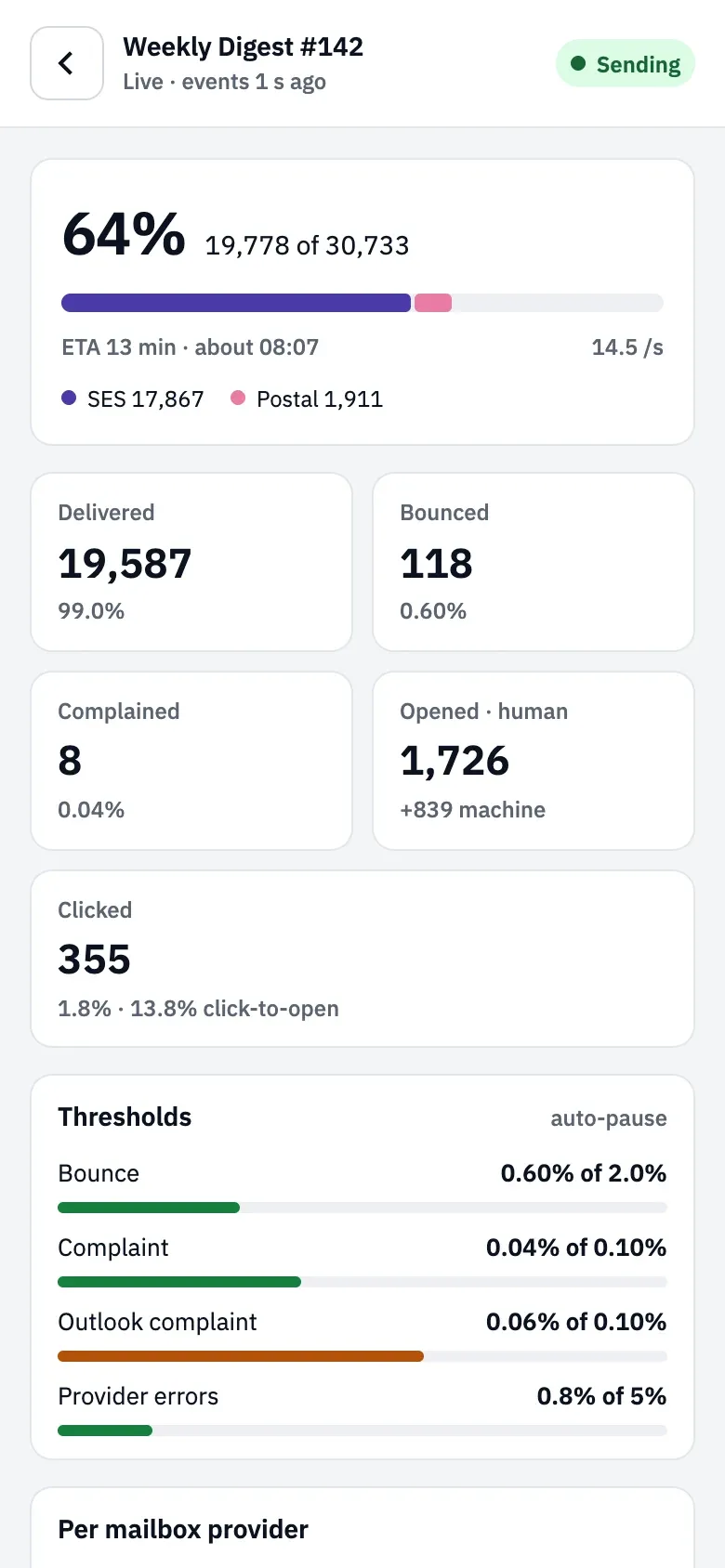
Below 768 px the live view gets its own layout: a short header with the connection status (“Live · events 1 s ago”), the tiles in two columns, compact threshold and provider rows, and Pause (or Resume) and Cancel at the bottom. Decision panels use the desktop layout.
If the event stream drops, the monitor reconnects by itself (up to 10 attempts) and offers Reconnect now. A monitor that never updates behind a reverse proxy usually means the proxy buffers the stream; see reverse proxy and TLS.
Defaults and limits
Section titled “Defaults and limits”| Setting | Default | How to change |
|---|---|---|
| Bounce rate (hard and soft bounces per message sent) | 2.0% | Settings › Providers, 0.1–50%; per campaign in Review & send, 0.1–20% |
| Complaint rate (per message delivered) | 0.10% | Settings › Providers, 0.01–5%; per campaign in Review & send, 0.01–5% |
| Complaint rate per mailbox provider (Gmail, Outlook, Yahoo, iCloud, other) | 0.10%, the same as the complaint rate unless set separately | Settings › Providers, 0.01–5%; per campaign in Review & send, 0.01–5% and at most 5 times the complaint rate |
| Deferral rate per mailbox provider | 5.0% | Fixed |
| What a tripped threshold pauses | Only the affected mailbox provider or sending provider (route) | Settings › Providers › Pause scope, or per campaign in Review & send; route or the whole campaign |
| How often rates are checked during a send | Every 2 s | Fixed |
| Bounces, complaints or deferrals needed before a rate can trip | 5 | Fixed |
| Confidence that a rate is above its threshold before it trips | About 90% | Fixed |
| Messages before a mailbox provider's or sending provider's rates count | 500 messages | Fixed |
| Messages before campaign-wide rates count | 1,000 messages | Fixed |
| Provider outage during a send holds the provider's share after | 3 minutes of failed calls (at least 5 calls), or as soon as the provider is marked down | Fixed |
| Retry of a held share | Every 60 s for 15 minutes, then a person is asked again | Retry on the held share in the live monitor (needs campaigns:send) |
| Retries of a message that failed temporarily | Up to 10 attempts, after 5 s, 10 s, 20 s, 40 s, then every 60 s | Fixed |
| Campaign thresholds can be changed until | The send starts | Review & send; later changes to the workspace defaults don't affect a send that has started |
When to change them
Section titled “When to change them”- Workspace defaults in workspace sending defaults (Settings, then Providers) set the bounce and complaint thresholds and the Pause scope for every new send.
- One campaign can use different thresholds or the campaign scope in Review & send, until it starts. Lower them for a list you haven’t mailed in a long time or a new provider; choose the campaign scope when a partial send would confuse readers, for example a time-limited offer.
- Raising a threshold above what your sending provider tolerates trades a paused send for a suspended account. Compare with the provider’s own limits in bounces, complaints and provider limits.
Related
Section titled “Related”- Schedule and send a campaign is where per-campaign thresholds are set.
- Provider health and outages covers held Broadcast shares from the Sending providers screen.
- Read campaign reports shows the final numbers per mailbox and sending provider.
- Limits and defaults lists every fixed number.