
Choose a sending provider
ReputeCast doesn’t deliver mail itself: it hands each message to a sending provider you connect, such as Amazon SES, Postmark or your own Postal server. This page helps you pick an email sending provider for newsletters by comparing what each built-in adapter can do. You can connect several and split the work between them.
How the catalog describes a provider
Section titled “How the catalog describes a provider”When you open Sending providers, then Add provider, the catalog lists every adapter in your build. Each card shows facts the adapter reports about itself, so the catalog and this page always agree with the code.
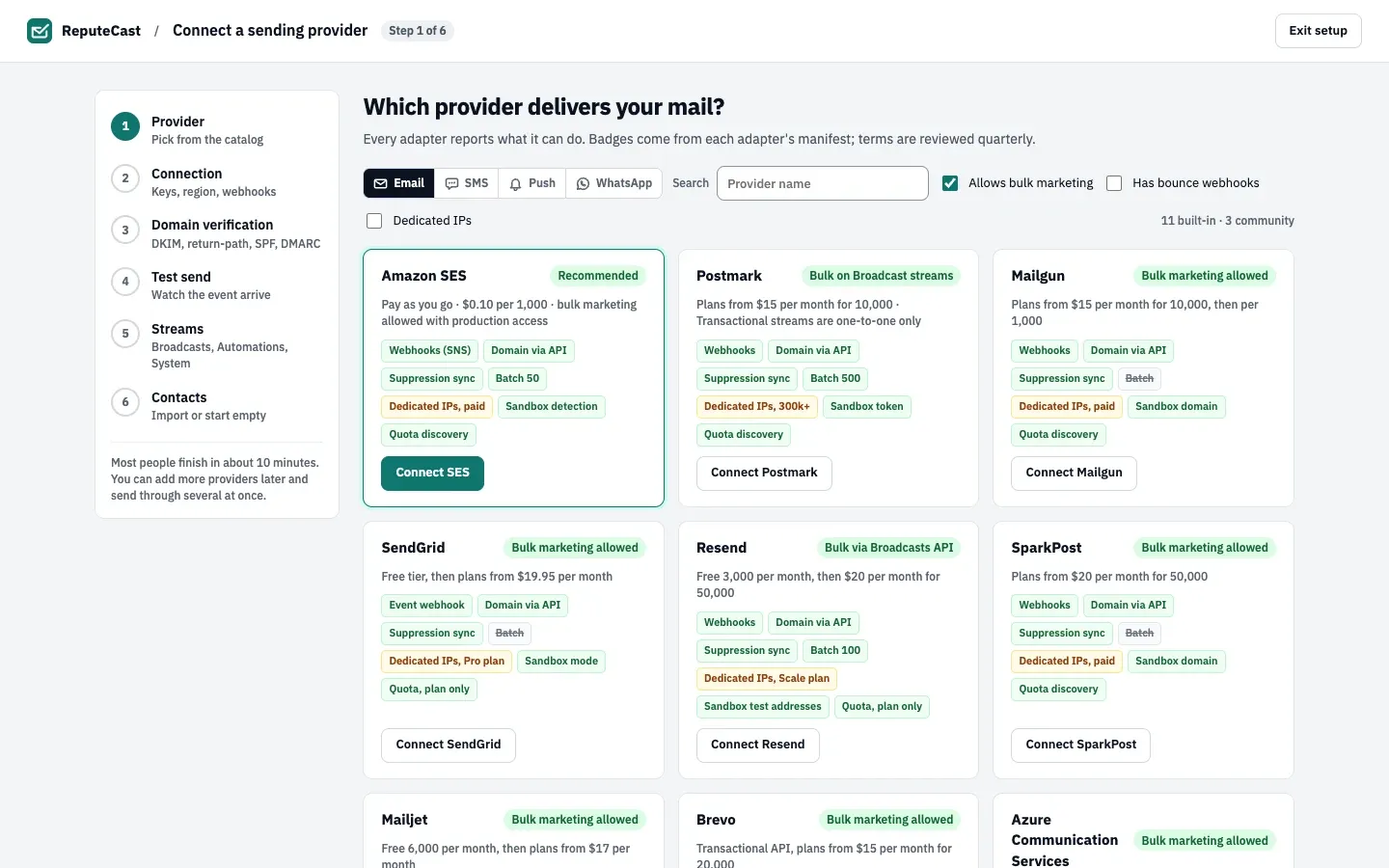
- The terms badge at the top right of a card says what the provider’s acceptable-use terms allow for bulk mail: Bulk marketing allowed, Bulk on Broadcast streams (Postmark), Bulk via Broadcasts API (Resend), Your own policy (your own server) or Depends on the server (SMTP). Amazon SES carries the Recommended badge instead.
- Capability chips describe how events come back (webhooks or a bounce mailbox), how the sending domain is set up (through the provider’s API or by hand), suppression sync, batch sending, dedicated IPs, sandbox handling and whether ReputeCast can read your quota. A green chip is supported, an amber chip is supported in part (for example “Domain, manual DNS” or “Suppression, pull only”), and a grey, crossed-out chip is not supported.
- The pricing line comes from the adapter. List prices change often, so check each provider’s own pricing page before you decide.
- Filters narrow the list to providers that Allows bulk marketing, Has bounce webhooks or offer Dedicated IPs.
Below the built-in providers, the catalog lists the generic HTTP adapter and any community adapters an instance admin installed. Community adapters without a release in the last year aren’t offered for new connections.
Compare the built-in adapters
Section titled “Compare the built-in adapters”| Provider | Kind | Bulk marketing | Event webhooks | Domain setup | Suppression sync | Batch size | Notes |
|---|---|---|---|---|---|---|---|
| Amazon SES | API | Allowed | Amazon SNS topic created by ReputeCast; RSA signatures checked against Amazon's certificates | API | Two-way | 50, in parallel | Connect with a CloudFormation stack or IAM access keys; ReputeCast creates the SNS topic and one configuration set per stream. Detects the SES sandbox in each region and reads your sending quota and rate. |
| Postmark | API | Broadcast streams only | Registered by ReputeCast on each message stream; basic auth | API (account token) | Two-way | 500 | Bulk mail goes on a Broadcast message stream, which ReputeCast can create. Suppressions sync per message stream. Month-to-date volume is read from Postmark; enter your plan size for the quota bar. |
| Postal (self-hosted) | Self-hosted | Your own policy | Added by hand in Postal; RSA signature checked with the server's JWKS | Manual DNS | Local only | 1 | Your own Postal mail server. You add the webhook in Postal. New IPs need warming up. Servers on a private network need providers.allow_private_networks. |
| Mailgun | API | Allowed | Registered by ReputeCast; HMAC-SHA256 with the account's webhook signing key, 12-hour window | API | Two-way | 1 | Detects sandbox domains and reads the account's monthly sending limit. One call per message. Can poll Mailgun's events API while webhooks can't reach ReputeCast. |
| SendGrid | API | Allowed | Signed Event Webhook registered by ReputeCast; ECDSA P-256, 26-hour window | API | Two-way | 1 | Reads the plan's email credits. One call per message. |
| Resend | API | Allowed | Registered by ReputeCast; Standard Webhooks (Svix) signature | API | Two-way | 100 | Up to 100 messages per call. An account without a verified domain shows as sandbox. Monthly volume is read from Resend. |
| SparkPost | API | Allowed | Registered by ReputeCast; basic auth (SparkPost doesn't sign) | API | Two-way | 1 | Existing SparkPost accounts in the US or EU region. Reads the account's sending limit. One call per message. |
| Mailjet | API | Allowed | Registered by ReputeCast; basic auth in the callback URL (Mailjet doesn't sign) | API | Two-way | 50 | Mailjet allows one callback URL per event and API key, so use a key only ReputeCast uses. Suppressions sync with Mailjet's campaign exclusions. |
| Brevo | API | Allowed | Registered by ReputeCast; bearer token (Brevo doesn't sign) | API | Pull only | 1 | Brevo tracks opens and clicks in transactional mail, and ReputeCast can't turn that off over its API. Suppressions are pulled from Brevo but not pushed to it. |
| Azure Communication Services | API | Allowed | Event Grid subscription you create in Azure; Entra ID token or a shared secret | Manual DNS | Local only | 1 | The email domain and the Event Grid subscription (Event Grid event schema) are set up in the Azure portal. ReputeCast answers Event Grid's validation handshake. |
| Generic SMTP | SMTP | Your own policy | Bounce mailbox (IMAP/POP3) | Manual DNS | Local only | 25 per connection | SMTP has no webhooks, so bounces are read from a bounce mailbox over IMAP or POP3. |
| Generic HTTP adapter | HTTP | Your own policy | Added by hand in your provider; HMAC, Standard Webhooks, basic auth, a header secret or none | Manual DNS | Local only | 1 | Maps any HTTP email API's send call and webhook without writing code, from a form or a manifest. |
What each column means:
- Kind: API (a hosted provider’s HTTP API), Self-hosted (your own Postal mail server), SMTP (any SMTP server or relay) or HTTP (any HTTP email API, mapped with the generic HTTP adapter).
- Bulk marketing: what the provider’s terms allow on the connection. See Bulk-marketing terms below.
- Event webhooks: how the provider reports deliveries, bounces and complaints, and how ReputeCast checks that a webhook really came from it. SMTP has no webhooks, so ReputeCast reads bounces from a bounce mailbox over IMAP or POP3. Read Delivery events and suppression sync.
- Domain setup: API means ReputeCast adds your sending domain at the provider and fetches the exact DNS records it needs. Postmark needs its account token for this. Manual DNS means ReputeCast shows the records to publish, and you set the domain up in the provider’s own dashboard.
- Suppression sync: Two-way pulls the provider’s suppressions into ReputeCast’s shared suppression list and pushes the shared list back out. Pull only reads the provider’s list but can’t write to it (Brevo). Local only means the provider has no suppression API; ReputeCast checks the shared list before every send instead.
- Batch size: how many separately rendered messages go in one API call. Every message is rendered for its recipient (tracking links, unsubscribe link, personalization), so providers whose batch calls share one body for all recipients (Mailgun, SendGrid, SparkPost, Brevo) get one call per message, with several calls running at a time.
- Notes: sandbox handling, quota discovery and anything else that matters when you connect it. Each provider’s name links to its setup guide.
Bulk-marketing terms
Section titled “Bulk-marketing terms”Newsletters are bulk mail, and some providers only allow it on certain connections. ReputeCast reads each adapter’s policy and uses it in three places:
- The catalog and the matrix above show it as Allowed, Broadcast streams only or Your own policy.
- Connecting a provider: if the terms don’t allow bulk mail, the connect wizard doesn’t offer the Broadcasts stream for that provider. For Postmark, bulk mail is allowed on a Broadcast message stream, and ReputeCast can create one in your Postmark server for you.
- Routing: if you put a provider whose terms don’t allow bulk mail on the Broadcasts route, as a split or as the fallback, ReputeCast warns you before it saves and offers a fix: create the Broadcast stream (Postmark), use another provider, or save without a fallback. If you keep it anyway, the choice is recorded in the audit log and Send Readiness blocks every broadcast until you change the route.
Your own Postal server, an SMTP server or an HTTP API you map yourself show Your own policy: the rules are yours and those of the network you send from.
Use several providers
Section titled “Use several providers”You can connect as many providers as you like and send through several at once. A route decides which provider carries each email. Common setups:
- One provider per kind of mail. Amazon SES for Broadcasts and Automations, Postmark for System and Transactional mail, so a large campaign never slows down a password reset.
- A fallback for each stream. If the primary provider goes down, System, Automations and Transactional mail fail over to the fallback automatically; Broadcasts wait for your decision unless you choose otherwise. Read Provider health and outages.
- A weighted split. Send 90% of Broadcasts through one provider and 10% through a new one while it warms up, then raise its share.
Read Route mail across providers to set this up. Bounces and complaints from every provider land in one suppression list, so an address that bounced at one provider is never tried at another.
Defaults and limits
Section titled “Defaults and limits”| Setting | Default | How to change |
|---|---|---|
| Throttle per mailbox provider | Gmail no limit; Outlook 5/s; Yahoo 4/s; iCloud 3/s | Settings › Providers, 0–10,000 messages per second (0 = no limit) |
| Suppression sync with providers | Every 15 minutes, and right after a bounce adds addresses | — |
| Provider health check | Every 5 minutes; every minute while a provider is down or degraded | Fixed |
| Provider marked down | 2 failed health checks in a row, or 50% of calls failing over 3 minutes (at least 5 calls) | Fixed; rejected credentials mark it down at once |
| Healthy time before traffic switches back after an outage | 10 minutes | Fixed |
| "Webhooks silent" after | 6 hours without an event while mail is being accepted | Fixed; SMTP providers are exempt (they use a bounce mailbox) |
| Raw provider webhook events kept | 90 days | Fixed |
| Largest provider webhook payload | 5 MiB | Fixed |
| Provider webhook secret after rotation | The new secret replaces the old one at once | Settings › Providers › Webhook signing secrets |
| Bounce mailbox polling (SMTP providers) | Every minute, up to 200 messages each time | Fixed |
| Event polling when webhooks aren't set up yet | Every minute | Connect a provider › Use polling for now |
| Wait for the setup test message's delivery event | 30 minutes | Fixed |
| Messages per API call | Amazon SES 50, Postmark 500, Resend 100, Mailjet 50, SMTP 25 per connection; other built-in adapters 1 | Fixed |
When to choose something else
Section titled “When to choose something else”- Your provider isn’t in the catalog but has an HTTP API: map it with the generic HTTP adapter without writing code.
- You want a reusable adapter for a provider, or one with logic a mapping can’t express: write a community adapter.
- You already run a mail server or relay: send through any SMTP server, or connect your own Postal server through its API to get signed webhooks.