
Sell sponsorships
Run newsletter sponsorship sales from Earn, then Sponsors: define the slots each issue offers, keep a library of sponsors, book them into issues, collect their creative and send them a report after the issue goes out. Sponsorships work without Stripe: payments are recorded by hand, and ReputeCast sends no invoices and moves no money.
Before you begin
Section titled “Before you begin”- You need
sponsors:manageto keep the library and book sponsors. Seeing bookings needsearn:view(Permissions and roles). - Know which campaign series carries the sponsorship, for example a weekly digest (Send RSS digests automatically).
Set up slots and sponsors
Section titled “Set up slots and sponsors”- Open Earn, then Sponsors, then Slots and select New slot. A slot is a placement in each issue of a list: where it goes (for example after the first story), its price, how many bookings an issue takes and the days it runs. Set when the creative is due before the issue (4 days by default).
- Open Sponsors and select New sponsor. Add the company and its payment terms (14 days after the issue by default).
Book a sponsor into an issue
Section titled “Book a sponsor into an issue”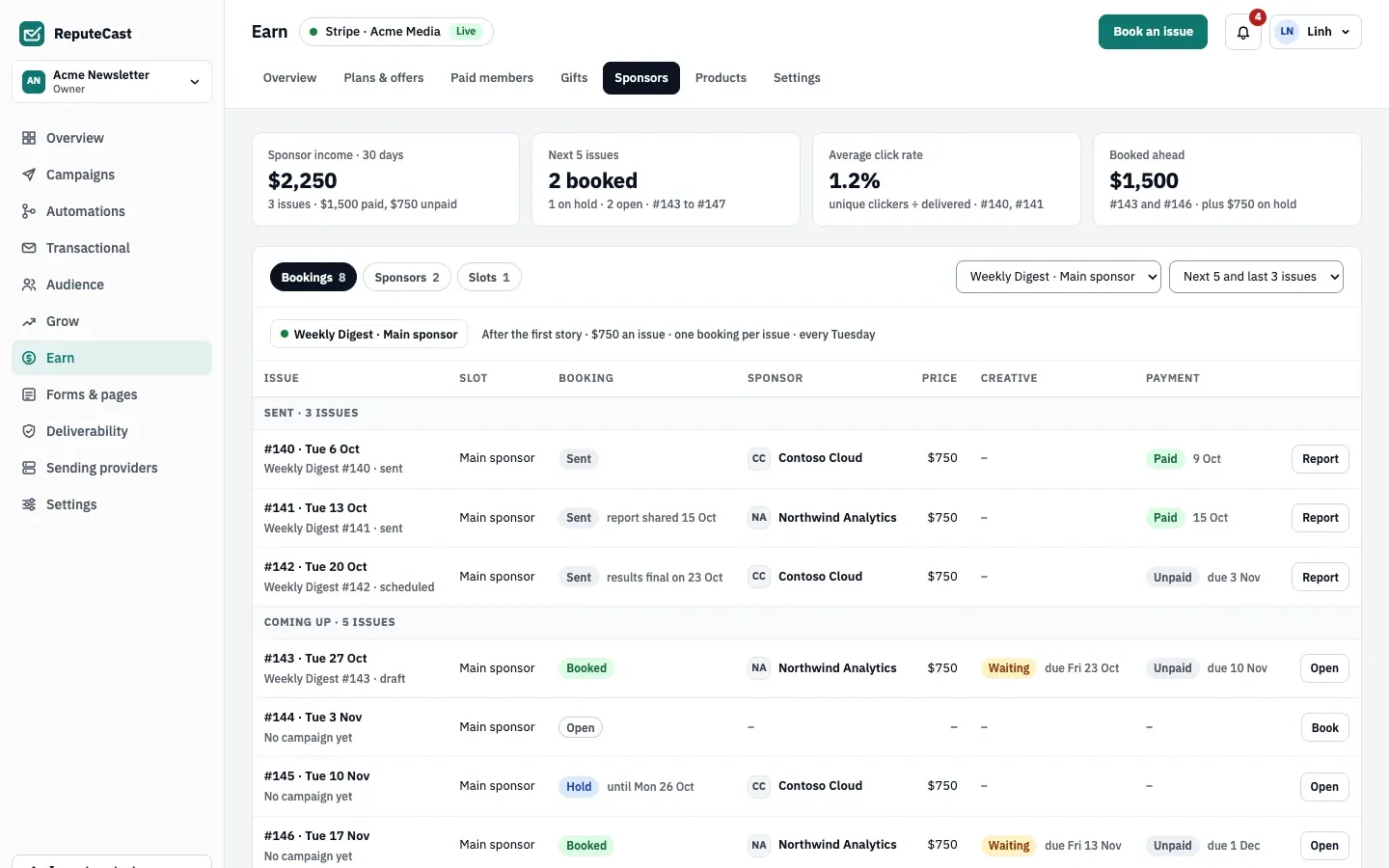
- Open Bookings. Each upcoming issue of the slot is a row.
- Select Book on an open issue, choose the sponsor and confirm the price. Use Hold to reserve the issue for a sponsor until a date while they decide.
- Collect the creative before its due date: a headline, text (up to 280 characters), a button and a link. The booking shows Waiting with the due date until it arrives.
- Place the Sponsor block in the issue’s email. It always carries a label: “Sponsored” or “Sponsored by” and the sponsor’s name.
- After you are paid, select Record a payment on the booking. Payment shows Unpaid with its due date until then.
Bookings move through Open, Hold, Booked, Sent and Canceled.
Share the sponsor report
Section titled “Share the sponsor report”Once the issue is sent, the booking’s Report shows the sponsor’s results. The numbers are final 72 hours after the send. Share a read-only link with the sponsor; it expires after 90 days by default (30 days, 90 days, a date or never). Sponsor income is shown apart from subscription revenue (Revenue metrics explained).
Defaults and limits
Section titled “Defaults and limits”| Setting | Default | How to change |
|---|---|---|
| Creative text | Up to 280 characters; headline 120, button 40 | Fixed |
| Creative due before the issue | 4 days | Earn › Sponsors › slot, 0–30 days |
| Sponsor report final | 72 hours after the send | Fixed |
| Payment terms | 14 days after the issue | Earn › Sponsors › sponsor, 0–120 days |
| Shared sponsor report link expires | 90 days | Share dialog; 30 days, 90 days, a date or never |
Check that it worked
Section titled “Check that it worked”- The booked issue shows Booked and, once the creative arrives, the creative’s state instead of Waiting.
- In the composer’s preview, the sponsor block shows the sponsor’s creative with the “Sponsored” label.
Troubleshooting
Section titled “Troubleshooting”- A creative is overdue → Earn’s Overview lists it under the items that need you. Remind the sponsor or move the booking to a later issue.
- The report numbers still change → results are final 72 hours after the send.
- Payment shows Unpaid after the due date → record the payment by hand once it arrives; ReputeCast does not collect sponsor payments.