
Send with your own Postal server
If you run your own Postal mail server, ReputeCast can send your newsletter through its HTTP API and read its signed webhooks, so a Postal mail server newsletter gets the same bounce handling, auto-pause and reports as any other sending provider. You add the webhook in Postal yourself, publish Postal’s DNS records, and warm up the server’s IP before it carries Broadcasts.
| Kind | Self-hosted |
|---|---|
| Bulk marketing | Your own policy |
| Event webhooks | Added by hand in Postal; RSA signature checked with the server's JWKS |
| Domain setup | Manual DNS |
| Suppression sync | Local only |
| Batch size | 1 |
| Notes | Your own Postal mail server. You add the webhook in Postal. New IPs need warming up. Servers on a private network need providers.allow_private_networks. |
Before you begin
Section titled “Before you begin”- A Postal mail server and an API credential for it (Postal › your mail server › Credentials, type API; an SMTP credential won’t work) (Postal: Using the API, checked October 2026).
- Network access both ways. ReputeCast calls Postal’s API and reads its public signing key from
<Server URL>/.well-known/jwks.json; Postal posts webhooks to<public URL>/hooks/postal/<token>. - For a Postal server on your own network, an instance admin turns on
providers.allow_private_networks(REPUTECAST_PROVIDERS__ALLOW_PRIVATE_NETWORKS=true) and restarts ReputeCast. Without it, ReputeCast refuses loopback and private addresses. Cloud metadata and link-local addresses are always refused. See the configuration reference. - Permissions. Connecting needs
providers:manage; adding a new sending domain needsdomains:manage.
Connect Postal
Section titled “Connect Postal”-
Open Sending providers, choose Add provider and pick Postal in the catalog. Connect a sending provider explains the steps every provider shares.
-
Enter the Server URL (the address of your Postal web interface, for example
https://mta.acme.io) and the API key. Choose Connect. ReputeCast checks the key with a harmless API call and stores it encrypted; the card then says “Postal · reachable”. -
In 2. Webhooks, ReputeCast tests its own public URL, then shows the webhook URL. Choose Copy URL. The wizard also offers Create a secret: skip it. Postal signs its webhooks with its own RSA key, and ReputeCast checks that signature instead.
-
In Postal, open the mail server › Webhooks and add a webhook with that URL for all events. ReputeCast uses
MessageSent,MessageDelayed,MessageDeliveryFailed,MessageHeldandMessageBounced, plusMessageLinkClickedandMessageLoadedif Postal sends them (Postal: Webhooks, checked October 2026). -
Choose Continue to domain verification and enter your sending domain. ReputeCast can’t add it in Postal: add the domain in Postal and publish the DKIM and return-path records Postal shows. ReputeCast suggests an SPF record with
a:<your Postal host>, merged with your existing SPF record, and DMARC if the domain has none. -
In Test send, send a test. The timeline waits for Postal’s
MessageSentwebhook. -
In Streams, pick the streams. A new IP has no reputation yet, so start with System or Automations mail, or a small weighted share of Broadcasts.
-
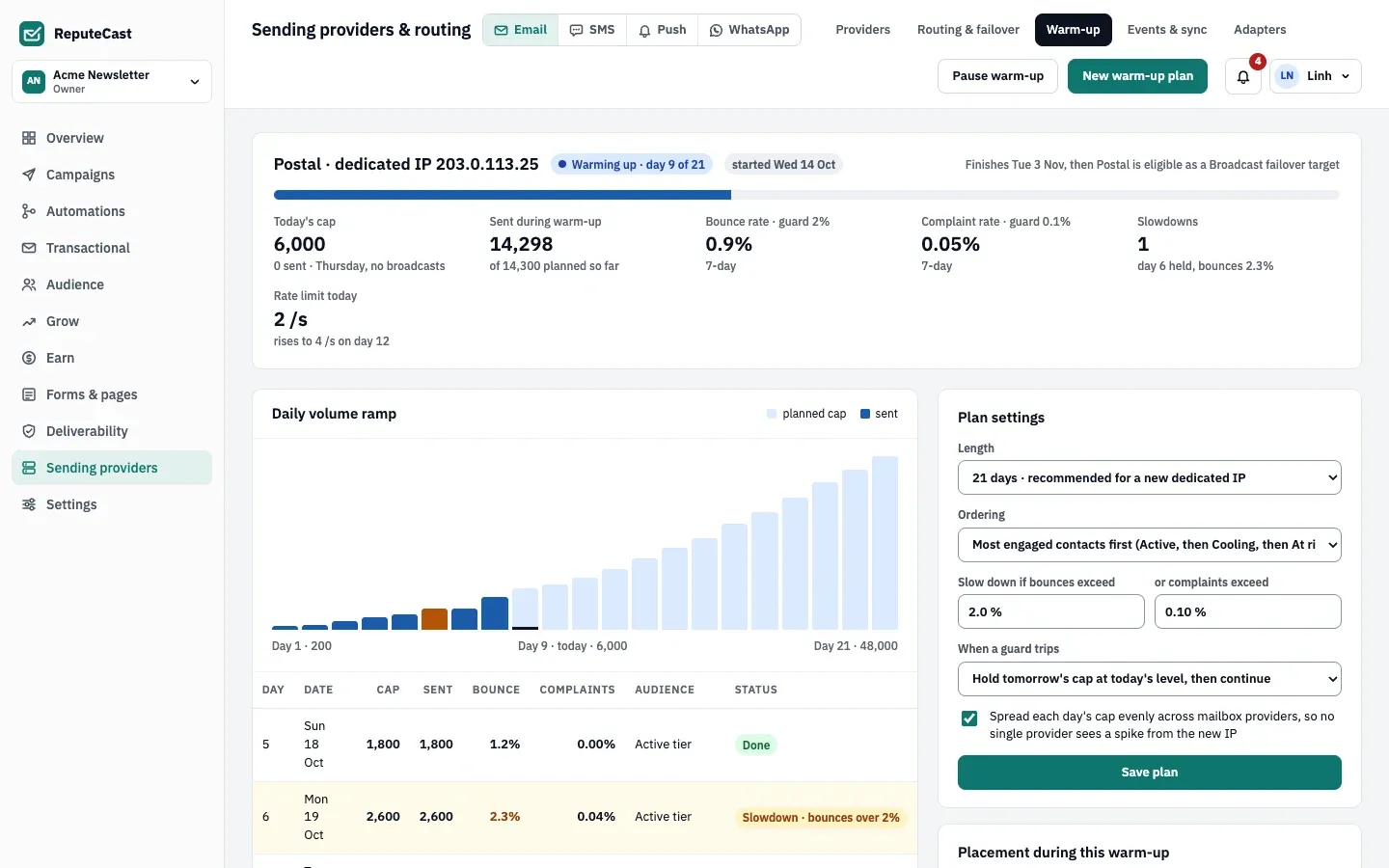
Open Sending providers, then Warm-up, choose New warm-up plan for the Postal server and start it. The plan ramps the daily volume, sends to your most engaged contacts first and slows down when bounces or complaints rise.
Check that it worked
Section titled “Check that it worked”-
The Postal card on Sending providers, then Providers shows Warming up while the plan runs.
-
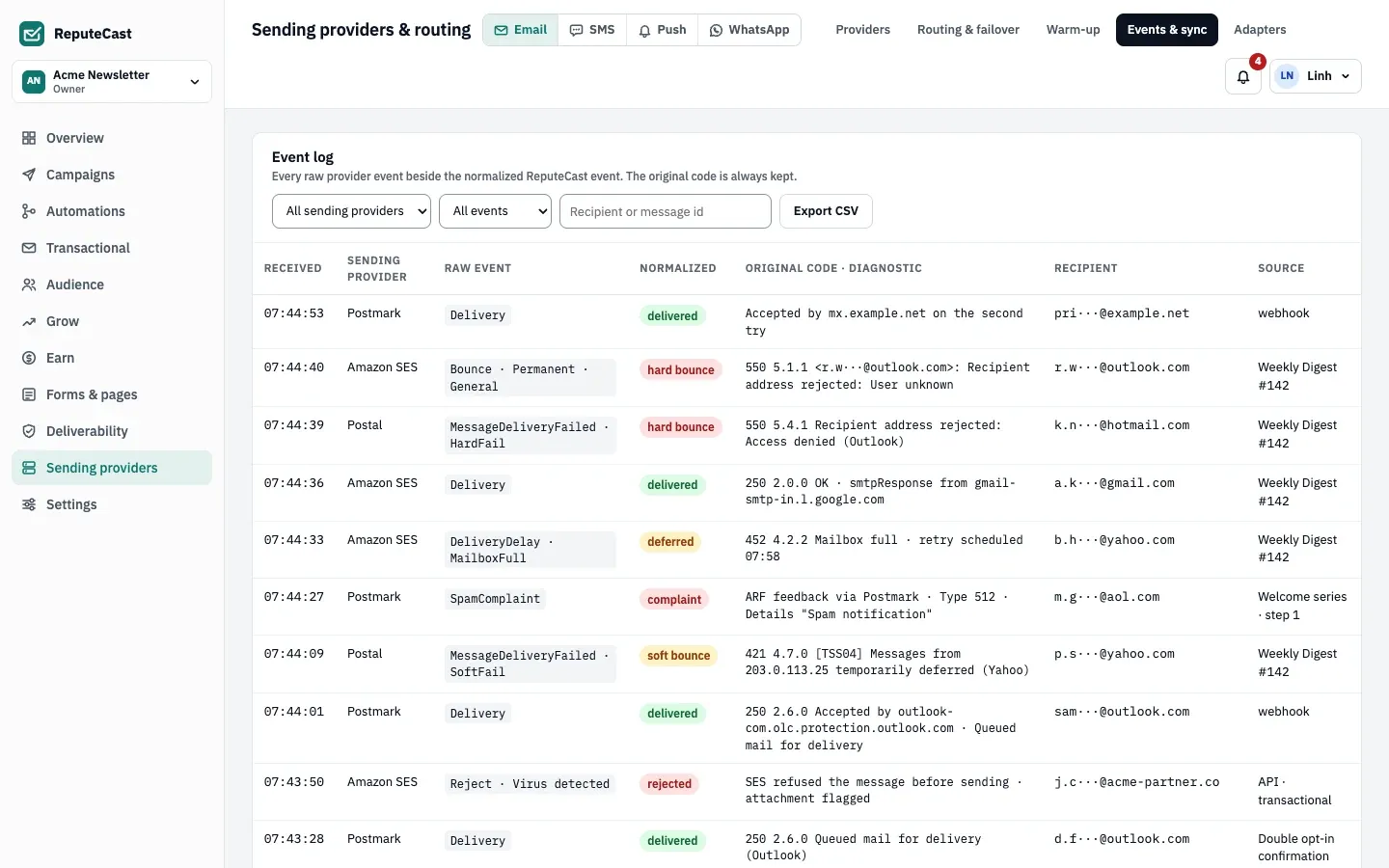
Postal’s events show up under Sending providers, then Events & sync next to the normalized ReputeCast event and the original SMTP reply.
ReputeCast sends one raw message per API call and tags it so Postal’s webhooks find their way back. Copies and
attachments work. Postal reports no quota or rate, so ReputeCast sends at most 20 messages per second to it, and less
while the warm-up plan’s daily cap and rate apply. A MessageDeliveryFailed with a permanent failure is a hard
bounce and suppresses the address; MessageBounced (a bounce Postal received later) counts as a soft bounce. Postal
has no complaint or unsubscribe events, so ReputeCast gets no complaints through Postal, and unsubscribes come only
from ReputeCast’s own links.
Troubleshooting
Section titled “Troubleshooting”- “ReputeCast won’t connect to that address”. The server URL resolves to a private or loopback address. Turn on
providers.allow_private_networks, or use Postal’s public address. - “Postal (self-hosted) rejected this key” with
InvalidServerAPIKey. Use an API credential of the same mail server, not an SMTP credential. - “Postal (self-hosted) didn’t answer the check”. ReputeCast couldn’t reach the server URL, it redirected (redirects aren’t followed), or the server is suspended. Use the exact HTTPS address of the web interface.
- Webhooks get
401. ReputeCast couldn’t verify Postal’s signature: it can’t read<Server URL>/.well-known/jwks.json, or the webhook comes from another Postal server. Check that the JWKS URL loads from the ReputeCast host. - The endpoint test fails because ReputeCast itself only has a private address. Postal can’t post to it. Give ReputeCast a reachable public URL, or choose Use polling for now after connecting: polling reads only the latest delivery status per message, without bounces, opens or clicks.
- Opens or clicks look doubled. Postal’s own click and open tracking is on for your server. Turn it off in Postal; ReputeCast can’t read that setting.
- You changed the public URL or disconnected Postal. ReputeCast changes nothing in Postal. Update or delete the webhook there.