
Send with Postmark
Postmark allows bulk mail only on a Broadcast message stream, so a Postmark newsletter broadcast stream is the heart of this setup: you connect Postmark with a server token, and ReputeCast creates the Broadcast stream, registers webhooks on each stream, fetches your domain’s DNS records and keeps suppressions in sync.
| Kind | API |
|---|---|
| Bulk marketing | Broadcast streams only |
| Event webhooks | Registered by ReputeCast on each message stream; basic auth |
| Domain setup | API (account token) |
| Suppression sync | Two-way |
| Batch size | 500 |
| Notes | Bulk mail goes on a Broadcast message stream, which ReputeCast can create. Suppressions sync per message stream. Month-to-date volume is read from Postmark; enter your plan size for the quota bar. |
Before you begin
Section titled “Before you begin”- A Postmark server and its Server API token (Postmark › Servers › your server › API Tokens). While your Postmark account is pending approval, every recipient must share the domain of the From address (Postmark API overview, error 412, checked October 2026), so send your tests to an address on your own domain until Postmark approves the account.
- Optional: an Account API token. With it, ReputeCast adds your sending domain in Postmark and shows its DKIM and Return-Path records. Without it, you add the domain in Postmark yourself.
- Permissions. Connecting needs
providers:manage; adding a new sending domain needsdomains:manage. - A public HTTPS address. Postmark posts events to
<public URL>/hooks/postmark/<token>. Postmark has no events API that ReputeCast could poll instead, so the address must be reachable from the internet.
Postmark separates Transactional message streams (one-to-one mail triggered by a user action) from Broadcast streams
(newsletters and announcements)
(Postmark: How to create and send through Message Streams,
checked October 2026). ReputeCast sends System, Automations and Transactional mail on your server’s transactional
stream, outbound, and Broadcasts only on a Broadcast stream.
Connect Postmark
Section titled “Connect Postmark”-
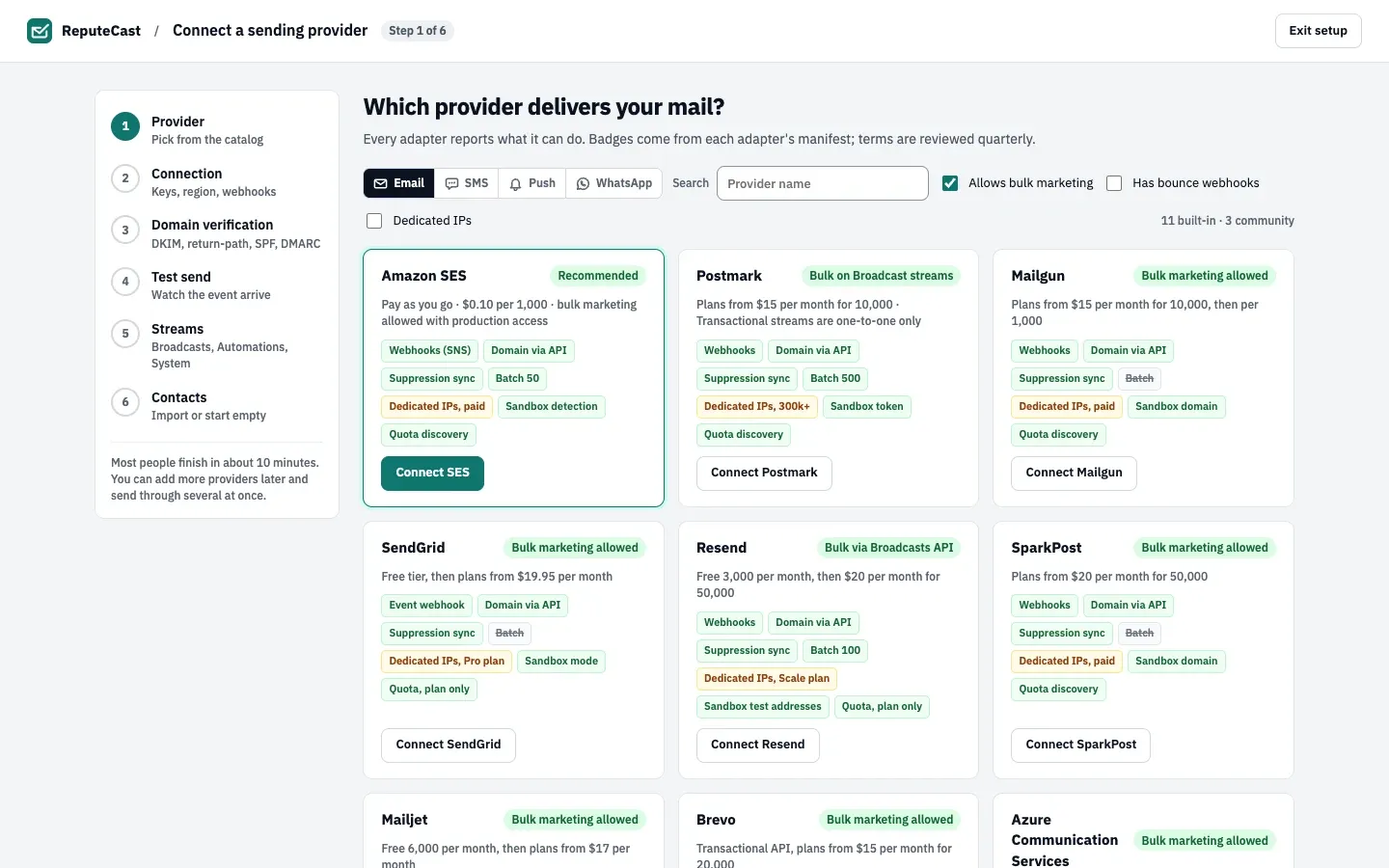
Open Sending providers, choose Add provider and pick Postmark in the catalog. Connect a sending provider walks through the steps every provider shares.
-
Paste the Server API token and keep Message stream set to
outbound. Under the extra Postmark settings you can add the Account API token and your Plan · emails per month (used for the quota bar). Leave Broadcast stream empty: ReputeCast creates the stream in step 8. -
Choose Connect. ReputeCast checks the token with read-only calls (
GET /serverand this month’s outbound statistics) and stores it encrypted. -
In 2. Webhooks, ReputeCast first tests its own public URL, then registers a webhook on the message stream with HTTP basic auth (user
reputecast, a secret ReputeCast generates). The webhook reports Delivery, Bounce, SpamComplaint and SubscriptionChange; Open and Click stay off because ReputeCast tracks opens and clicks itself. -
Choose Continue to domain verification and enter your sending domain. With an Account API token, ReputeCast adds the domain in Postmark with the Return-Path
pm-bounces.<your domain>and lists the DKIM TXT record and the Return-Path CNAME (topm.mtasv.net), plus a DMARC record if the domain has none. -
In Test send, send a test. It goes through the
outboundstream; the timeline waits for Postmark’s Delivery webhook. -
In Streams and Contacts, pick the streams Postmark carries and whether to pull existing suppressions from Postmark. Broadcasts aren’t offered yet: Postmark’s terms allow bulk mail only on a Broadcast stream.
-
To send newsletters through Postmark, open Sending providers, then Routing & failover and make Postmark the route (or the fallback) for Broadcasts. When you save, ReputeCast offers to create the stream: choose Create Broadcast stream and save. It creates a Broadcast stream called “ReputeCast Broadcasts” in your Postmark server (stream ID
broadcast, orreputecast-broadcastsif that ID is taken), registers the webhook on it too, and uses it for the route.
Check that it worked
Section titled “Check that it worked”- The Postmark card on Sending providers, then Providers shows Healthy and this month’s volume.
- In Postmark, each stream ReputeCast uses has a webhook pointing at
/hooks/postmark/…with basic auth, and your server lists the “ReputeCast Broadcasts” stream once you created it. - Delivery events from both streams appear under Sending providers, then Events & sync.
ReputeCast sends up to 500 messages per call to Postmark’s batch endpoint, with TrackOpens off and TrackLinks
set to None on every message. If your server’s own tracking settings are on, the
Provider-side tracking check on the Events & sync tab shows it and can turn it off through the
API; until then Send Readiness warns about double tracking. Suppressions sync
per stream every 15 minutes: ReputeCast pushes its shared list to both streams and, if you ticked the pull option,
imports Postmark’s bounces, spam complaints and unsubscribes.
Troubleshooting
Section titled “Troubleshooting”- “Postmark rejected this key” with
ErrorCode 10. The token isn’t a Server API token, or it belongs to another server. Copy the token from the server you send with, not the Account token. - The webhook card says the endpoint isn’t reachable. Postmark can’t be polled, so fix the public URL (or use a tunnel while testing), then choose Re-test endpoint. See Reverse proxy and TLS.
- Test messages stay queued and retry while your Postmark account is pending approval. Postmark refuses recipients outside the From domain (error 412) and ReputeCast retries it as a temporary error. Send the test to an address on your own domain, or wait for Postmark’s approval.
- Broadcasts can’t use Postmark in the streams step or in Routing. Create the Broadcast stream as in step 8.
- The domain step shows no DKIM or Return-Path record. You connected without an Account API token. Add the domain in Postmark and publish the DKIM record it shows, or add the token under Settings, then Credentials on the provider card.
- “Postmark didn’t create the stream” because both stream IDs are taken. Create a Broadcast stream in Postmark, then enter its ID.
- The catalog shows a “Sandbox token” badge. ReputeCast has no test mode for Postmark: the setup’s test send delivers a real message.
- You changed the public URL or disconnected Postmark. A new public URL adds a webhook for the new address; delete the old one in Postmark. Disconnecting removes ReputeCast’s webhooks, but the Broadcast stream, the domain and the pushed suppressions stay in Postmark.