
Triggers and steps
This page lists the email automation triggers, steps and conditions of the flow editor, with every option and its default. Build automations explains the editor itself.
Triggers
Section titled “Triggers”A flow has exactly one trigger; you pick its kind under Starts when.
| Trigger | Starts when | Options (defaults in brackets) |
|---|---|---|
| Joined list | A contact joins the list. | List; Double opt-in confirmed only [on]: only contacts who confirmed double opt-in start the flow; Include contacts added by an import [off]. |
| Form submitted | A contact submits the signup form; with double opt-in, once they confirm. | Form. |
| Tag added | The tag is added to a contact. | Tag: letters, numbers, spaces and - _ . : /, up to 64 characters. |
| API event | Your app sends the event for a contact with send an API event, using an API key with subscribers:edit. See record events and conversions. |
Event name: letters, numbers and . _ : -, starting with a letter or number, up to 100 characters, such as workspace.created. |
| Date field | A contact’s date field is the set number of days away. The flow starts on that day, once the set time has passed in the workspace time zone. | Date field (a date field, or Subscribed on); Days and Before or after [0: on the date], up to 365; At [09:00]; Every year [off]. |
| Score crosses… | A contact’s score crosses the threshold through activity, decay or a field condition. Contacts who cross only because a scoring rule changed start it only when the person saving the rules chooses so. | Rises to or Falls below [rises]; Score from 1 to 100 [where the Hot band starts, else 50]; At most once per contact in N days [90; 0 for no limit, up to 3,650]. See score contacts by interest. |
| Answered a poll or survey | A contact answers a poll in a campaign, or submits a survey. Test answers and answers from people who aren’t contacts never start it. | Poll or survey; for polls, Answer: Any answer, Is one of or Isn’t one of [any]; Start again when the answer changes [off]. See polls and surveys. |
| Bought a product | A contact pays for a digital product. Buyers who aren’t contacts never enter; a refund takes the contact out of the flow. | Product [Any product]. The flow’s emails can use {{ order.product_name }}, {{ order.amount }} and {{ order.number }}. See sell digital products. |
| Reached a milestone | A referrer reaches a referral milestone, whether or not the milestone sends its own email. | Program [any program]; Milestone [any milestone]. Once per contact per milestone. See run a referral program. |
| Order placed | A contact places an order in a connected Shopify or WooCommerce store. | Store; filters Product, Collection, Total at least and The contact's first order in the store only. See connect Shopify or WooCommerce. |
| First order | A contact places their first order in the store. | Store. |
| Abandoned checkout | A checkout gets no order within the set hours. Only customers who accepted marketing in the store enter; this rule can’t be removed. Contacts who got an abandoned-cart email in the last 7 days don’t enter. WooCommerce stores need the ReputeCast plugin for it. | Store; After 1 to 24 hours [1]; Add a filter for the same filters as Order placed. |
Every trigger except Score crosses… and Reached a milestone also has Re-entry: Once per contact [default] lets a contact through the flow one time, and Every time, once they've left lets them enter again. Exceptions:
- A contact enters Score crosses… flows at most once in the set number of days, and enters Reached a milestone flows once per milestone.
- An Abandoned checkout flow starts for every new abandoned checkout; the 7-day rule above limits it.
- With Start again when the answer changes, a changed answer starts the flow again whatever the re-entry setting.
Message steps
Section titled “Message steps”The Messages group of the palette. Send SMS, Send push and Send WhatsApp appear once the workspace has set up that channel.
| Step | What it does | Options (defaults in brackets) | Publishing needs |
|---|---|---|---|
| Send email | Sends an email on the Automations stream. Contacts who are no longer active, or are on the suppression list, leave the flow here. | Email: pick one, or Create new from template; the step sends one version of it (v1, v2…), and Edit in composer saves a new one. Subject: the subject that goes out. Sending route: the Automations route [default] or one sending provider only. Send window: only between 07:00 and 21:00 in the recipient’s time zone, otherwise held until the window opens [on]. Skip if: the contact got any email in the last 4 hours [on], or the contact is in a list [off]; a skipped contact moves on to the next step. Language versions: see send each reader their language. | automations:publish |
| Send SMS | Texts the contact through your SMS routes. | Text, between the SMS rules’ brand prefix and opt-out text; Opt-out text [on]; Consent: the list whose SMS consent the step needs (required, can’t be removed); Outside quiet hours: Wait for the window (default) or Skip the text; Skip if: Got a text in the last N hours [off; 24 when on, 1 to 720]. See send SMS campaigns. | automations:publish, sms:send |
| Send push | Sends a web push notification to the contact’s linked browser subscriptions. Contacts without one skip the step and go on; anonymous subscribers are never reached. | Title (up to 200 characters); Message (up to 500); Link (required); Button (optional, opens the same link); Expiry: 30 minutes, 4 hours or 1 day [4 hours]; Outside quiet hours: wait for the window or skip [wait]. See send web push notifications. | automations:publish, push:send |
| Send WhatsApp | Sends a WhatsApp message through Meta’s WhatsApp Cloud API. | Approved template, which works any time, with Variables filled from a contact field or fixed text, each with a fallback; or Free text, sent only inside the 24-hour customer service window, with Outside the window: Skip the message [default] or Send a template instead. Consent: the list whose WhatsApp consent the step needs (required, can’t be removed); Outside quiet hours: wait for the window or skip [wait]. See send WhatsApp messages. | automations:publish, whatsapp:send |
Text, push and WhatsApp steps wait for, or skip, the workspace’s quiet hours in each contact’s time zone. When the publisher lacks the send permission a channel step needs, publishing goes to approval by a member who holds it (see publish automation changes safely).
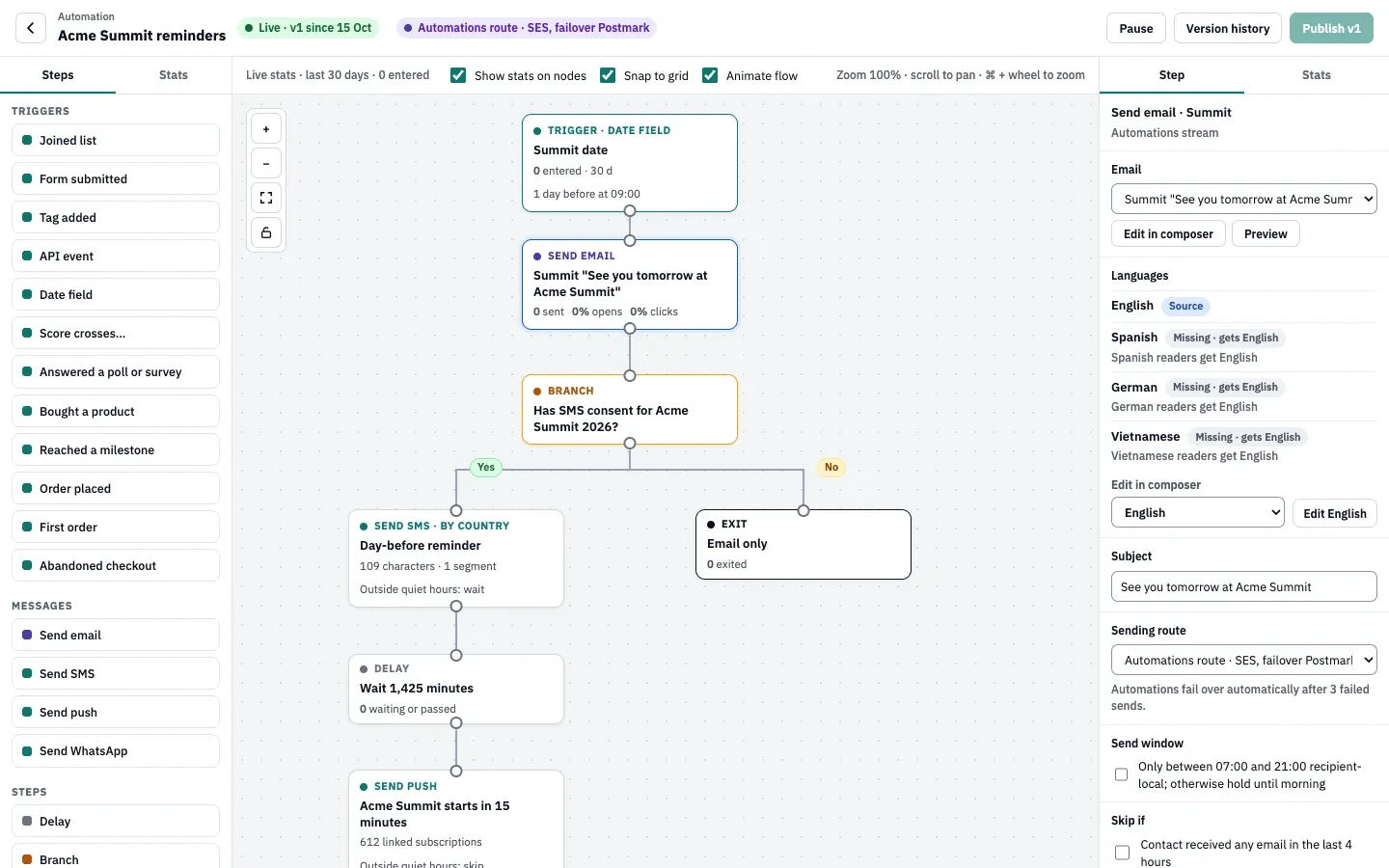
Flow steps
Section titled “Flow steps”| Step | What it does | Options (defaults in brackets) |
|---|---|---|
| Delay | Holds contacts, then moves them on. | Wait: an amount in minutes, hours, days or weeks [1 day], at most a year. Contacts already waiting keep their timer when you change it, unless you move them to the new version when you publish. |
| Branch | Sends contacts who meet the condition down Yes and the others down No. Both paths must be connected. | Condition [Opened an email, human opens only, within 2 days]. For opens, clicks, text clicks and replies, Wait up to sets how long the branch waits, counted from when the message went out; contacts who haven’t acted by then take the No path. Other conditions are checked at once. |
| Filter | Lets contacts who meet the condition continue; the others leave the flow here. | Only contacts who and a condition [Has a tag]. |
| A/B split | Splits contacts at random by weight (weighted split); a contact keeps their variant for the whole run. Every variant needs a path. | Variants: 2 to 5, lettered A to E, with weights that add up to 100% [A and B, 50 / 50]; Add variant. |
| Webhook | Calls your URL for each contact, then moves on whether or not the call works (see webhook step calls). | Name; Method: POST or PUT [POST]; URL: a public http:// or https:// address, without credentials; Signing secret: at least 16 characters, write-only, never shown again. |
| List action | Changes the contact’s lists or tags. | Action: Add to a list, Remove from a list, Add a tag [default], Remove a tag or Unsubscribe from all lists. See lists, consent and double opt-in. |
Goal and exit
Section titled “Goal and exit”The palette’s Goal / exit item adds either; Ends the flow as switches between them.
| Step | What it does | Options (defaults in brackets) |
|---|---|---|
| Goal | Ends the flow for contacts who meet it and counts toward the goal rate in the list. A contact who meets the goal anywhere in the flow jumps to it and finishes; one who arrives without meeting it goes on to the next step, if there is one. A goal leads to at most one step. | Goal: counts toward the goal rate; Goal name; Reached when the contact: a condition [Clicked a link], or Reaching this step (met on arrival). |
| Exit | Ends the flow. The contact stays on their lists. Nothing can follow an exit. | Exit: leaves the flow; Name [Leave the flow · stays on the list]. |
A path that ends without a goal or exit also ends the flow for the contact who reaches its last step.
Conditions
Section titled “Conditions”Branches, filters and goals use the same conditions.
| Condition | True when | Options |
|---|---|---|
| Opened an email | The contact opened the email. | Which email [Any email in this flow]; Human opens only (ignore Apple Mail Privacy Protection) [on]; in a branch, Wait up to. See human opens. |
| Clicked a link | The contact clicked a link in the email. | Which email; Link contains (optional, such as docs); in a branch, Wait up to. |
| Has a tag | The contact has the tag. | Tag. |
| Is in a list | The contact is subscribed to the list. | List. |
| Sent an API event | The API event arrived for the contact since they entered the flow. | Event, such as teammate.invited. |
| A contact field | A contact field compares as set, ignoring case. | Field, such as plan; Comparison: is, isn't, contains, is one of (comma-separated values), is set or is empty; Value. |
| Bought a product | The contact paid for the product since entering the flow; an order refunded in full doesn’t count. | Product [Any product]. |
| Placed an order | The contact placed an order in the store since entering the flow. | Ordered in [Any connected store]. |
| Has SMS consent | The contact has SMS consent on the list. Offered once SMS is set up. | Consent [Any list]. |
| Clicked a text’s link | The contact clicked a link in the text. | Which text [Any text in this flow]; in a branch, Wait up to. |
| Replied to a text | The contact replied to the text. | Which text [Any text in this flow]; in a branch, Wait up to. |
A goal watches for its condition anywhere in the flow when it is an open, a click, a tag, a list, an API event, a purchase or an order. A goal with a field or text condition is checked only when a contact reaches the goal step.
Webhook step calls
Section titled “Webhook step calls”Each call sends this JSON body with Content-Type: application/json, User-Agent: ReputeCast-Webhooks/1.0 and
X-ReputeCast-Event: automation.step. The step’s name is its Name, or the
URL’s host when it has none.
{ "type": "automation.step", "id": "01a16a2e-5c7e-7b51-9f0e-3d2c1b0a9e8f", "occurredAt": "2026-10-22T09:14:03Z", "automation": { "id": "01a1637b-8042-7b3b-ae2f-a664344e716b", "name": "Onboarding", "version": 7 }, "step": { "id": "n7", "name": "Sync to CRM" }, "contact": { "id": "01a1637a-91c4-7d2e-8b0f-5a6e3c2d1b0a", "email": "ana@example.com", "firstName": "Ana", "lastName": "Silva", "tags": ["trial"], "fields": { "plan": "team" } }}| Rule | Value |
|---|---|
| Signature | With a signing secret set, X-ReputeCast-Signature: t=<Unix seconds>,v1=<signature>, where the signature is the lowercase hex HMAC-SHA256 of <t>.<raw body>, keyed with the secret. Endpoints from Settings, then Webhooks sign differently: see receive webhooks. |
| Success | Any 2xx response. |
| Timeouts | 5 seconds to connect, 10 seconds for the response headers, 15 seconds in total. At most 3 redirects. |
| Retries | Network errors, 429 and 5xx responses are retried: 3 attempts in total, about 30 seconds and 2 minutes apart. Other responses are not retried. |
| Failure | The contact moves on anyway. The call is in the step’s Delivery log, and the list shows Step failing until a call works again. |
| Addresses | Public addresses only. ReputeCast checks the address it actually connects to, after DNS and on every redirect, so private, loopback, link-local and internal addresses are refused. |
| Log | Calls are kept for 90 days; the delivery log shows the latest 30. |
Flow rules
Section titled “Flow rules”These problems block publishing; the editor lists them under Before you publish.
- A flow has one trigger, and nothing leads into it.
- Every step is connected to the trigger, and no connection leads back to an earlier step.
- Each path out of a branch or A/B split is connected exactly once. Other steps lead to at most one step; an exit leads to none.
- Every step is set up: a picked email with a subject, a list that still exists, a valid tag, event name or URL, a delay above zero, split weights that add up to 100%.
- A flow has at most 200 steps and 400 connections.
A webinar landing page can create a draft reminder flow for you: a Date field trigger on the field its registration form writes, an email the day before at the session’s time, a 23-hour delay and a second email an hour before. See build landing and sales pages.