
Receive webhooks
ReputeCast posts normalized events (deliveries, bounces, complaints, subscriptions, sends and more) to endpoints you register, and signs every request. This page sets up an endpoint and shows webhook signature verification in Node.js, Python, Go and PHP, so your code only acts on requests that really came from your ReputeCast instance.
Before you begin
Section titled “Before you begin”- You need
webhooks:managein the workspace. - Your endpoint needs a URL your ReputeCast server can reach, such as
https://api.example.com/webhooks/reputecast. Addresses on private and internal networks (10.0.0.0/8,localhost,*.internaland the like) are refused unless an instance admin turns onwebhooks.allow_private_networks(configuration reference). Credentials in the URL (https://user:pass@…) are refused; the signing secret takes their place. - Webhooks belong to one workspace. Add an endpoint in each workspace you want events from.
Add an endpoint
Section titled “Add an endpoint”-
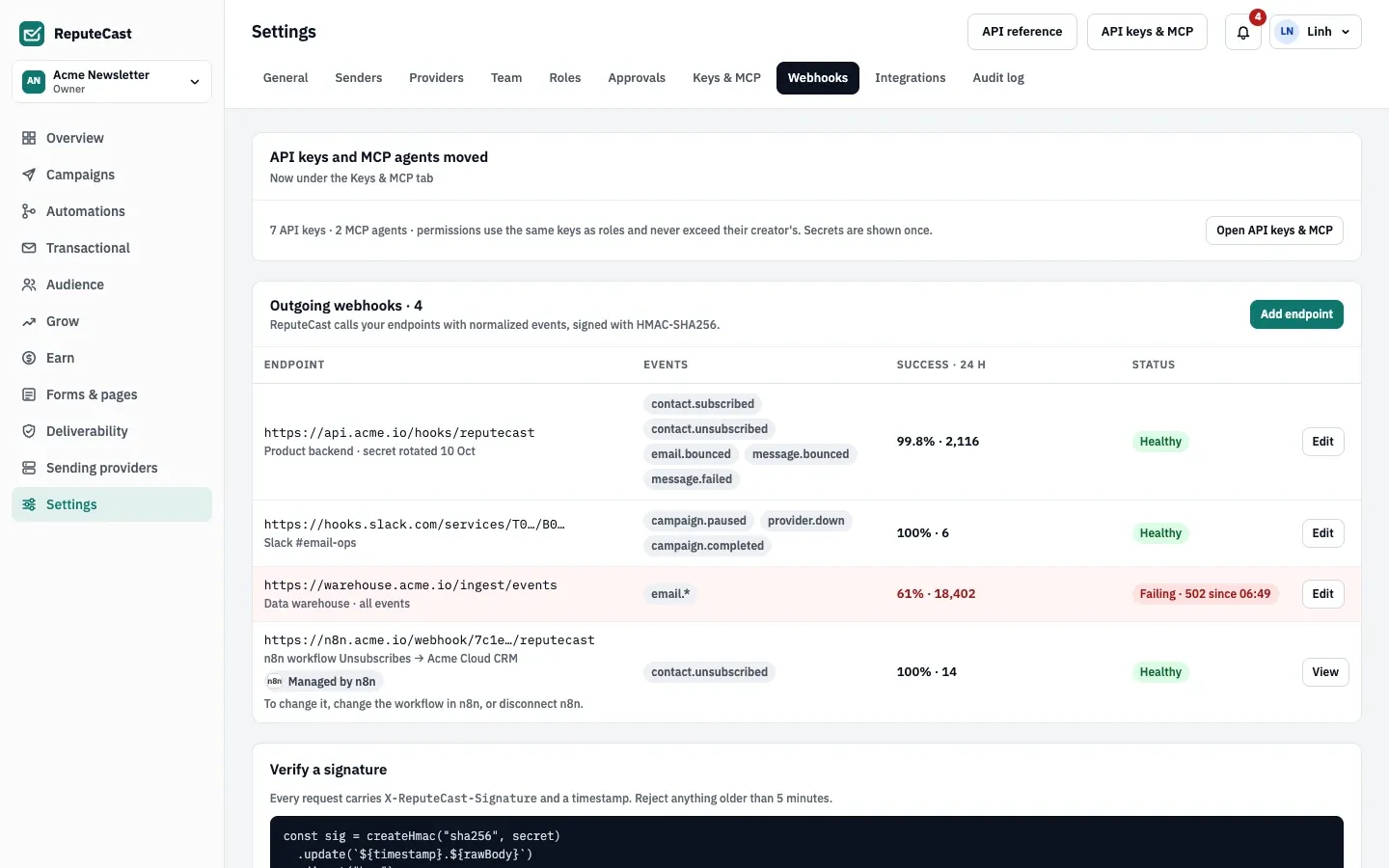
Open Settings, then Webhooks and select Add endpoint.
-
Enter the endpoint’s URL, an optional name and description, and pick the events. Ticking a whole group subscribes to its wildcard, such as
email.*; new events added to that group later are included. -
Select Add endpoint. ReputeCast shows the signing secret,
whsec_…, once. Copy it into your receiver’s configuration, for example asREPUTECAST_WEBHOOK_SECRET. ReputeCast stores it encrypted and never shows it again. -
Deploy a receiver that verifies the signature (Verify the signature) and answers
2xx. -
Open the endpoint again and select Send a test event. ReputeCast sends one
webhook.testevent at once and shows the response.
The same endpoints can be managed through the API: create-webhook, update-webhook, pause-webhook,
test-webhook and the other operations under the Webhooks tag.
Events and wildcards
Section titled “Events and wildcards”An endpoint subscribes to 1–40 entries. Each entry is an event name (email.bounced), a group wildcard (email.*)
or * for every event. The full catalog, with what each event means and a sample of its data, is in
Webhook events.
webhook.test isn’t in the catalog: only the test button and the test-webhook operation send it.
What a delivery looks like
Section titled “What a delivery looks like”Each delivery is an HTTP POST with a JSON envelope:
{ "id": "0192f1c4-7b2e-7c51-9d0a-3f5e8b1a2c44", "type": "contact.subscribed", "created_at": "2026-10-22T09:41:07Z", "workspace": "acme-newsletter", "data": { "…": "the event's own fields" }}ididentifies the event. It stays the same on every retry and for every endpoint that gets the event, so use it to ignore duplicates.typeis the event name,created_atis when it happened (UTC) andworkspaceis the workspace slug.datadepends on the event; see Webhook events.
These headers come with every delivery:
| Header | Value |
|---|---|
Content-Type |
application/json |
User-Agent |
ReputeCast-Webhooks/<version> |
X-ReputeCast-Signature |
Lowercase hex HMAC-SHA256 of <timestamp>.<raw body>. There is no sha256= or other prefix. |
X-ReputeCast-Timestamp |
When this attempt was signed, in Unix seconds. |
X-ReputeCast-Event |
The event name, the same as type. |
X-ReputeCast-Delivery |
The delivery ID: one per event and endpoint, the same on every retry. |
Verify the signature
Section titled “Verify the signature”To check a delivery:
- Read the raw request body as bytes, before any JSON parsing. Re-serialized JSON won’t match.
- Take the
X-ReputeCast-Timestampheader and reject the request when it is more than 5 minutes from your clock. This keeps an old, captured request from being replayed. ReputeCast doesn’t enforce it; your receiver does. - Compute HMAC-SHA256 over the timestamp, a dot and the raw body:
<timestamp>.<raw body>. - Use the whole secret string as the key,
whsec_prefix included, as UTF-8 bytes. Don’t strip the prefix and don’t base64-decode the rest. - Hex-encode the result in lowercase and compare it with
X-ReputeCast-Signaturein constant time. Answer401on a mismatch.
Each example below is a complete receiver on port 3000 at /webhooks/reputecast that reads the secret from
REPUTECAST_WEBHOOK_SECRET:
import { createHmac, timingSafeEqual } from 'node:crypto'import { createServer } from 'node:http'
// The HMAC key is the whole secret, whsec_ prefix included.const secret = process.env.REPUTECAST_WEBHOOK_SECRET
function verify(rawBody, timestamp, signature) {  const age = Math.abs(Date.now() / 1000 - Number(timestamp))  if (!signature || !(age <= 300)) return false // reject timestamps more than 5 minutes off  const expected = createHmac('sha256', secret).update(`${timestamp}.`).update(rawBody).digest('hex')  const a = Buffer.from(expected)  const b = Buffer.from(signature)  return a.length === b.length && timingSafeEqual(a, b)}
createServer((req, res) => {  if (req.method !== 'POST' || req.url !== '/webhooks/reputecast') return res.writeHead(404).end()  const chunks = []  req.on('data', (chunk) => chunks.push(chunk))  req.on('end', () => {    const rawBody = Buffer.concat(chunks) // the exact bytes ReputeCast signed    if (!verify(rawBody, req.headers['x-reputecast-timestamp'], req.headers['x-reputecast-signature'])) {      return res.writeHead(401).end()    }    const event = JSON.parse(rawBody.toString('utf8'))    console.log(event.type, event.id)    res.writeHead(204).end()  })}).listen(3000)
Runs on Node.js 18 or later with no packages: node server.mjs.
import hashlibimport hmacimport osimport time
from flask import Flask, abort, request
app = Flask(__name__)# The HMAC key is the whole secret, whsec_ prefix included.SECRET = os.environ["REPUTECAST_WEBHOOK_SECRET"].encode()

def verify(raw_body: bytes, timestamp: str | None, signature: str | None) -> bool:    if not timestamp or not timestamp.isdigit() or not signature:        return False    if abs(time.time() - int(timestamp)) > 300:  # reject timestamps more than 5 minutes off        return False    expected = hmac.new(SECRET, timestamp.encode() + b"." + raw_body, hashlib.sha256).hexdigest()    return hmac.compare_digest(expected.encode(), signature.encode())

@app.post("/webhooks/reputecast")def reputecast_webhook():    raw_body = request.get_data()  # the exact bytes ReputeCast signed    timestamp = request.headers.get("X-ReputeCast-Timestamp")    signature = request.headers.get("X-ReputeCast-Signature")    if not verify(raw_body, timestamp, signature):        abort(401)    event = request.get_json()    print(event["type"], event["id"])    return "", 204
Needs Python 3.10 or later and Flask 3 (pip install flask); run it with flask --app app run --port 3000.
package main
import (  "crypto/hmac"  "crypto/sha256"  "encoding/hex"  "encoding/json"  "io"  "log"  "net/http"  "os"  "strconv"  "time")
// The HMAC key is the whole secret, whsec_ prefix included.var secret = []byte(os.Getenv("REPUTECAST_WEBHOOK_SECRET"))
func verify(body []byte, timestamp, signature string) bool {  ts, err := strconv.ParseInt(timestamp, 10, 64)  if err != nil {    return false  }  // Reject timestamps more than 5 minutes off.  if age := time.Since(time.Unix(ts, 0)); age > 5*time.Minute || age < -5*time.Minute {    return false  }  mac := hmac.New(sha256.New, secret)  mac.Write([]byte(timestamp + "."))  mac.Write(body)  expected := hex.EncodeToString(mac.Sum(nil))  return hmac.Equal([]byte(expected), []byte(signature))}
func main() {  http.HandleFunc("POST /webhooks/reputecast", func(w http.ResponseWriter, r *http.Request) {    body, err := io.ReadAll(http.MaxBytesReader(w, r.Body, 10<<20)) // the exact bytes ReputeCast signed    if err != nil {      http.Error(w, "can't read body", http.StatusBadRequest)      return    }    if !verify(body, r.Header.Get("X-ReputeCast-Timestamp"), r.Header.Get("X-ReputeCast-Signature")) {      http.Error(w, "invalid signature", http.StatusUnauthorized)      return    }    var event struct {      ID   string          `json:"id"`      Type string          `json:"type"`      Data json.RawMessage `json:"data"`    }    if err := json.Unmarshal(body, &event); err != nil {      http.Error(w, "invalid JSON", http.StatusBadRequest)      return    }    log.Println(event.Type, event.ID)    w.WriteHeader(http.StatusNoContent)  })  log.Fatal(http.ListenAndServe(":3000", nil))}
Needs Go 1.22 or later (method patterns in http.HandleFunc): go run ..
<?php// The HMAC key is the whole secret, whsec_ prefix included.$secret = getenv('REPUTECAST_WEBHOOK_SECRET');$rawBody = file_get_contents('php://input'); // the exact bytes ReputeCast signed$timestamp = $_SERVER['HTTP_X_REPUTECAST_TIMESTAMP'] ?? '';$signature = $_SERVER['HTTP_X_REPUTECAST_SIGNATURE'] ?? '';
$expected = hash_hmac('sha256', $timestamp . '.' . $rawBody, $secret);// Reject timestamps more than 5 minutes off, then compare in constant time.if (!ctype_digit($timestamp) || abs(time() - (int) $timestamp) > 300 || !hash_equals($expected, $signature)) {    http_response_code(401);    exit;}
$event = json_decode($rawBody, true, flags: JSON_THROW_ON_ERROR);error_log($event['type'] . ' ' . $event['id']);http_response_code(204);
Serve it with your web server, or try it with php -S 127.0.0.1:3000 webhook.php. Needs PHP 8.0 or later.
Check that it worked
Section titled “Check that it worked”-
In ReputeCast, Send a test event reports whether the test event was delivered and what your receiver answered. The Delivery log on the same page lists every delivery with its response code.
-
To test your receiver without ReputeCast, sign a request yourself with OpenSSL. It computes the same signature:
Terminal ts=$(date +%s)body='{"id":"0192f1c4-7b2e-7c51-9d0a-3f5e8b1a2c44","type":"webhook.test","created_at":"2026-10-22T09:41:07Z","workspace":"acme-newsletter","data":{}}'sig=$(printf '%s.%s' "$ts" "$body" | openssl dgst -sha256 -hmac "$REPUTECAST_WEBHOOK_SECRET" | sed 's/^.* //')curl -i -X POST http://localhost:3000/webhooks/reputecast \-H 'Content-Type: application/json' \-H "X-ReputeCast-Timestamp: $ts" \-H "X-ReputeCast-Signature: $sig" \--data "$body"Your receiver answers
204. Change one character ofbodyafter signing, and it answers401.
Answer quickly; ReputeCast retries the rest
Section titled “Answer quickly; ReputeCast retries the rest”- Any
2xxanswer counts as delivered. Answer within 10 seconds, and do slow work after answering (for example, put the event on your own queue). Redirects aren’t followed. - Any other answer, a timeout or a connection error is a failed attempt. ReputeCast tries each delivery up to 8 times, waiting 1, 2, 4, 8, 30, 90 and 225 minutes between attempts: about 6 hours in all.
- After the 8th failure, the delivery goes to the dead-letter queue and stays there for 7 days after its last attempt. To send it again, select Replay in the Delivery log: that starts a new round of 8 attempts.
- To skip the wait, select Retry now on a retrying delivery, or
Retry all failed to queue every failed delivery again (
retry-failed-webhooksin the API). - Retries and replays carry the same
idandX-ReputeCast-Delivery, with a new timestamp and signature. Make your handler idempotent: ignore anidyou have already processed. - While an endpoint is failing, ReputeCast tries only its oldest waiting delivery, on the schedule above. The others
wait and go out in order as soon as the endpoint answers
2xxagain. Nothing else in ReputeCast waits for the endpoint: sending, imports and automations carry on.
Pause an endpoint
Section titled “Pause an endpoint”Pause endpoint holds new events for the endpoint instead of sending them, for example during maintenance. Resume endpoint delivers everything held, in order.
Rotate the signing secret
Section titled “Rotate the signing secret”Rotate signing secret creates a new secret, shows it once, and signs every delivery with it from that moment. The old secret stops working at once; there is no overlap. Deliveries that fail while you update your receiver are retried on the schedule above (1, 2, 4 minutes and so on), so update the receiver right after rotating. Only a person can rotate a secret; API keys can’t.
Endpoints managed by integrations
Section titled “Endpoints managed by integrations”Zapier, Make and n8n create their own endpoints when a workflow starts with a ReputeCast trigger.
Settings, then Webhooks marks them as managed by the app and shows them read-only; API keys
don’t see them. When such an endpoint answers 410 Gone, ReputeCast removes it. See
Build an integration.
Limits
Section titled “Limits”| Setting | Default | How to change |
|---|---|---|
| Delivery attempts | 8, with waits of 1, 2, 4, 8, 30, 90 and 225 minutes (about 6 hours) | Fixed |
| Time allowed per attempt | 10 s; redirects are not followed | Fixed |
| Recommended timestamp tolerance in your receiver | 5 minutes | Your receiver's code |
| Failed deliveries kept for replay | 7 days after the last attempt | Replay starts a new round of 8 attempts |
| Delivered deliveries kept in the log | 30 days | Fixed |
| Endpoint limits | URL up to 500 characters; 1–40 events | Settings › Webhooks |
Troubleshooting
Section titled “Troubleshooting”- Every delivery fails with 401 from your receiver: you are hashing parsed JSON instead of the raw body, using the
secret without its
whsec_prefix, or comparing against an uppercase hex string. Test with the OpenSSL command above. - 401 only for some deliveries: your server’s clock is off. Sync it with NTP; the 5-minute check compares against it.
- “… is a local hostname” or a blocked address when saving: the URL points to a private network. Use a public
address, or ask an instance admin to set
webhooks.allow_private_networks. - Deliveries time out: your handler takes more than 10 seconds. Answer first, then process.
- The test event works but real events never arrive: check that the endpoint subscribes to those events, and that the endpoint isn’t paused.
- Events arrive twice: a retry followed an answer that came too late or wasn’t
2xx. Ignore anidyou already processed.