
Make your first API call
This email marketing API quickstart takes about five minutes: you create an API key
that can read campaigns, check that it works, and list a workspace’s campaigns with curl.
Before you begin
Section titled “Before you begin”- A ReputeCast instance reachable at its public URL. The examples use
https://reputecast.example.com; for a local trial,http://localhost:8080works too. - A member account with the
apikeys:managepermission in the workspace. The Owner and Admin roles have it. A signed-in person creates keys; a key can’t create other keys. - The workspace slug: the part after
/w/in the app’s address, for exampleacme-newsletterin/w/acme-newsletter/campaigns. curlin a terminal.
-
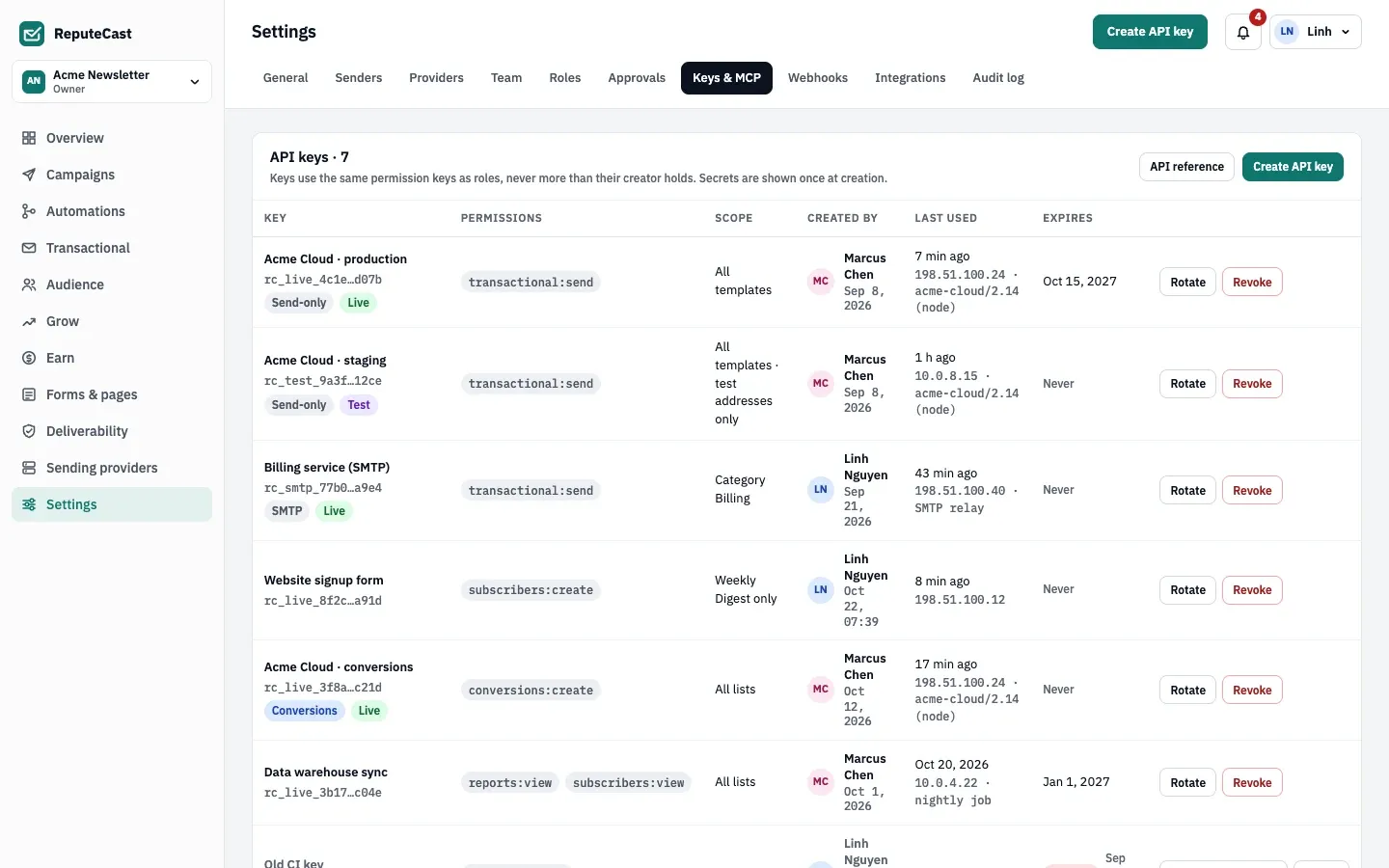
Open Settings, then Keys & MCP and select Create API key.
-
Give the key a name that says where it runs, such as
Campaign reader. Under Start from, keep Custom. Under Permissions, tick the row forcampaigns:viewin the Campaigns group. Under Expires, choose In 30 days for a trial key. Select Create key.The list offers only permissions you hold yourself. The others are locked, with the reason next to them.
-
In Copy your new key now, select Copy, tick the box that confirms you copied the key, and select Done.
The key is
rc_live_followed by 64 hexadecimal characters. This is the only time ReputeCast shows it: the server keeps only a SHA-256 hash. If you lose it, rotate the key to get a new one. -
Put your instance’s address and the key in environment variables for the next commands:
Terminal export RC_URL=https://reputecast.example.comexport RC_KEY=rc_live_… -
Check the key with the test call
GET /api/v1/integration. It needs only the key and answers with the key’s workspace and permissions:Terminal curl -s -H "Authorization: Bearer $RC_KEY" "$RC_URL/api/v1/integration"Response {"workspace": "acme-newsletter","workspaceName": "Acme Newsletter","integration": "","key": "Campaign reader","triggers": [],"actions": [],"permissions": ["campaigns:view"]}workspaceis the slug the other paths take.integration,triggersandactionsstay empty for a key you created yourself; they describe the keys of integrations. -
List the most recent sent campaign with
list-campaigns:Terminal curl -s -H "Authorization: Bearer $RC_KEY" \"$RC_URL/api/v1/workspaces/acme-newsletter/campaigns?status=sent&channel=email&pageSize=1"Response {"items": [{"id": "01a1637b-7ca8-78aa-80be-d3afe3429ffd","name": "October Product Update","channel": "email","status": "sent","blocked": false,"audience": "All subscribers","recipients": 47980,"createdAt": "2026-10-15T21:00:00+07:00","updatedAt": "2026-10-18T23:41:00+07:00","updatedBy": "Linh Nguyen","scheduledAt": "2026-10-18T21:00:00+07:00","startedAt": "2026-10-18T21:00:00+07:00","delivered": 99.1,"humanOpens": 41.2,"clicks": 6.3,"routes": [{"providerId": "01a1637b-7a69-7226-a5b2-3326a2d0d468","provider": "Amazon SES","short": "SES","adapter": "ses","percent": 90,"planned": 43182,"sent": 43182},{"providerId": "01a1637b-7a6d-7a25-9a11-1297d012f10d","provider": "Postal","short": "Postal","adapter": "postal","percent": 10,"planned": 4798,"sent": 4798}],"notes": ["A/B subject, winner B"],"paidOnly": false}],"total": 49,"page": 1,"pageSize": 1,"counts": { "all": 61, "drafts": 9, "scheduled": 1, "sending": 0, "sent": 51, "paidOnly": 0 }}This answer comes from the demo data; yours lists your own campaigns.
-
Read the response:
itemsholds one page of campaigns.totalis the number of campaigns that match your filters, andpageandpageSizesay which slice you got. Pagination explains how to fetch the rest.countsgives the number of campaigns in each status, for tabs and badges.delivered,humanOpensandclicksare percentages. They are left out of a campaign that hasn’t sent anything yet, so check for a missing field rather thannull.routeslists the sending providers the campaign went through and the share each one carried.
-
See what an error looks like: send a key that doesn’t exist.
Terminal curl -i -H "Authorization: Bearer rc_live_0000000000000000000000000000000000000000000000000000000000000000" \"$RC_URL/api/v1/workspaces/acme-newsletter/campaigns"Response HTTP/1.1 401 UnauthorizedContent-Type: application/problem+jsonWww-Authenticate: Bearer realm="reputecast"{"title":"Unauthorized","status":401,"detail":"This API key is revoked or unknown.","code":"unauthenticated"}Every failed call answers with a problem document like this one. Branch on
statusandcode;detailis written for people. Errors lists every code.
What you built
Section titled “What you built”You have a key that can read campaigns and nothing else, and two working calls: a test call that tells you the key’s workspace and permissions, and a list call with paging. The key’s row in Settings, then Keys & MCP now shows when it was last used and from which IP address. When you finish experimenting, select Revoke on that row: the key stops working at once.