
Migrate from Brevo
To migrate from Brevo, you connect ReputeCast to your Brevo account with an API key and import your Brevo lists, their contact attributes and every address on Brevo’s blocklist. ReputeCast only reads from the Brevo API v3; nothing changes in Brevo, so you can keep sending through it while you move.
Before you begin
Section titled “Before you begin”- You need the
subscribers:importpermission (Owner, Admin and Editor have it). - Create a Brevo API key. In Brevo, open your account menu, choose Settings › SMTP & API › API Keys & MCP and click Generate a new API key. Brevo asks for a verification code, a name and an expiry date, then shows the key once. Only the account owner and users with the API keys permission can create one. Source: Brevo, Create and manage your API keys (checked October 2026).
- Read how a migration carries consent if this is your first import.
Import your Brevo lists
Section titled “Import your Brevo lists”-
Open Import contacts and choose Brevo. The wizard links to Brevo’s API keys page if you still need a key.
-
Paste the key and select Connect. The wizard shows your Brevo company name and every list, with its subscribed and unsubscribed counts.
-
Tick the lists to import and pick the ReputeCast list each one goes into. Keep pulling suppressions from your sending providers on, then continue to field mapping. ReputeCast reads Brevo’s blocklist first, then every contact of the chosen lists.
-
Map the fields.
EMAILis required; Brevo attributes such asFIRSTNAMEandLASTNAMEare matched by name, and new custom fields are created for the rest. -
On the consent step, check what each status becomes (see the next section). Brevo’s API gives no opt-in date or IP, so the contacts arrive as single opt-in. Choose Re-permission everyone first if you can’t vouch for how they joined.
-
Run the preview and start the import.
What moves from Brevo
Section titled “What moves from Brevo”- Lists become the ReputeCast lists you chose.
- Contact attributes in Brevo’s normal category become contact fields. Attributes in Brevo’s other categories (such as transactional or calculated ones) aren’t read.
- The blocklist decides who becomes a suppression, with the reason “blocklisted in Brevo”.
- Dates: Brevo’s creation date becomes the contact’s creation date.
| In Brevo | Becomes in ReputeCast |
|---|---|
| On the list | Subscribed · confirmed, as single opt-in (or pending, or Skip) |
| Unsubscribed from this list | Suppressed · unsubscribed: no Broadcasts or Automations, System mail allowed (locked) |
| On the blocklist because of a hard bounce | Suppressed · hard bounce, all streams (locked) |
| On the blocklist because of a spam report | Suppressed · complaint, all streams (locked) |
| On the blocklist for any other reason | Suppressed · unsubscribed (locked) |
A suppression belongs to the address: a contact unsubscribed from one Brevo list gets no Broadcasts or Automations on any ReputeCast list.
What stays in Brevo
Section titled “What stays in Brevo”Campaigns and their statistics, automations, segments, forms, templates and sender settings are not imported. Rebuild them in ReputeCast with segments, automations and the composer.
Keep Brevo as a sending provider while you move
Section titled “Keep Brevo as a sending provider while you move”Importing contacts and sending through Brevo are separate. To keep Brevo sending until the new setup is ready, connect Brevo as a sending provider too, then move traffic away from it gradually with a weighted split, for example 90% on Brevo and 10% on the new provider.
With Brevo connected as a sending provider, ReputeCast pulls Brevo’s blocked contacts into the shared suppression list, and unsubscribes from Brevo’s own unsubscribe header reach it through Brevo’s webhook. Brevo’s API can’t receive suppressions, so addresses suppressed in ReputeCast stay in ReputeCast; ReputeCast never sends to them through any provider.
Rate limits
Section titled “Rate limits”On Brevo’s general rate limits, endpoints under /v3/contacts allow 36,000 requests an hour and 10 a second, and endpoints not listed separately, such as /v3/account, allow 100 an hour. Brevo answers 429 above them. Source: Brevo, Rate limits (checked October 2026). ReputeCast reads 500 contacts per request, one request at a time, and backs off on its own:
| Setting | Default | How to change |
|---|---|---|
| Largest CSV or XLSX file | 100 MB and 500,000 rows (XLSX reads the first sheet) | Fixed |
| Source API rate limit (429) | Up to 5 retries, each after the source's Retry-After (2 s when absent, at most 60 s); then the import pauses and resumes by itself after 1 minute | Resume now, or Slow down to 3 req/s on the paused import |
| Source server or network errors | Up to 5 retries, after 1, 2, 4, 8 and 16 s | Fixed |
If the import pauses with “Brevo is rate-limiting us (429)”, select Resume now, or Slow down to 3 req/s to stay well under Brevo’s 10 requests a second.
Check that it worked
Section titled “Check that it worked”The summary shows how many contacts were imported, merged, suppressed, left pending and skipped, and how many each list now has.
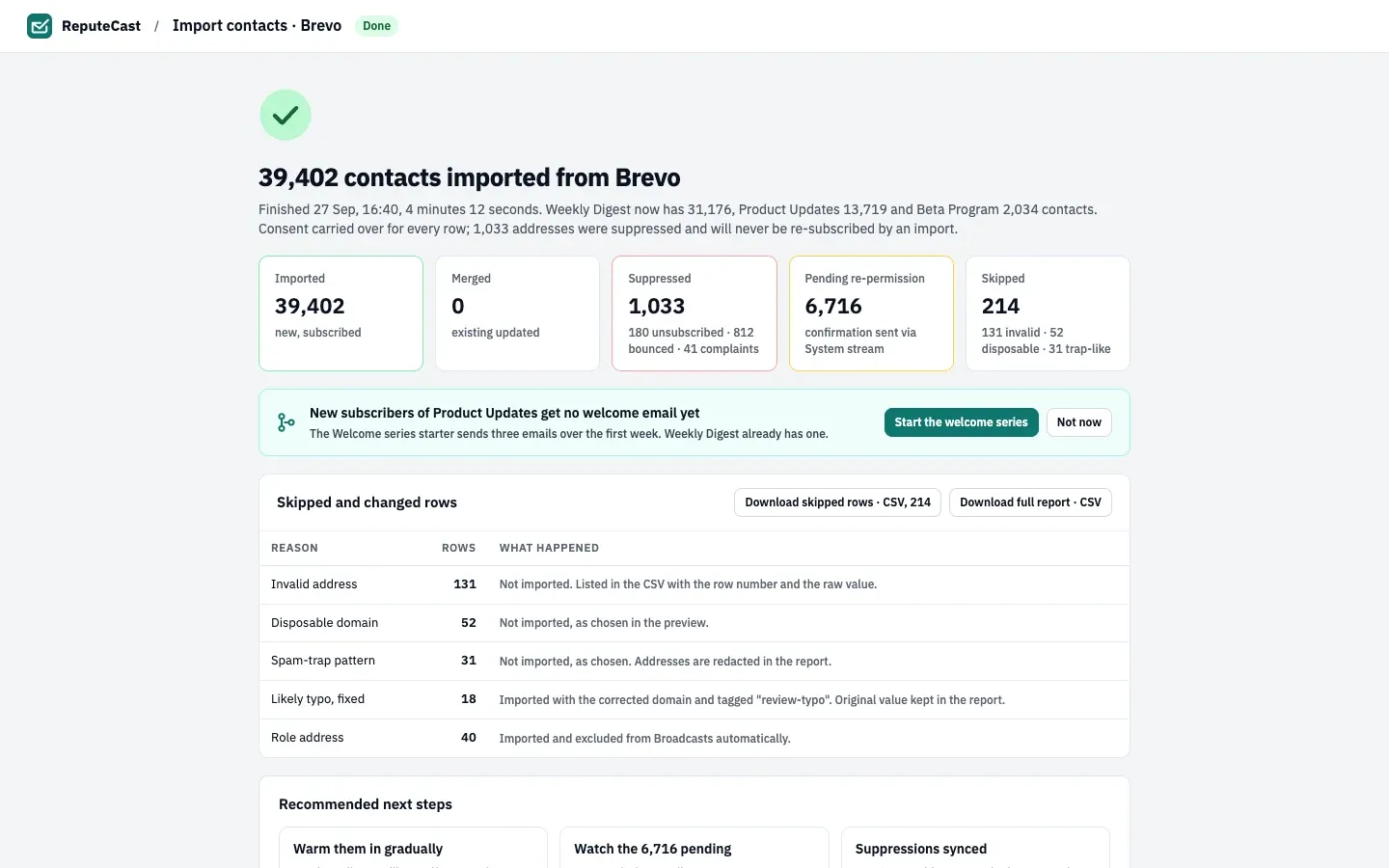
Then open Audience, then Suppression list and check that the blocklisted addresses are there with the reason “blocklisted in Brevo”.
Troubleshooting
Section titled “Troubleshooting”- “Brevo rejected the API key”: the key was deleted, deactivated or has expired. Brevo also deactivates keys that make no successful call for 90 days. Create a new key and paste it.
- Brevo emails you about an API call from a new IP address: your account blocks unknown IP addresses. Authorize your ReputeCast server’s address in Brevo, then connect again.
- 429 right after connecting: connecting reads
/v3/account, which Brevo limits to 100 requests an hour. Wait, then try again. - Fewer contacts than in Brevo: unsubscribed and blocklisted contacts become suppressions, not list members. Download full report · CSV lists every row with what happened to it.