
Audit log
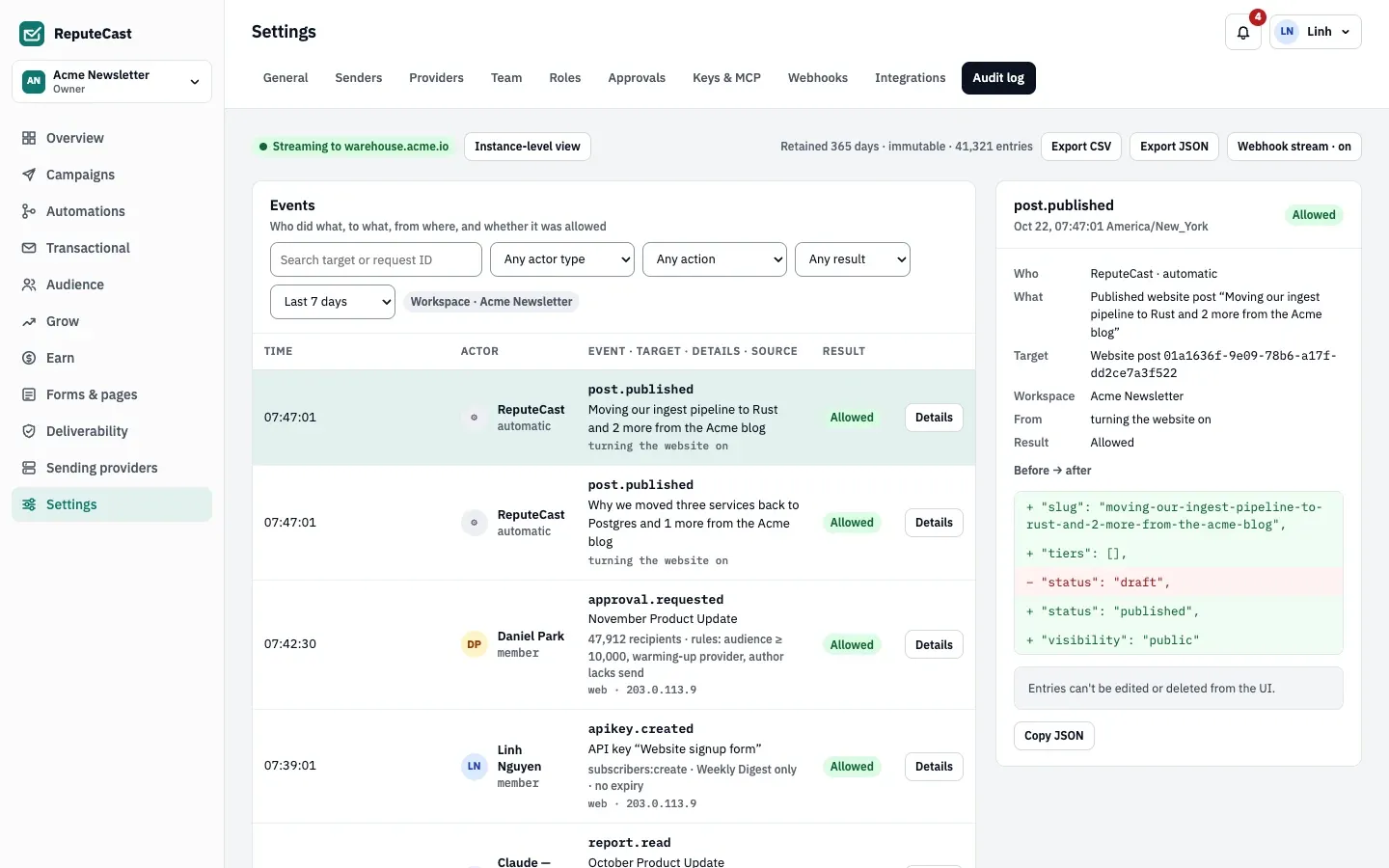
The audit log records who did what, to what, from where, and whether it was allowed, for each workspace in Settings, then Audit log and for the instance in Instance admin, then Audit log.
Access
Section titled “Access”| Log | Who can read it | Who can change retention and streaming |
|---|---|---|
| Workspace | Members, API keys and MCP agents with audit:view (Owner, Admin, Editor, Viewer; not the client roles) |
Signed-in members with workspace:manage |
| Instance | Instance admins, signed in | Instance admins |
The instance log shows every workspace’s entries plus instance-level ones: sign-ins, single sign-on, policies, users and agency mode. Instance admins can switch between the two with Instance-level view.
What an entry records
Section titled “What an entry records”| Field | Content |
|---|---|
| Time | When it happened (UTC in exports). |
| Actor | Type (member, API key, MCP agent, or automatic for the system), ID and name. |
| Action | A dotted name such as role.updated, member.removed or audit.exported. |
| Target | Type, ID and name of what changed. |
| Result | allowed, denied or error, with the reason (for example the missing permission). |
| Before and after | The changed values; the detail panel shows them as a diff. |
| Source | Client IP address (as resolved through your trusted proxies), user agent and request ID. |
| Metadata | Extra context, such as an export’s entry count. |
Notes on recording
Section titled “Notes on recording”- An action and its entry are saved in the same database transaction.
- Entries are immutable: a database trigger refuses updates and deletes, except the retention cleanup. The app has no way to edit or delete them.
- Entries outlive the workspace, user or key they name.
- Denied changes are always recorded. Denied reads are recorded only when they need a sensitive permission, such as an export. Most plain reads are not recorded.
- Secrets (API keys, webhook and provider secrets) never appear in entries.
- Exports are themselves recorded as
audit.exported.
Filters
Section titled “Filters”| Filter | Values |
|---|---|
| Search | Target or actor name (contains), target ID or request ID (exact). The instance log also matches the sign-in reference ID shown on error pages. |
| Actor type | Members, API keys, MCP agents, System |
| Action | 22 categories, from Sending and Team & access to Agency |
| Result | Allowed, Denied, Error (instance log: Allowed, Denied) |
| Date range | Last 24 hours, 7 days (default), 30 days, 90 days, all retained, or custom dates in the workspace timezone |
| Workspace | Instance log only: all workspaces, one workspace or instance-only entries |
Export
Section titled “Export”Export CSV and Export JSON download the entries that match the current
filters, with no row limit, as audit-<workspace>-<date>.csv or .json (instance: audit-instance-<date>). The CSV
columns are occurred_at, actor_type, actor_name, actor_id, action, target_type, target_id, target_name, result, reason, summary, ip, user_agent, request_id, before, after; the instance export adds workspace. The API equivalent
is GET /api/v1/workspaces/<workspace>/audit/export?format=csv|json with the same filters (see the
API reference).
Audit stream
Section titled “Audit stream”The workspace’s Audit stream and retention dialog, with Stream entries to a webhook, sends new entries to an HTTPS endpoint, such as a SIEM or a warehouse. Instance admins set up a separate stream for instance-level entries with Stream instance events.
- Every 30 seconds, ReputeCast posts up to 500 new entries per workspace, oldest first, as
{"workspace": "<id>", "sent_at": "…", "events": [ … ]}. - Each request is signed like workspace webhooks: headers
X-ReputeCast-Timestamp,X-ReputeCast-Event: audit.batchandX-ReputeCast-Signature, the HMAC-SHA256 of<timestamp>.<raw body>with thewhsec_…secret shown once after saving. - A batch counts as delivered on any 2xx answer. Until then, the same batch is retried every 30 seconds, in order, and nothing is dropped.
- Turning the stream on or changing its URL starts from that moment; older entries are not sent.
- Private and loopback addresses are refused unless the operator sets
webhooks.allow_private_networks.
Retention
Section titled “Retention”Set Keep entries for in the workspace dialog, or Change retention for the instance log. Cleanup runs every hour.
| Setting | Default | How to change |
|---|---|---|
| Workspace audit entries kept | 365 days | Settings › Audit log › Webhook stream › Keep entries for; 90 days to 3 years (API 30–3,650 days) |
| Instance audit entries kept | 365 days | Instance admin › Audit log › Retention; 90 days to 10 years (API 30–3,650 days) |
| Retention cleanup | Every hour | Fixed |
| Audit stream batches | Up to 500 entries per request, checked every 30 s | Fixed |