
Send with Amazon SES
To send an Amazon SES newsletter from ReputeCast, you connect your own AWS account in the connect wizard. ReputeCast creates the Amazon SNS topic and one configuration set per stream that carry bounces, complaints and deliveries back to it, detects the SES sandbox in every region, and reads your sending quota and rate.
| Kind | API |
|---|---|
| Bulk marketing | Allowed |
| Event webhooks | Amazon SNS topic created by ReputeCast; RSA signatures checked against Amazon's certificates |
| Domain setup | API |
| Suppression sync | Two-way |
| Batch size | 50, in parallel |
| Notes | Connect with a CloudFormation stack or IAM access keys; ReputeCast creates the SNS topic and one configuration set per stream. Detects the SES sandbox in each region and reads your sending quota and rate. |
Before you begin
Section titled “Before you begin”- An AWS account with Amazon SES. New SES accounts start in the sandbox in each AWS Region: you can send only to verified addresses and domains, at most 200 messages per 24 hours and 1 message per second (Amazon SES: Request production access, checked October 2026). You can connect a sandboxed region and request production access from the wizard.
- Permissions. Connecting needs
providers:manage. Adding a new sending domain in the wizard also needsdomains:manage. - A public HTTPS address. SNS delivers events to
<public URL>/hooks/ses/<token>, so ReputeCast’s public URL must be reachable from the internet. On a laptop, use a tunnel while testing (see Reverse proxy and TLS). - A way to grant access. Pick one:
- CloudFormation stack (recommended). The stack creates an IAM role named
ReputeCastSESthat ReputeCast assumes with an external ID. No long-lived keys are stored. The ReputeCast server itself needs an AWS identity to assume the role with (an instance role, orAWS_ACCESS_KEY_IDandAWS_SECRET_ACCESS_KEYin its environment). - IAM access keys. An access key ID and secret access key of an IAM user that has the policy below. Use a
long-term key (it starts with
AKIA); the form has no field for a session token.
- CloudFormation stack (recommended). The stack creates an IAM role named
This is the least-privilege policy the stack attaches to the role, and the one an IAM user needs:
{ "Version": "2012-10-17", "Statement": [ { "Effect": "Allow", "Action": [ "ses:SendEmail", "ses:SendRawEmail", "ses:GetAccount", "ses:GetSendQuota", "ses:*ConfigurationSet*", "ses:*EmailIdentity*", "ses:*SuppressedDestination*", "ses:PutAccountDetails" ], "Resource": "*" }, { "Effect": "Allow", "Action": ["sns:CreateTopic", "sns:Subscribe", "sns:SetTopicAttributes", "sns:GetSubscriptionAttributes"], "Resource": "arn:aws:sns:*:*:reputecast-*" } ]}Connect Amazon SES
Section titled “Connect Amazon SES”-
Open Sending providers, choose Add provider and pick Amazon SES in the catalog. The wizard has six steps; Connect a sending provider describes the ones every provider shares.
-
Under 1. How to grant access, choose how ReputeCast gets into your AWS account.
- CloudFormation stack (recommended): choose
Launch stack in AWS. The AWS CloudFormation console opens a quick-create stack
named
ReputeCastSESwith the external ID filled in. Create the stack, then copy itsRoleArnoutput (it looks likearn:aws:iam::123456789012:role/ReputeCastSES) into Role ARN, from the stack's RoleArn output. - IAM access keys: paste the Access key id and the Secret access key.
Show the IAM policy (least privilege) shows the policy above. Choose Check access: ReputeCast checks the access with read-only calls (
GetAccount) before it stores anything, encrypted.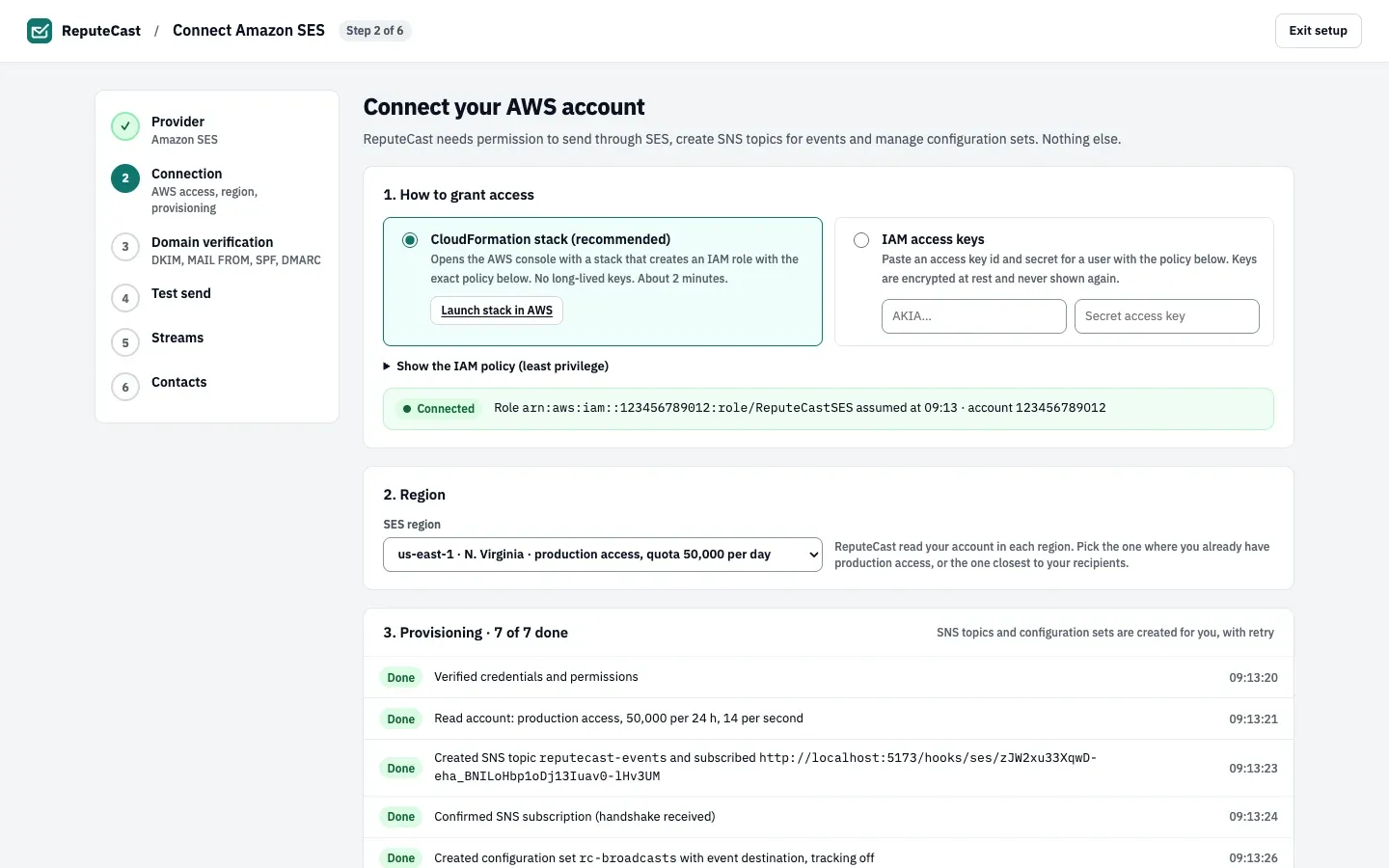
- CloudFormation stack (recommended): choose
Launch stack in AWS. The AWS CloudFormation console opens a quick-create stack
named
-
In 2. Region, pick the SES region. ReputeCast reads your account in each region, so every option says whether that region has production access and its daily quota, or is in the sandbox. Pick the region where you already have production access, or the one closest to your recipients.
-
Wait for the provisioning list to finish. ReputeCast creates, with retries:
- the SNS topic
reputecast-events, subscribed to your webhook URL, and confirms the subscription when SNS sends its handshake; - the configuration sets
rc-broadcasts,rc-automations,rc-systemandrc-transactional, each with an event destination that publishes sends, deliveries, bounces, complaints, rejects, delays and subscription events to the topic. Open and click events stay off: ReputeCast tracks those itself.
If another connection on this instance already uses the same AWS account and region, the names get your workspace’s slug as a suffix. A failed row shows AWS’s error code and the action that was refused; fix the policy (Fix policy opens the role or the IAM users page in AWS), then retry.
- the SNS topic
-
If the region is in the sandbox, a sandbox badge appears with a form that files the production-access request with AWS for you: Website, Mail type, Use case description (prefilled from your workspace), Expected daily volume and Contact language. The use case text is prefilled from your lists and says that bounces and complaints are processed through SNS and suppressed across all sending providers. Move Amazon SES out of the sandbox explains what AWS looks for. You can keep going while you wait.
-
Choose Continue to domain verification and enter your sending domain. ReputeCast creates the SES identity with 2048-bit DKIM keys, sets its MAIL FROM domain to
bounce.<your domain>, and lists the exact records to publish. Records turn Verified as DNS propagates.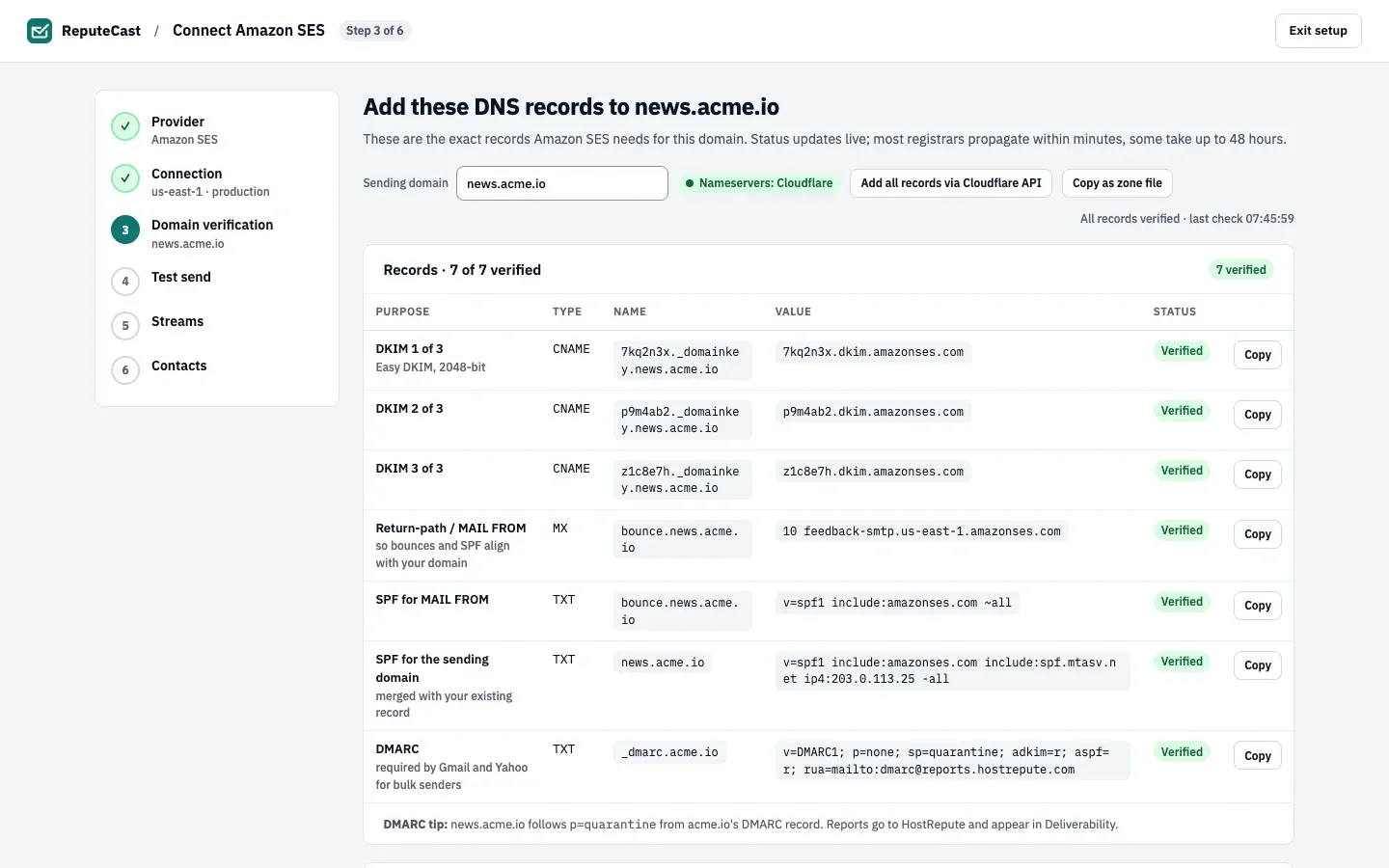
- The first of three DKIM CNAME records that point to
dkim.amazonses.com. - The MAIL FROM MX record on
bounce.<your domain>, so bounces and SPF align with your domain. - SPF for the sending domain, merged with the record you already have.
- The DMARC record, suggested when the domain has none.
- The verification status and the time of the last check.
- The first of three DKIM CNAME records that point to
-
In Test send, send a test. The delivery timeline shows the message accepted by SES (with its MessageId and configuration set), then the Send and Delivery events that come back through SNS.
-
In Streams, choose the streams SES carries. Each stream uses its own configuration set, so a Broadcast problem never touches password resets.
-
In Contacts, keep the option to pull existing suppressions from SES ticked (it is recommended and ticked by default) to import the addresses on your SES account-level suppression list. With it ticked, the suppression sync is two-way; unticked, ReputeCast only pushes its list to SES.
Check that it worked
Section titled “Check that it worked”-
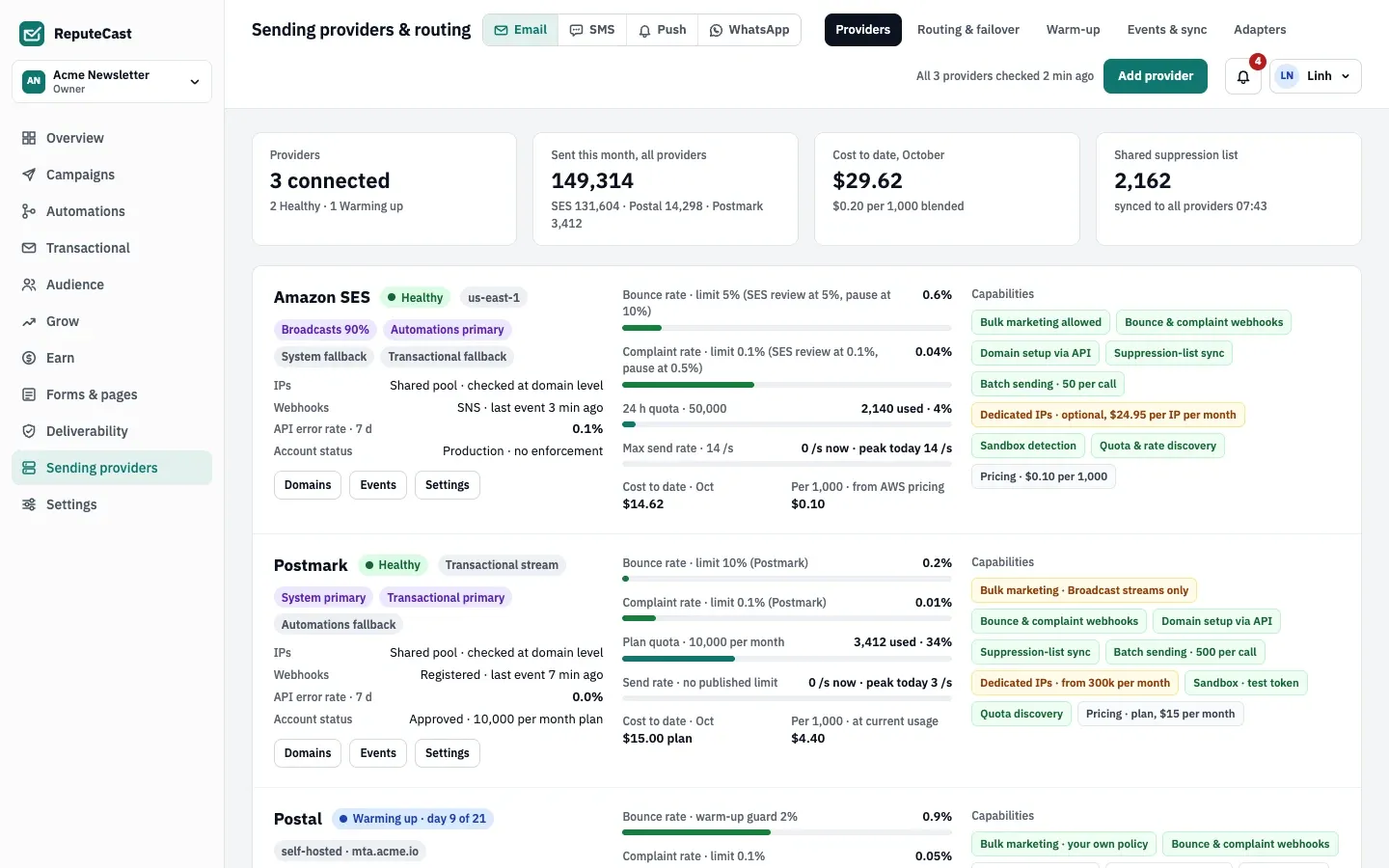
On Sending providers, then Providers, the Amazon SES card shows Healthy (or Sandbox · verified addresses only), your account status, the 24-hour quota and the send rate ReputeCast read from SES.
-
In the AWS console, in the region you picked: the SNS topic
reputecast-eventshas a confirmed HTTPS subscription, the fourrc-configuration sets each have an event destination calledreputecast, and your domain identity is verified. -
New deliveries and bounces appear under Sending providers, then Events & sync.
ReputeCast sends each message with SES SendEmail and the stream’s configuration set. A batch is up to 50 messages,
sent as parallel calls, at the maximum send rate SES reports for your account. When a campaign is larger than the
24-hour quota left, Send Readiness warns you: sending pauses at the quota and
resumes as it frees up. The card shows your bounce and complaint rates against limits of 5% and 0.1%, next to the
levels at which SES reviews and pauses an account;
Bounces, complaints and provider limits explains them.
Troubleshooting
Section titled “Troubleshooting”- “AWS didn’t let ReputeCast assume this role.” Check that the stack finished, that you pasted its
RoleArnoutput, and that the external ID in the stack wasn’t changed. The same message appears when the role is missing a permission or AWS didn’t answer, so check the role’s policy too. - “ReputeCast couldn’t assume the role: this server has no AWS credentials of its own.” The server has no AWS
identity to assume the role with. Run ReputeCast with an instance role or
AWS_*environment variables, or use IAM access keys instead. - “Amazon SES rejected this key” with a code such as
UnrecognizedClientException. The key ID or secret is wrong or the key was deleted. Create a new access key for the IAM user and paste both values again. - A provisioning row fails with
AccessDeniedand an action such asses:CreateConfigurationSet. The role’s or user’s policy doesn’t allow that action (or was edited after the stack ran). Restore the policy above, then retry. - “No confirmation after 5 minutes” on the SNS subscription row. SNS couldn’t reach your webhook URL. Make sure
the public URL is reachable from the internet over HTTPS and that your proxy passes
/hooks/to ReputeCast, then retry. - The test fails with
MessageRejectedbecause an address isn’t verified. The region is in the sandbox: verify the recipient in SES, send to an address you verified, or request production access. - You changed the public URL. ReputeCast doesn’t update SNS for you. Subscribe the
reputecast-eventstopic to the new webhook URL in AWS. - You disconnected SES. ReputeCast deletes its stored credentials but removes nothing in AWS. Delete the SNS
topic and subscription, the
rc-configuration sets, the identity and the stack or IAM user yourself if you no longer need them.