
Send with Mailgun
To send a Mailgun newsletter from ReputeCast, you connect a Private API key, the region your Mailgun account lives in and the Mailgun domain you send from. ReputeCast registers the webhooks on that domain, adds and verifies sending domains, detects sandbox domains and keeps suppressions in sync both ways.
| Kind | API |
|---|---|
| Bulk marketing | Allowed |
| Event webhooks | Registered by ReputeCast; HMAC-SHA256 with the account's webhook signing key, 12-hour window |
| Domain setup | API |
| Suppression sync | Two-way |
| Batch size | 1 |
| Notes | Detects sandbox domains and reads the account's monthly sending limit. One call per message. Can poll Mailgun's events API while webhooks can't reach ReputeCast. |
Before you begin
Section titled “Before you begin”- A Mailgun domain (for example
mg.acme.io) that already exists in your Mailgun account, in the region you connect. The connection is checked against it, so create it in Mailgun first, or connect the sandbox domain to try things out. - A Private API key from Mailgun › API Security. A Domain Sending key or the HTTP webhook signing key won’t work.
- Permissions. Connecting needs
providers:manage; adding a new sending domain needsdomains:manage. - A public HTTPS address for webhooks:
<public URL>/hooks/mailgun/<token>. If ReputeCast isn’t reachable from the internet yet, it can poll Mailgun’s events API every minute instead.
Mailgun signs every webhook with your account-wide HTTP webhook signing key, which is not your API key (Mailgun: Securing webhooks, checked October 2026). ReputeCast reads that key through the API, so you don’t paste it unless your API key can’t read it.
Connect Mailgun
Section titled “Connect Mailgun”-
Open Sending providers, choose Add provider and pick Mailgun in the catalog. Connect a sending provider explains the steps every provider shares.
-
Paste the Private API key, pick the Region (
US · api.mailgun.netorEU · api.eu.mailgun.net, wherever the domain was created) and enter the Sending domain. The extra Mailgun settings hold your Plan · emails per month (used for the quota bar when the account has no custom sending limit) and the HTTP webhook signing key. -
Choose Connect. ReputeCast reads the domain with your key, then the account’s monthly sending limit, and stores the key encrypted. Nothing is saved when the check fails.
-
In 2. Webhooks, ReputeCast tests its own public URL and registers it on the domain for
delivered,permanent_fail,temporary_fail,complainedandunsubscribed. Opens and clicks are not registered: ReputeCast tracks them itself. If the endpoint isn’t reachable, choose Use polling for now and fix the public URL later.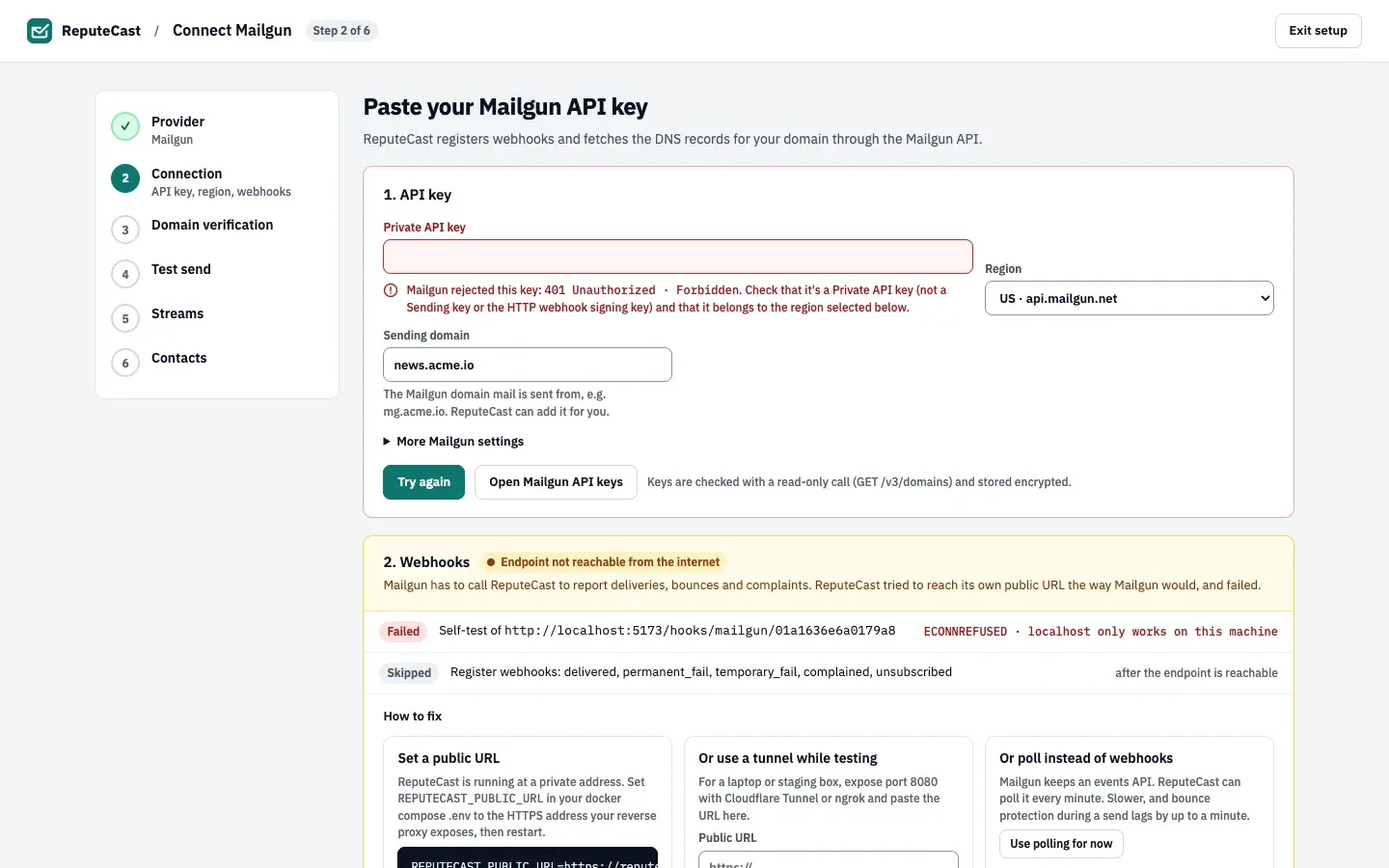
-
Choose Continue to domain verification and enter your sending domain. If it isn’t in Mailgun yet, ReputeCast adds it (automatic sender security, 2048-bit DKIM) and lists the SPF, DKIM and MX records to publish. Mailgun’s tracking CNAME is left out because ReputeCast tracks opens and clicks itself.
-
In Test send, send a test and watch the
deliveredwebhook arrive. -
In Streams and Contacts, pick the streams and keep the option to pull Mailgun’s existing bounces, complaints and unsubscribes ticked.
Check that it worked
Section titled “Check that it worked”- The Mailgun card on Sending providers, then Providers shows Healthy with your domain and its state (for example “Domain mg.acme.io · active”). A sandbox domain shows Sandbox · verified addresses only instead.
- In Mailgun, the domain’s webhooks list your ReputeCast URL for the five events.
- Deliveries and bounces appear under Sending providers, then Events & sync.
ReputeCast sends one API call per message, with Mailgun’s open, click and unsubscribe tracking turned off on each message. If unsubscribe tracking is on for the domain, Mailgun adds its own unsubscribe link and footer next to ReputeCast’s; Send Readiness warns about it, and the Provider-side tracking check on the Events & sync tab can turn it off. The shared suppression list is pushed to Mailgun’s unsubscribes table (for all tags), so every address ReputeCast suppresses, bounced ones included, shows up there.
Mailgun’s sandbox domain only delivers to authorized recipients, up to 5 (Mailgun: Sandbox domain, checked October 2026). While Mailgun is connected with a sandbox domain, Send Readiness blocks Broadcasts through it.
Troubleshooting
Section titled “Troubleshooting”- “Mailgun rejected this key” with
401 Unauthorized. Use a Private API key from the same account, not a Sending key or the webhook signing key. - “Mailgun rejected this key” with
404 Not Found · domain_not_found. The key is fine, but Mailgun doesn’t know the sending domain in the selected region. Check the domain’s spelling and the region, or create the domain in Mailgun first. - “Mailgun allows three URLs per event” when registering webhooks. One of the events already posts to three addresses. Remove an old URL in Mailgun, then choose Try registering again.
- The webhook self-test fails (
ECONNREFUSED, “localhost only works on this machine”). SetREPUTECAST_PUBLIC_URLto the HTTPS address your reverse proxy exposes, use a tunnel while testing, or poll for now. See Reverse proxy and TLS. - Webhooks arrive but fail verification, and the provider turns “Webhooks silent”. Your API key can’t read the account’s webhook signing key. Copy it from Settings › API Security › HTTP webhook signing key in Mailgun into Settings, then Credentials on the provider card.
- Test recipients are refused with
unauthorized_recipient. The domain is Mailgun’s sandbox: add the address as an authorized recipient in Mailgun, or connect a verified domain. - Transactional messages with Cc, Bcc or attachments fail. The Mailgun adapter can’t send copies or attachments; route those templates through another provider.
- You disconnected Mailgun. ReputeCast removes its URL from each webhook event. The domain and the pushed unsubscribes stay in Mailgun.