
Upgrade ReputeCast
To upgrade ReputeCast, you replace the image or binary with a newer release and let it apply its database migrations; everything else (configuration, secret key, data) stays as it is.
See which version you run
Section titled “See which version you run”An instance admin sees the installed version, the latest release and its
changelog under Instance admin, then Instance & updates, in the
Version & updates card. From the command line, reputecast version prints the same:
reputecast <version> (<commit>) <Go version>.
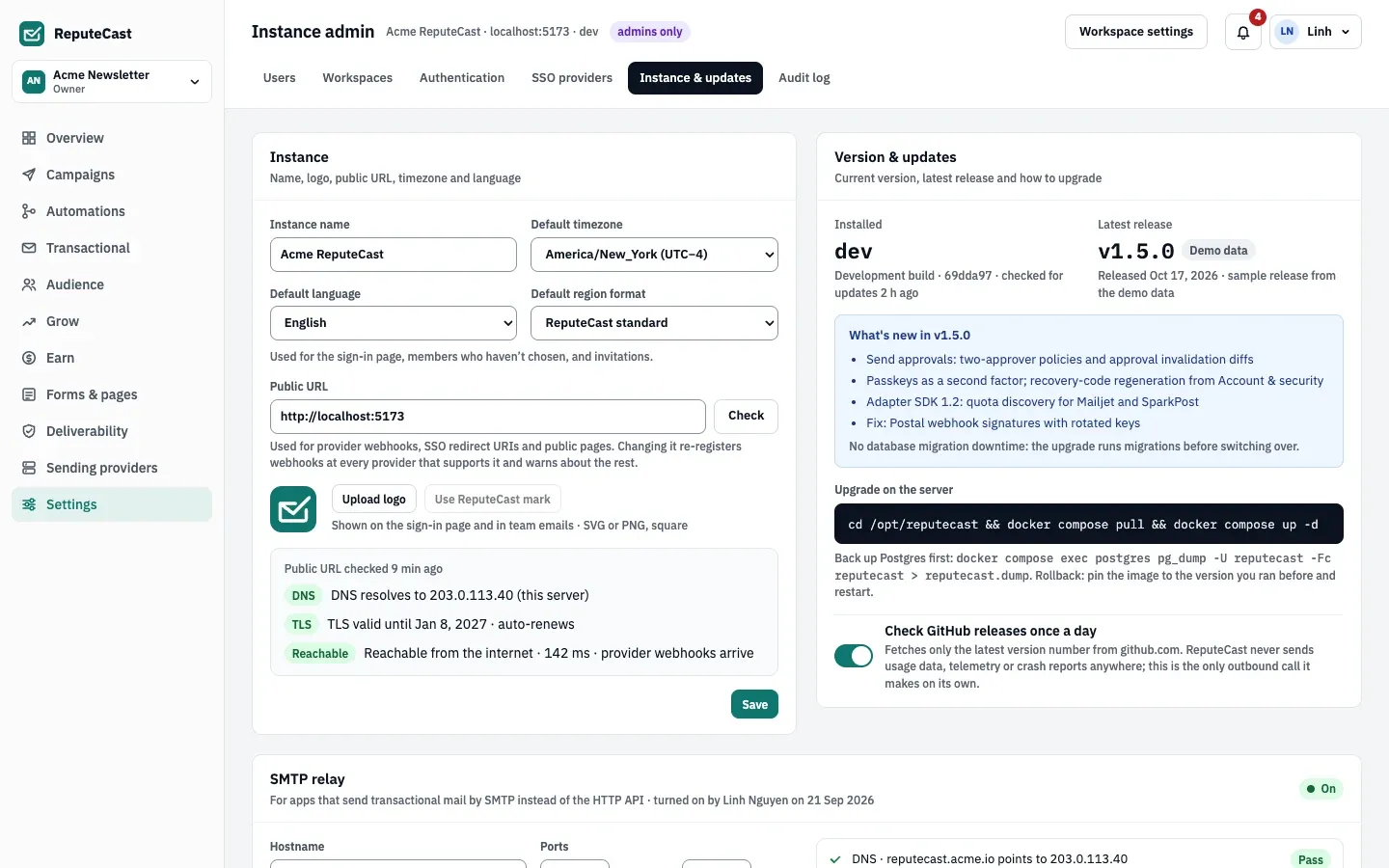
- The badge Update available appears when the latest release is newer than the installed
version. Builds without a release version number (such as
dev) never show it. - Under Upgrade on the server, the card shows the Docker Compose command
cd /opt/reputecast && docker compose pull && docker compose up -d. Replace/opt/reputecastwith the folder that holds yourdocker-compose.yml. - The switch Check GitHub releases once a day fetches the latest release from
api.github.comonce a day. The request carries no version number and no instance ID; it is the only outbound call ReputeCast makes on its own. Switch it off here, or setupdates.check: falsein the configuration to turn it off for the whole instance (the switch is then locked).
Before you begin
Section titled “Before you begin”- Read the release notes of every version between yours and the new one, on the GitHub releases page.
- Back up the database and the secret key. Migrations change the schema, and a backup is the reliable way back.
- Plan a short interruption while the app restarts.
Upgrade
Section titled “Upgrade”-
Go to the folder with your
docker-compose.ymland take a backup:Terminal window docker compose exec -T postgres pg_dump -U reputecast -d reputecast -Fc > reputecast-before-upgrade.dump -
If you pin a version in
.env(REPUTECAST_VERSION=v1.4.2), change it to the new release tag. Image tags are the release tags with their leadingv, pluslatest. WithoutREPUTECAST_VERSION, the compose file useslatest. -
Pull the new image and recreate the app container:
Terminal window docker compose pull && docker compose up -dThe image starts with
serve --auto-migrate, so it applies pending migrations before it serves requests. The logs show onemigration appliedline per migration.
-
Take a backup (see back up and restore).
-
Download the archive for your platform and
checksums.txtfrom the release page, and check the download:Terminal window sha256sum --ignore-missing -c checksums.txt -
Stop every ReputeCast process, for example
sudo systemctl stop reputecast. -
Replace the binary (for example
/usr/local/bin/reputecast) with the new one. -
Apply the migrations once, with the same environment the service uses:
Terminal window reputecast migrate upIt applies ReputeCast’s migrations, then those of the job queue, and ends with
Database is up to date. -
Start every process again. If you run several roles, upgrade all of them to the same version.
Check that it worked
Section titled “Check that it worked”- Version & updates shows the new version as installed.
reputecast migrate statuslists every migration with an applied date and none aspending. In Docker:docker compose exec app /usr/local/bin/reputecast migrate status./readyzanswersready(health checks, metrics and logs).
Roll back
Section titled “Roll back”Going back to the previous image or binary does not undo migrations: the database keeps the newer schema.
- Restore the backup for an exact return to the state before the upgrade: stop ReputeCast, restore the dump you took (see restore), then start the version you ran before. Changes made after the upgrade are lost.
- Pin the previous version (
REPUTECAST_VERSIONin.env, thendocker compose up -d), as the Version & updates card suggests, when you want to keep the data written since the upgrade. reputecast migrate downrolls back only the latest ReputeCast migration, one per run, and leaves the job queue’s tables alone. Prefer a restore.
Troubleshooting
Section titled “Troubleshooting”- The new container exits at start: read
docker compose logs app. A failed migration stops the start withmigrate: …; restore the backup and report the error with the release version. - The version card says the update check failed: the server can’t reach
api.github.com, or GitHub answered with an error. Nothing else is affected; the next check runs the following day. - The latest release shows a dash: the check is off, or has not run yet.
Related
Section titled “Related”- Back up and restore
- Instance admin: the rest of Instance & updates.
- CLI reference:
migrate,versionand every other command.